
Key Takeaways
- ✓ Amazon’s published position: build AI-assisted A+ in modules marked “AI Ready” (English only, US only for now) — and review everything generated for accuracy, compliance, and brand consistency before publishing.
- ✓ The three approval guardrails are accuracy of product representation, the synthetic-performer tag for photorealistic AI people, and claim-free imagery in regulated categories.
- ✓ AI earns the environment, the draft, and the volume; humans own the product’s identity, every rendered word, claim safety, and the module flow.
- ✓ Run the REVIEW gate before submitting: represent the product exactly, erase implied claims, verify and tag people, inspect text overlays, check the full module sequence, read the copy aloud.
- ✓ There is no published evidence that AI-assisted A+ approves slower — build to the checklist and let the review speak.
The “can I use AI in A+ Content?” question is settled — I answered it in the A+ AI question post: yes, under the same rules as the rest of your listing. Amazon even ships generative AI inside A+ Content Manager.
But “can I” was never the hard part. The hard part is the how: which modules can AI touch, what the quality bar is that keeps AI-assisted A+ inside approval, and the three guardrails that decide whether your stack goes live or comes back with a rejection.
This is the builder’s article. Assume A+ basics are known — if you need them, start with my A+ examples walkthrough, the sizes and requirements guide, and the mistakes that kill A+ conversions. What follows is the workflow that makes the AI yes safe.
Key takeaways
- Amazon’s published position: use generative AI in A+ via modules marked “AI Ready” (English only, US only at this time) — and review everything generated for accuracy, compliance, and brand consistency before publishing.
- The three approval guardrails: the image must represent the product exactly (accuracy is the approval line), photorealistic AI people need the contains-synthetic-performer tag, and regulated categories need claim-free imagery.
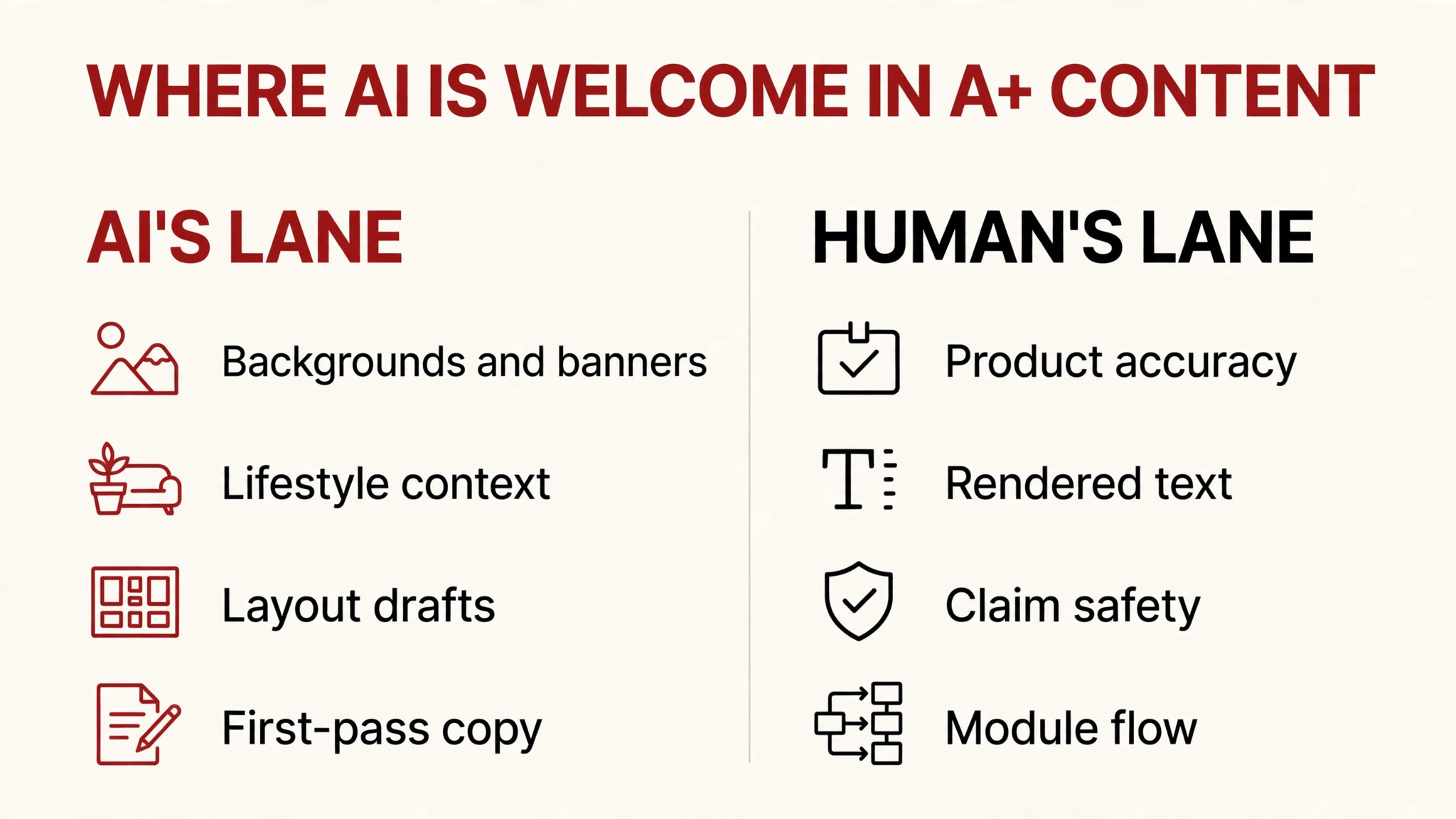
- AI earns a seat on backgrounds, banners, lifestyle context, layout drafts, and first-pass copy; humans own product truth, rendered text, claim safety, and module flow.
- Run every AI-assisted A+ page through the REVIEW gate before submitting: represent, erase implied claims, verify people, inspect text, end-to-end module check, read the copy aloud.
- There is no published evidence that AI-assisted A+ approves slower — but there is also no evidence it approves faster. Rejections trace to module/spec issues, not to the generation method.
What Amazon actually gives you: the AI Ready layer
The citable anchor for this whole article is one paragraph in Amazon’s own published guidance (kdp.amazon.com help page): “you can use generative AI to create A+ Content by choosing a module that shows the AI Ready badge.” It adds that generated content should be reviewed for factual accuracy, compliance, and brand consistency before publication. One limitation to know: it’s an English-only feature available in the US only at this time.
That paragraph tells you two honest things. First, Amazon is not anti-AI in A+ — it ships the tooling. Second, Amazon puts the verification burden on you. “AI Ready” means the module accepts generated content, not that generated content is automatically compliant.
LandingCube’s 2026 A+ guide (trade press, accurately citing the feature) describes what the tools do: sellers can generate or enhance selected text and image fields inside A+ Content Manager — backgrounds, module imagery, and first-pass copy. That’s the builder’s reality: Amazon’s AI gives you a draft, not a finished module. The finish is your job.
And one twist worth knowing: practitioners report that Amazon is also applying its own AI to your A+. ZonGuru’s 2026 analysis reports a phased rollout (begun 2025, expanding through 2026) removing the seller-written alt-text field from A+ modules and Brand Story, with Amazon’s AI writing the image descriptions instead — Europe already at full removal. Amazon has published nothing about it, so I present this as practitioner-observed, not policy. The design lesson is sound either way: build images unambiguous enough that a vision model, a shopper, and a search crawl all read them correctly — clear product, short benefit overlays, nothing cryptic.
The three approval guardrails
Everything in the rest of this article hangs on three rules. Get all three right and AI-assisted A+ stays inside approval. Get any one wrong and it doesn’t matter how good the design looks.
Guardrail 1: Accuracy — the image must represent the product exactly. This is the approval line for all listing media, and it’s the line AI most wants to cross. AI can change how the product looks; it must never change what the product is. A generated lifestyle scene behind your product: fine. A generated scene that changes the product’s colour, shape, label, size, or material: a misrepresentation — and the mechanism by which AI-assisted listings get flagged. I set this principle out for still images in the AI main image article; in A+ it applies to every module equally.
Guardrail 2: Photorealistic AI people need the tag. The July 2026 synthetic-performer rule covers A+ content explicitly — CNBC’s reporting on the seller notice names qualifying “A+ content” as in scope. A photorealistic AI person in an A+ banner, a Brand Story video with an AI-generated spokesperson (the paradigm case cited by legal analysis, e.g. DAM Law Firm, 2026), an AI “customer” in a testimonial-style module — all need the contains-synthetic-performer keyword in the file’s XMP dc:subject metadata before upload. The tagging workflow is covered in full in my A+ mistakes article — I won’t re-teach it here; the point for builders is that the people question belongs in your module plan, not as an afterthought.
Guardrail 3: Claim-free imagery in regulated categories. For supplements, beauty, and health-adjacent products, the approval risk isn’t the AI — it’s the claims. SalesDuo’s 2026 A+ guidance is the working rule: A+ visuals are “useful for review — keep claims product-specific and compliant.” AI loves to generate badges, seals, “clinically proven” ribbons, and before/after panels. None of those go in the module unless the claim already exists in your approved listing copy. My supplements A+ article teaches the claim discipline in full; this article assumes it.
Where AI earns a seat vs where human craft is non-negotiable
The honest split, grounded in every source above plus my own design work:
| A+ task | AI’s lane | Human’s lane |
|---|---|---|
| Module backgrounds and banners | Generate the scene, extend the canvas, re-light the context | Not the final colour grade — your brand colour must survive |
| Lifestyle context | Generate the room, the beach, the kitchen around a real product reference | Not the product itself — accuracy is the approval line |
| Layout drafts | Draft the module sequence and rough composition | Not the final flow — skimmer logic is a design decision (structure article: https://lystiqcreative.com/?p=663) |
| First-pass copy | Headlines, module body drafts, comparison-chart rows | Not the final wording — claim safety, tone, and brand voice are yours |
| Rendered text in images | AI garbles letterforms — never generate text inside the image | All text overlaid in the design file as real, proofread type |
| Product representation | Never the product’s identity — colour, shape, label, contents | Verified against the physical product, 100% zoom |
| People | Never as a shortcut around the tagging rule | Decide: real talent, tagged synthetic, or no people |
One row deserves emphasis because sellers get it backwards: AI’s best contribution to A+ is often the boring work — backgrounds, canvas extension, first-draft copy. Its worst contribution is the load-bearing work — the product’s identity and the words on the image. My AI vs human comparison makes the same point for listings; it applies doubly in A+, where the modules are bigger and the rejection surface is wider.
The REVIEW gate: my pre-submit QA workflow
For every AI-assisted A+ page I touch — mine or a client’s — it passes through this six-step gate before submission. The acronym is REVIEW, and each letter is a real check, not a slogan.
R — Represent the product exactly. Open every module image at 100% zoom beside the physical product (or its reference photos). Colour, shape, label, size callouts, what’s in the box, the product’s material. Anything AI invented that the product doesn’t have fails the gate here. This is the longest step and the most important one.
E — Erase implied claims. AI-generated scenes imply features: a bathroom scene implies water resistance; a gym bag in the shot implies it’s included. Read every module for what a shopper would reasonably infer, then delete or disclaim. The A+ mistakes article covers the rejection side of this; the builder’s side is: if the scene implies it and your copy doesn’t already say it, change the scene.
V — Verify people, then tag. List every human figure in the stack: real, AI-generated, or absent. Real people edited with AI tools are exempt. Photorealistic fully-AI people get the contains-synthetic-performer keyword in XMP dc:subject before upload. When in doubt about whether a figure counts as photorealistic, tag it — the cost of an unnecessary tag is zero; the cost of a missing one is an enforcement problem.
I — Inspect text overlays. Every word rendered on an image: is it real type from the design file (correct) or model-generated pixels (rejected by me, every time)? Proofread for spelling, and check that no AI-generated badge, seal, or ribbon slipped in that your copy can’t defend.
E — End-to-end module check. A+ approves as a page, not as modules. Walk the full stack top to bottom: does the sequence make sense to a skimmer (hook → proof → details → reassurance)? Are image sizes right per module (sizes guide)? Does anything repeat? AI-assisted stacks have a particular failure mode here — generic, samey modules that “don’t clearly differentiate your product or brand,” as riverbendconsulting’s 2026 practitioner note warns. If two modules could belong to any brand, one of them needs rewriting.
W — Written copy, read aloud. Read every module’s copy out loud — headline, body, chart rows, FAQ answers. AI first-draft copy has a rhythm you can hear: fluent, generic, slightly too long. Cut what doesn’t earn its place, check every factual claim against the listing, and confirm the voice sounds like your brand, not a template.

Annotated example: one real A+ stack, divided module by module

This is a full A+ stack I designed for an oversized dog plush — family/gifting positioning, size callouts, a before/after-style panel. Let’s divide it the way the gate does:
- Hero brand banner: The warm background scene is exactly what AI does well — environment generation around a real product. What stays human: the product photo itself (this plush’s exact proportions are the purchase), the size callouts (AI must never invent measurements), and the headline’s brand voice.
- Feature modules: Layout — feature icon, short line, product crop — is a strong AI draft candidate. What stays human: feature selection (strategy), every rendered word (real type, proofread), and product crops (accuracy at 100% zoom).
- Before/after-style panel: High rejection-risk territory with AI. The comparison must show the same product in the same conditions — a generated “after” that brightens the product beyond reality crosses the accuracy line. Human judgment owns this panel end to end.
- Size/detail callouts: Measurements, materials, care instructions — AI drafts the module; a human verifies every number against the listing. No exceptions.
- Bottom reassurance module: Gifting and family copy. AI’s first draft is usable; the brand voice, claim safety, and emotional specificity are human work.
The pattern across the whole stack: AI touches the environment, the draft, and the volume. Humans touch the product, the words, and the judgment. That’s the division the table teaches; this stack is what it looks like in practice.
Mistakes I see constantly
Using AI output as the submission. Generating module images and uploading them as-is. Amazon’s own guidance says to review generated content for accuracy, compliance, and brand consistency — the review is the workflow. Raw output is a draft with a confidence problem.
Letting AI write the product’s facts. Size callouts, ingredient lists, “what’s in the box” — AI invents these fluently. Every fact on the image must trace to the listing or the product itself.
The phantom badge. AI-generated modules sprout “premium quality” seals, “clinically tested” ribbons, five-star graphics. In regulated categories these are rejection magnets; everywhere else they’re trust eroders. If the badge isn’t in your listing copy, it doesn’t go on the image.
Text baked into the generation. Model-rendered headlines drift — letterforms warp, words duplicate, spelling hallucinates. Every word on an A+ image should be real type placed in the design file, proofread by a human. The artifact I spot fastest in seller A+ audits, and the easiest to prevent.
Samey modules. AI-assisted stacks converge on a template: hero banner, three features, comparison chart — and the modules could belong to any brand. Riverbendconsulting’s 2026 warning: Amazon is “becoming more sensitive to low-quality or repetitive content that doesn’t clearly differentiate your product or brand.” Differentiation is a design decision, not a generation setting.
Forgetting the people check. A synthetic lifestyle figure in one module of seven — easy to miss, and the tagging rule doesn’t care that it was only one module. The V in the REVIEW gate exists because this mistake is so easy to make.
Your pre-submit checklist
- Every module image checked at 100% zoom against the real product — colour, shape, label, contents, material
- All measurements, ingredients, and “what’s in the box” facts verified against the listing, not the prompt
- Every human figure classified: real, AI-generated (tagged), or absent — contains-synthetic-performer in XMP dc:subject where required
- Every word on every image is real type from the design file — proofread, no model-rendered text, no phantom badges
- No implied claims in the scenes that the listing copy doesn’t already make
- Copy read aloud: brand voice, factual accuracy, no generic template rhythm
- Module sequence makes sense to a skimmer; no two modules could belong to any brand
- Image sizes match the module requirements (sizes guide)
- Brand Registry active on the brand (A+ requires it — no exceptions to plan around)
- A second pair of eyes on the full stack — someone who didn’t generate it

Your two-week action plan
Week 1 — audit and plan. Pick one ASIN with existing A+ (or your next A+ build). Run the current stack — or the module plan — through the three guardrails: accuracy, people, claims. Mark every module AI-friendly or human-required using the table. If you use Amazon’s AI Ready tools, note the US-English limitation and plan the review time accordingly.
Week 2 — build and gate. Generate the AI-friendly layers (backgrounds, layout drafts, first-pass copy). Build the human-required layers (product truth, text, claim safety, flow). Run the full REVIEW gate, then submit — and keep a change log of what AI touched, so the next optimisation round starts from facts, not memory.
FAQ
Can Amazon’s AI write my whole A+ page?
No — and that’s Amazon’s own framing, not mine. AI Ready modules generate or enhance selected fields; the published guidance says to review generated content for factual accuracy, compliance, and brand consistency before publishing. The tool gives you a draft. The finished module is yours.
Will AI-assisted images slow down A+ approval?
There is no published evidence either way — I’ll say that plainly rather than invent an answer. In practice, approval delays trace to module and spec issues (wrong sizes, guideline violations), not to the generation method. If your stack is clean on the checklist, the method shouldn’t matter.
Does the AI-people tagging rule really apply to A+?
Yes — CNBC’s reporting on the July 2026 seller notice explicitly names qualifying “A+ content” as in scope, and trade-press analysis (sentrykit, 2026) describes the requirement as covering “product images and A+ content across all of Amazon’s stores worldwide.” Tag photorealistic AI people in A+ exactly as you would in listing images.
What about a Brand Story video with an AI spokesperson?
Same rule. Legal analysis of the notice (e.g. DAM Law Firm, 2026) cites an AI-generated human spokesperson in a brand video as the paradigm A+ case. Tag it, or use real talent. (Note: for Brand Story visuals I use fresh illustrative graphics, never client-brand files — my Brand Story examples article covers the narrative patterns.)
Does Amazon’s AI in A+ Content Manager tag synthetic people automatically?
No source confirms this, and I won’t assume it. Until Amazon says otherwise, treat the tagging duty as the seller’s. If this changes, I’ll update the article.
I’m not brand-registered. Can I use any of this?
A+ Content requires Brand Registry — that’s a standing requirement with no workaround. If you’re not registered, the AI workflow in this article has nowhere to run; the registration decision comes first.

Azam Khan Tarakai
Founder, Lystiq Creative — Amazon Listing Image & A+ Content Designer
I design Amazon listing images, A+ Content, Brand Stories and Storefronts that turn browsers into buyers — built on my C.A.S.H. Creative Framework™.