
Amazon does not ban AI-assisted or AI-generated images outright — what it enforces is accuracy. The main image must be a realistic, accurate image of the actual product on a pure white background, filling roughly 85% of the frame, with no text, logos, badges, or props — however it was made. The practical rule I work by: keep the product itself photographically true, and keep AI for everything around it.
Why sellers keep asking: AI image tools are cheap and fast, and it is natural to ask whether the savings apply to the main image too. But the main image is also the most scrutinized image in the gallery — it is the first thing shoppers see and the image Amazon’s compliance checks watch most closely — so it is the one place to stay conservative.
The main-image rules are what actually decide this. Strip away the AI question for a moment and look at what a main image must pass, whether shot on a camera or rendered by software: pure white background (RGB 255, 255, 255), the actual product shown accurately, no additional objects or props, no text, and the product filling about 85% of the frame. (Category rules apply on top — for clothing, for example, the main image must show the garment on a live model or ghost mannequin, so check your category’s style guide in Seller Central.) If an AI-generated main image genuinely passed all of that, nothing about the tool itself would be the violation. But here is where I will be honest with you: there is a genuine conflict in the 2026 guidance. Two well-maintained guides read Amazon’s requirements as effectively barring AI-generated images from the main-image slot — “the hero image must be a real photograph of the actual product on a white background.” Other 2026 guides frame AI-generated main images as acceptable so long as the accuracy and standard main-image rules hold. To my knowledge, Amazon has not published a one-line “no AI main images” rule in Seller Central — the main-image requirements themselves are the enforced standard, and the stricter reading is secondary-guide interpretation, not settled Amazon policy. My working rule keeps you compliant under both readings: a real photograph (or a highly accurate 3D render) for the main image, AI for the gallery.
The safe lane vs the risky lane. Gallery slots 2–9 have real freedom: lifestyle scenes, infographics, scale references, detail callouts, feature-benefit layouts. As one 2026 guide puts it, this is where AI product-photography tools are especially useful — and Amazon itself ships AI background-generation tools, so AI-assisted gallery work is mainstream, not a gray area. Use AI to generate the lifestyle background, drop your real product photo in, add the infographic overlay. What stays on the safe side, in the words of the same guidance: “keep the real product intact.” AI images that invent features, change the product’s shape or color, or imply contents that aren’t included can get a listing suppressed — it is misrepresentation, not the AI, that gets flagged. Accuracy vs the physical product is the entire game.
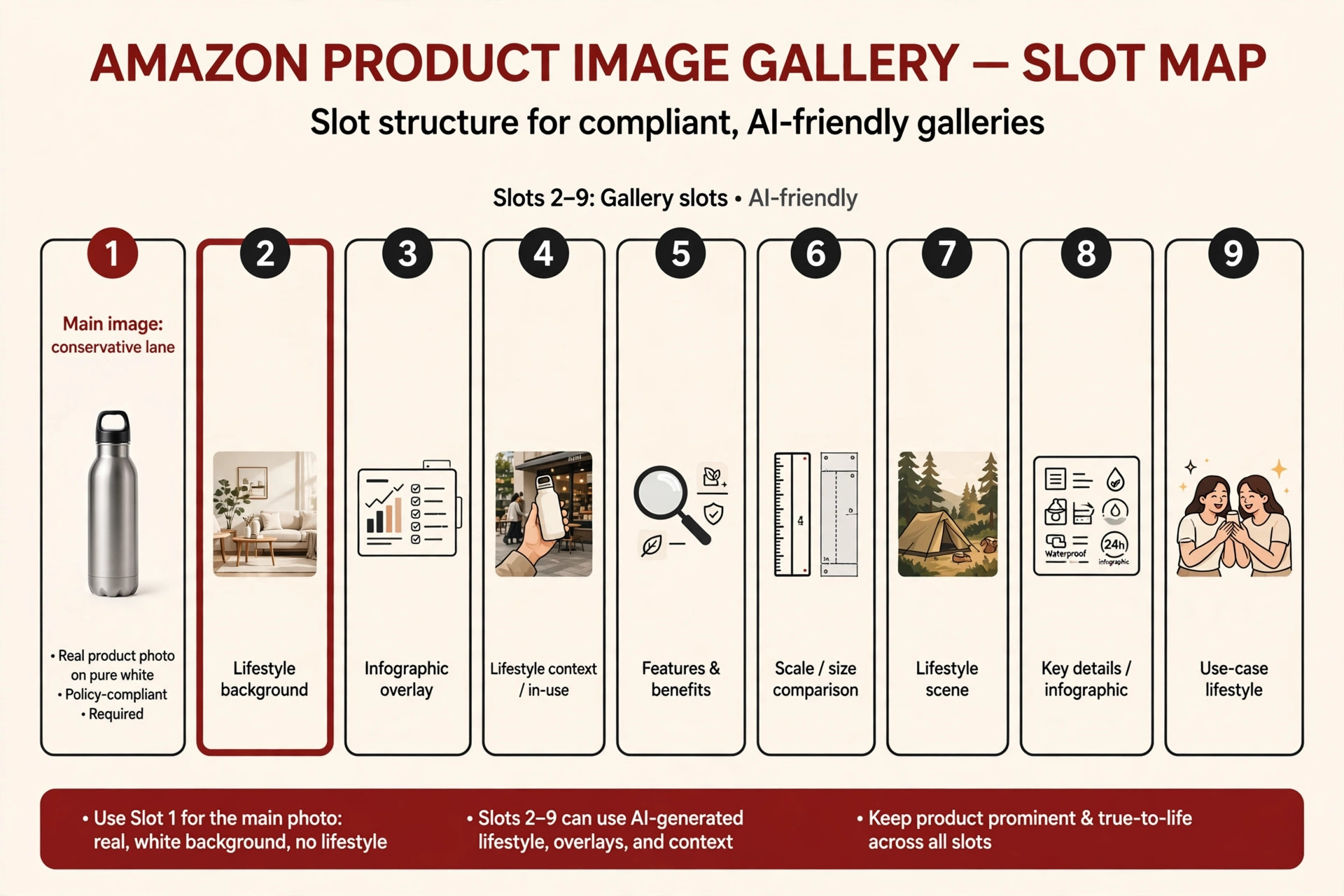
One 2026 rule is new and specific: the synthetic-performer disclosure. Photorealistic AI-generated people in product images or A+ videos must carry the contains-synthetic-performer keyword in the image’s XMP dc:subject field before upload, and Amazon may show a disclosure indicator to shoppers. It is deliberately narrow: it does not cover AI product shots without people, and it does not cover AI-retouched photographs of real people. If any gallery image shows a photorealistic AI person, see the full tagging walkthrough in my A+ Content mistakes guide rather than guessing at the steps.
Compliance checklist — 5 checks before uploading any AI-assisted image:
- Accuracy vs the physical product — does the final image show exactly what the buyer receives, including color, shape, and what’s in the box?
- Main-image rules hold — pure white background, no text or props, product filling most of the frame.
- People? Tag it — any photorealistic AI person gets the
contains-synthetic-performerkeyword; details in my mistakes guide. - No invented features — nothing shown that doesn’t exist on the real product, and no implied contents that aren’t included.
- Category style guide — Seller Central’s style guide for your category is the final authority; check it before you upload.
Mini-FAQ
Can I use AI backgrounds on gallery images?
Yes — that is the safest and most common use of AI in a listing. Generate the background, place the real product photo on it, and keep the product untouched. Lifestyle scenes, infographic panels, and use-context shots in slots 2–9 are where AI tools earn their keep.
Do 3D renders count as AI images?
Not quite — renders and AI generation are adjacent but different workflows, and they sit under different compliance questions. I cover that distinction in my companion post on 3D renders vs real photos, so I won’t flatten the answer here.
What is the single biggest AI mistake sellers make?
Letting the AI “improve” the product itself — smoothing a seam, straightening a curve, brightening a color until the image no longer matches what ships. That is misrepresentation, and it is exactly what gets listings suppressed.
Not sure where the line sits for your own listings? Get in touch — I’ll keep your product photographically true and put AI to work on everything around it.

Azam Khan Tarakai
Founder, Lystiq Creative — Amazon Listing Image & A+ Content Designer
I design Amazon listing images, A+ Content, Brand Stories and Storefronts that turn browsers into buyers — built on my C.A.S.H. Creative Framework™.
3 Responses