
Key Takeaways
- ✓ Rufus launched in February 2024 and became “Alexa for Shopping” in the US on May 13, 2026 (still called Rufus in the UK) — Amazon says it helped 300M+ customers research and buy in 2025.
- ✓ Rufus works mainly from TEXT — titles, bullets, A+ text, reviews, Q&A — and the honest truth is nobody outside Amazon can confirm how deeply it reads images, so never put a key fact only inside an image.
- ✓ Rewrite titles and bullets as answers to the five question patterns shoppers actually ask: gift, use-case, comparison, compatibility, and how-to.
- ✓ One fact, one claim, everywhere: conflicting details between your bullets, description, and A+ are a documented cause of wrong AI answers — consistency is the whole strategy.
- ✓ Your images still do real work in the AI era: mirror every answer on infographic panels, write descriptive alt text, and keep main-image accuracy exact — that’s the trust check after the AI speaks.
Your last ten buyers didn’t read your listing. They asked about it.
That’s the shift in one sentence. A growing share of Amazon shoppers now type a question into the assistant built into the app — “is this dry bag actually submersible or just splash-proof?” — and buy (or don’t) based on the answer the AI assembles from your title, your bullets, your reviews, and your Q&A. Amazon calls that assistant Rufus. Since May 2026 it goes by Alexa for Shopping on US screens, but the job is the same: it reads your listing so the shopper doesn’t have to.
Here’s what most sellers miss: your copy is now read twice — once by the shopper, once by the machine. Listings written as clear, consistent answers convert humans and feed the AI. Listings written as keyword soup starve both. This post is the honest version — what the assistant is, what it actually reads, the one question the experts genuinely disagree on, and the five-step method I use to make a listing ready for it.
What Rufus actually is (and why your screen may say Alexa now)
Rufus is Amazon’s conversational shopping assistant. It launched in February 2024 as a beta in the US mobile app, trained on Amazon’s product catalog, customer reviews, and community Q&A (some reporting adds web data). Shoppers ask plain-language questions — “what running shoes are good for flat feet?” — and it answers, summarizes review sentiment, compares products, and recommends by use case rather than keyword match.
On May 13, 2026, Amazon renamed it: in the US it’s now Alexa for Shopping; in the UK it’s still Rufus. The name changed; the job didn’t. It lives in the main search bar and on product pages, shows AI overviews and comparisons, and displays price history (up to a year in the US, UK, and India as that rolls out).
The scale is worth taking seriously: Amazon says Rufus helped 300M+ customers research and buy in 2025, and 50M+ have checked price history since launch. (You’ll see bigger numbers — one seller-tools firm claims 149% user growth and ~$12B in incremental 2025 sales. Those are vendor marketing figures, not Amazon’s.)
Think of it as a recommendation engine sitting on top of search. Traditional search still exists — short typed queries return standard results with the classic ranking factors. What changed: the questions shoppers used to answer by opening five listings are increasingly answered by the assistant reading those listings for them. Your listing is no longer just a page. It’s a source document for an AI’s answers.
What Rufus reads from your listing (it’s mostly text)
Every seller guide I read while researching this converged on the same list. Rufus builds its answers from:
| Source | How the AI uses it | Your move |
|---|---|---|
| Title | First-pass matching; anchors the product to a use case | Write it in natural language — intent + scenario, not a keyword string |
| Bullet points | Direct answers to “best for…?”, “will it…?”, “how long…?” | Structure each bullet as the answer to a real buyer question |
| Product description | Depth and long-tail context | Full sentences, real use cases, no tag clouds |
| A+ Content text | Authority and comparison | Comparison charts, spec tables, size guides, use-case copy |
| Reviews | Sentiment + real-world evidence | Mine recurring phrases back into your copy; fix the top complaint in the listing itself |
| Q&A | The highest-trust answer source | Pre-answer the ~10 questions buyers always ask |
| Backend attributes / search terms | Intent mapping (“used for,” “used by”) | Fill every attribute; add intent words like “gift for remote workers” |
Two things deserve emphasis. First: Amazon’s documentation says the assistant answers product questions from your detail page — which is why the conservative advice boils down to three words: accuracy, completeness, consistency. Conflicting facts between bullets, description, and A+ are a documented cause of wrong AI answers. If your bullet says 12 hours and your A+ says 10, the assistant doesn’t split the difference — it just gets your product wrong.
Second: the column you control least — reviews and Q&A — is the one the AI trusts most. One seller guide put it bluntly: if fifty reviewers say your “beige” blanket looks yellow, the system effectively retags it yellow no matter what your title says. Perception becomes the product record. Review mining isn’t a customer-service chore anymore; it’s copy fuel.

The honest conflict: does Rufus “see” your images?
Here’s where I give you the genuine disagreement instead of picking a camp for clicks — the same approach I took in my AI product images rules post.
Camp A says Rufus is multimodal — it sees your images. SellerMetrics writes that Rufus “sees” images using computer vision and OCR, treating unproven claims as weak. Imagine.io describes image recognition plus OCR plus vision-language models extracting text from infographics, labels, and size charts. 4Seller claims “visual semantic analysis” of on-image text, scenarios, people, and environments. One early Medium analysis guessed a Textract-equivalent — with “(I presume)” attached.
Camp B says Rufus reads text, full stop. GigaCommerce’s “Rufus Test”: “Rufus doesn’t infer facts from a lifestyle image… Read your detail page the way Rufus does: as a flat document with no photos.” And Amazon’s own documentation says the assistant answers from detail-page information — the guidance is to make every fact “complete, consistent and written as text.” Amazon has published nothing confirming image-parsing depth, and nothing about how it ranks answers. Anyone quoting exact ranking weights is inventing them.
My position, as a designer: don’t bet on either camp. The safe play is text redundancy — if a fact exists only inside an image, assume it does not exist for the AI. Every claim that matters should live in your title, bullets, description, or A+ text and be mirrored on your images. If Camp A is right, you’ve fed the machine twice. If Camp B is right, you’ve fed it once — and the images did their human job.
Either way, images still do real work, because the shopper is still a human who scrolls. After the AI answers, the buyer opens your gallery to verify — and that verification moment is where images win or lose the sale:
- The trust check. The product must match what the assistant just said — color, size, what’s in the box. Surprises here don’t just lose the sale; they seed the negative reviews the AI will quote next time.
- Mirrored answers. Every infographic panel should answer the same questions the assistant answers — in type a machine could OCR.
- Alt text. Amazon gives you an alt-text field on A+ modules; most sellers write “image 1.” Descriptive alt text is free context for any system that reads it.
- Comparison and sizing. A+ comparison charts and size guides are the most machine-friendly content on the page — structured, factual, unambiguous.
- Corroborating scenes. Lifestyle images showing the use cases your text claims back up the story in both readings of the world.
The RUFUS Method: my five-step framework for an AI-ready listing
I’ve started running every listing I touch through this. The acronym is a coincidence I’m choosing to enjoy.
R — Read your listing like the AI does. Cover your gallery. Read your own detail page as a flat document with no photos and no brand context, and ask: if I only had these words, what could I confidently tell a shopper? Anything you can’t answer from the text in front of you is a gap the assistant has too. Twenty minutes, highest-value audit in this post.
U — Unify: one fact, one claim, everywhere. Check every number across title, bullets, description, A+, and images — capacity, dimensions, battery life, what’s included, care instructions. Conflicting facts are a documented cause of wrong AI answers, and they look sloppy to humans. One fact, one claim, everywhere.
F — Frame copy as answers. Shoppers ask five kinds of questions: gift (“gift for a 10-year-old who likes science”), use-case (“best running shoes for flat feet”), comparison (“how does this differ from X?”), compatibility (“will this work with my iPhone 15?”), and how-to (“how do I clean this?”). Every bullet should answer one of them. “Double-wall vacuum insulation” is a spec. “Keeps coffee hot for 12 hours and water cold for 24 — fits standard car cup holders, leakproof lid” is an answer the AI can repeat verbatim. That’s the whole game.
U — Use reviews and Q&A as fuel. Mine reviews for the phrases buyers actually use and feed them back into your copy. Pre-answer the ten questions every buyer asks your category. And when a negative theme keeps surfacing, attack it in the listing itself: “We updated the manual in 2025 and pre-installed the difficult bracket — assembly takes under 10 minutes.” You’re overwriting the AI’s record of the complaint with your fix.
S — Sync images to the text. The design half: every image claim exists in text, every text claim worth verifying gets a panel, alt text is descriptive, on-image type is bold and OCR-safe, and the main image is accurate to the pixel.
Annotated example: one dry bag, rewritten
Let me show you what the F step looks like on a real-feeling product. Fictional copy, invented for this article — but the technique is exactly what I’d apply to a client’s dry bag.
Title — before: “Dry Bag Waterproof 30L Roll Top Sack Kayak Boating Camping Hiking Beige Black Grey”
Title — after: “Waterproof Dry Bag 30L with Built-In Rain Poncho — Roll-Top Sack for Kayaking, Camping & Hiking”
Why it works: the before is a tag cloud. The after keeps the keywords but adds intent — a named differentiator (built-in poncho) and the scenarios the buyer is shopping for. It answers “what is it for?” in one breath.
Bullet — before: “600D TPU waterproof material with welded seams.”
Bullet — after: “Fully submersible protection: 600D TPU body with welded seams keeps gear dry through capsizes and downpours — rated for kayaking, boating, and monsoon-season commutes.”
Why it works: it answers the use-case question (“can I actually dunk this?”) and names the scenarios. The spec survives — it’s just wearing an answer now.
Bullet — before: “Available in 15L, 20L, and 30L.”
Bullet — after: “Three sizes for three trips: 15L for day hikes (phone, wallet, layer), 20L for overnighters, 30L for multi-day or boat days — see the size chart in the images for exact dimensions.”
Why it works: compatibility plus how-to in one bullet, and it points the reader at the image — the redundancy loop, human and machine.
Notice the pattern: no keyword was lost. Every spec survived. They just got promoted into answers.

What this means for your listing images, specifically
This is the half of the Rufus conversation nobody in the software world is having, because they don’t make images. I do. Here’s the design brief the AI era hands us:
- Mirror every answer on a panel. The same five question patterns your bullets answer should be answered in the gallery. Size question? Size-chart panel with exact dimensions. Compatibility question? A fit panel. My dry-bag set below is the working example: the 15L/20L/30L chart and the feature callouts (600D TPU body, PU3000MM poncho rating) repeat the listing’s claims in large, clean type. (On infographic copy technique, see my copywriting breakdown.)
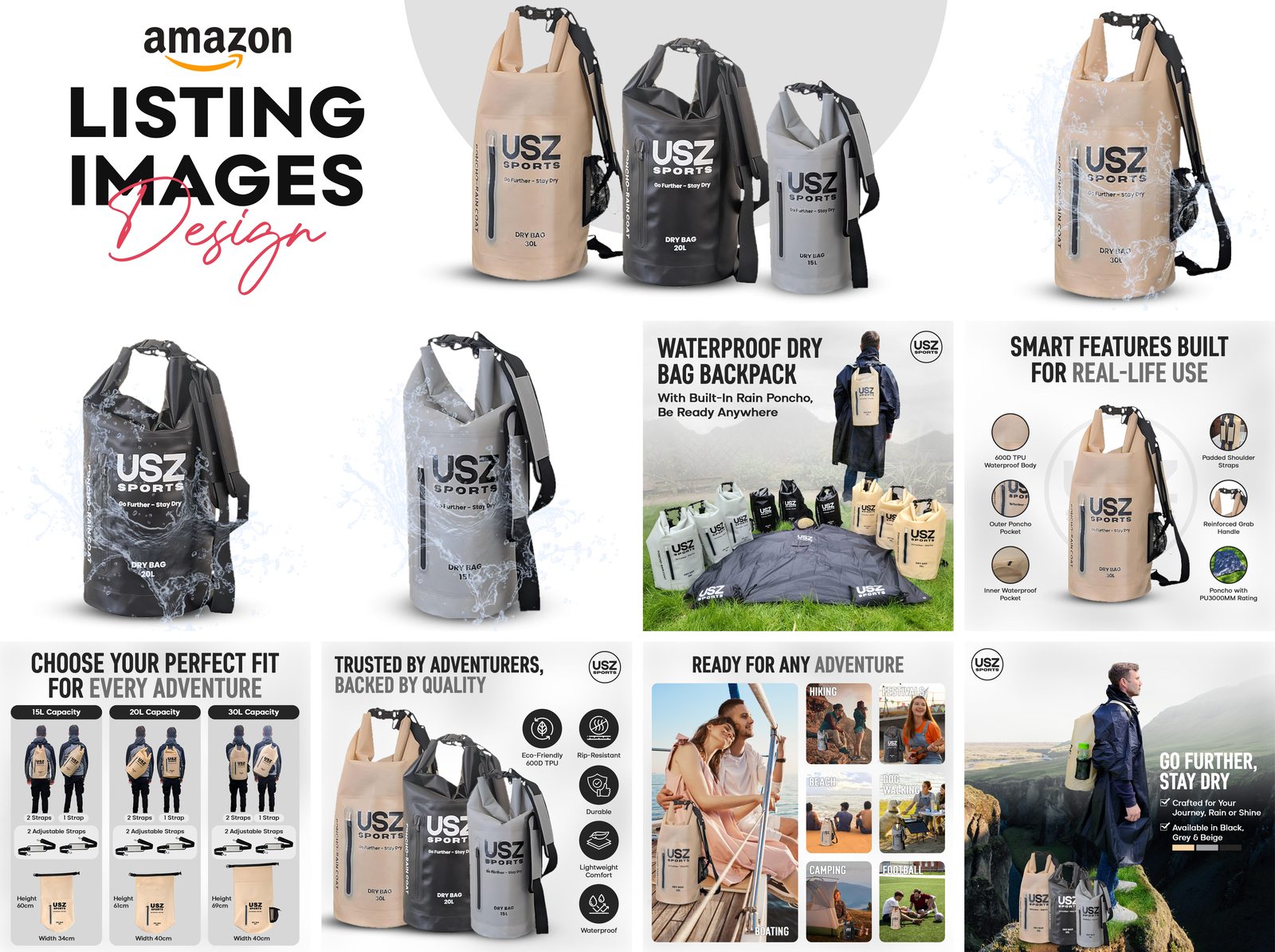
- Set on-image text the machine can read. Bold, clean fonts. One message per panel. High contrast. No text baked into busy photographic backgrounds where even a human squints. If Camp A is right and there’s OCR in the loop, this is what gets extracted. If Camp B is right, the human still reads it in half a second. Either way you win.
- Write real alt text. Every A+ module has an alt-text field and most sellers waste it on “image 1.” Describe what’s actually shown, with the use case in it. It costs nothing and it’s the most direct “here’s what this image means” signal you can hand any system. (On using AI inside A+ without tripping Amazon’s rules, see my A+ AI guide.)
- Keep the main image ruthlessly accurate. The trust check is real: the assistant says “beige, 30L, includes poncho,” the shopper opens the gallery, and the images must agree — same color, same contents, same proportions. The listing image requirements still rule here: 2,000px for zoom, 1,000px minimum, pure white main image. Zoom matters more now, not less — it’s how the buyer verifies the AI’s claims.
- Build the comparison content. A+ comparison charts, size guides, compatibility tables — if you have Brand Registry, this structured content is the easiest win on the page. It’s the highest-converting A+ pattern I build for my A+ design service clients, and it was winning before any AI showed up.
One caution for the AI-image crowd: if you’re generating lifestyle scenes with Amazon’s own AI image generator or any other tool, the accuracy rules from my AI product images guide apply double here — and check the AI disclosure rules too. A scene that misrepresents the product doesn’t just risk a flag; it teaches the review base to distrust you, and the assistant quotes the review base.
And fill the gallery. Six images minimum is still the working standard (here’s the full reasoning) — every empty slot is a question you didn’t answer in the place the verifier looks.
Mistakes I see constantly
Keyword-stuffed titles that read like tag clouds. The AI parses intent, not density — and the human stopped reading at word six.
Bullets that list specs without answering a single buyer question. “600D TPU.” “Welded seams.” Great — so what? If no bullet answers “will it survive a capsize,” the assistant answers from a competitor’s listing that does.
One fact, three versions. Bullet says 12 hours, A+ says 10, description says “all day.” The assistant doesn’t average them. It just gets your product wrong, confidently.
An abandoned Q&A section. The highest-trust answer source on your page, sitting empty — or answered wrong by a random buyer two years ago and never corrected.
A key fact that exists only inside an image. “But it’s right there in the infographic!” The AI can’t see it (Camp B), or can’t rely on it (Camp A). Put it in text.
Generic AI-generated copy with no scenario depth. Smooth sentences that say nothing — no use cases, no audience, no “for whom.” Multiple seller guides flag exactly this failure mode. AI drafts are a starting point; the scenarios are the work.
AI scenes that misrepresent the product. A background showing a feature the product doesn’t have, or a color it doesn’t come in. The returns and one-star reviews that follow become the AI’s permanent record of your product.
Your Rufus-readiness checklist
Run this on your top five ASINs. Be honest — it’s twenty minutes per listing.
- Title reads as a natural-language sentence with intent and scenario, not a keyword string
- Every bullet answers one of the five question patterns (gift, use-case, comparison, compatibility, how-to)
- All numbers (capacity, dimensions, battery, what’s included) match across title, bullets, description, A+, and images
- A+ includes a comparison chart or spec table with structured, factual content
- Every A+ image has descriptive alt text (not “image 1”)
- Q&A has at least ten pre-answered real buyer questions
- Top three review phrases are reflected in the copy; top complaint is addressed head-on in the listing
- Every claim on an infographic panel also exists in the text
- On-image text is bold, high-contrast, one message per panel
- Main image is color- and content-accurate at 2,000px; gallery has six or more images
- Backend attributes fully filled, including use-case and audience fields
A 4-week action plan
Week 1 — Audit. Run the flat-document test (the R step) on your top five ASINs. Pull the twenty real questions buyers ask — from your reviews, your Q&A, and your category’s frequent patterns. List every number on the page and flag the conflicts.
Week 2 — Rewrite. Titles and bullets for those five ASINs, framed as answers. Unify every conflicting fact. Pure copy work — no designer needed yet.
Week 3 — Q&A and reviews. Seed ten questions per ASIN with real answers. Mine review language back into the bullets. Write the head-on response to your top complaint into the listing itself.
Week 4 — Images and A+. Mirror the rewritten answers onto infographic panels, write the alt text, add the comparison chart or size guide to A+, and fill the gallery to six-plus images. Then re-run the flat-document test. If you can answer every Week 1 question from text alone, you’re done.
FAQ
Is Rufus gone?
Not exactly — it was renamed. On May 13, 2026, Amazon folded Rufus into “Alexa for Shopping” for US customers (in the UK it’s still called Rufus). Same assistant, same job, bigger surface: the main search bar, product pages, price history, comparisons.
Does Rufus actually read my product images?
Honestly? Nobody outside Amazon can say for sure. One camp of seller guides claims multimodal vision plus OCR that reads your infographics; another says it reads your listing as a flat text document and infers nothing from lifestyle images. Amazon hasn’t confirmed either. So don’t build your strategy on either claim: put every important fact in text, mirror it on images, and you’re covered both ways.
Do keywords still matter?
Yes — but they’re no longer sufficient. A listing with the right keywords and no context (who it’s for, what it’s for, proof) loses to a listing with both. Organic search hasn’t been switched off either: short typed queries still return standard results. Keep the keywords; add the answers.
How can I test whether Rufus understands my listing?
Ask it the questions yourself. Open the assistant and ask the five question patterns about your product — gift, use-case, comparison, compatibility, how-to — and see what comes back. Vague answers or competitor recommendations tell you exactly which gaps to close. Then run the flat-document test from this post.
Does Rufus change how I should run PPC?
Indirectly. Rufus recommendations are organic, driven by listing content — but the same content quality that makes a listing AI-ready also feeds relevance scoring elsewhere. Worth knowing: Amazon Ads has introduced Sponsored Products and Sponsored Brands prompts that can open a dialog inside the assistant or answer shoppers on the page.
What about backend search terms — do they matter for Rufus?
Fill them, including intent words (“gift for remote workers,” “backpack for weekend travel”) — several guides recommend this to feed use-case signals. But treat it as hygiene, not a ranking formula: Amazon publishes no weights, and anyone selling you exact ones is guessing.
The bottom line
You don’t need to outsmart the AI. You need to out-answer it — to give it such good answers that it quotes you.
The sellers who win the AI-shopping era won’t be the ones with the cleverest hacks. They’ll be the ones whose listings read like the world’s most patient salesperson: every question anticipated, every fact consistent, every claim verifiable in the images. That’s not a new skill. It’s the old skill — clear copy, honest images — with a second reader in the room.
If you’d like that handled for you — listing images and A+ Content engineered around the questions your buyers actually ask — that’s what my design services are for. Get in touch and we’ll audit your top ASINs together.

Azam Khan Tarakai
Founder, Lystiq Creative — Amazon Listing Image & A+ Content Designer
I design Amazon listing images, A+ Content, Brand Stories and Storefronts that turn browsers into buyers — built on my C.A.S.H. Creative Framework™.