
Key Takeaways
- ✓ Amazon’s free AI image generator is real, unlimited, and genuinely capable — but it is not a designer replacement, and this walkthrough presents its steps as documented by Amazon and agency guides, not as independently tested.
- ✓ Creative Studio lives in the ad console (Creative Tools → Creative Studio): load your product by ASIN, describe the scene in plain language, review 3–4 variations, refine the closest, and export.
- ✓ The tool’s best lanes are lifestyle scenes from packshots, fast ad-creative variations, seasonal reskins without photoshoots, and blank-brief concepting with the Creative Agent.
- ✓ Compliance stays on you: Amazon Ads policy prohibits content that is “photorealistic but inaccurate,” generated apparel can shift fit and logos, and no source confirms the tool handles AI-people tagging for you.
- ✓ Human design still wins where accuracy decides — main images, infographics with claim-safe copy, multi-panel storytelling, catalog-wide brand consistency, and anything involving people or fit.
The question every seller is asking me now: can Amazon’s own free AI image generator replace a designer? I went looking for the honest answer. Amazon ships a genuinely capable AI image tool while simultaneously enforcing strict accuracy rules on what you upload — so the truth sits in the tension between those two facts. The tool is real, free, and unlimited. It is not a designer replacement.
Pair this with today’s policy piece on what’s allowed and what gets flagged — this post is about the tool itself: where it lives, how to use it, what it’s genuinely good at, and the lanes where human design still wins.
What Amazon’s AI image tools actually are
There are three things sellers mean when they say “Amazon’s AI image generator,” and they live in different places:
Amazon Ads Creative Studio is the main one. It lives in the ad console: log in, left sidebar, “Creative Tools,” then “Creative Studio,” then “generate image” — Amazon’s own guide frames it as “how to use AI to generate images in just a few clicks” (advertising.amazon.com). In some accounts it may appear under “Creative Assets” or “Brand Content” depending on when the account was set up (ClearAds Agency, 2026) — if you don’t see the documented path, that’s normal, not a bug.
The Creative Agent is the newer agentic layer inside Creative Studio: a chat interface that acts as an AI creative partner. You give it product pages, audiences, brand guidelines, and previous ads; it proposes campaign concepts and taglines with rationale, builds editable storyboards, adds music and voiceover, and saves finished assets to your Creative Asset library. It works across Sponsored Brands, Sponsored Display, Amazon DSP, and Brand Stores (advertising.amazon.com, “Amazon Ads launches new agentic AI creative tool”, crawled ~Oct 2026). US advertisers got access in late 2025; the Video Generator reached US advertisers before its November 2025 international expansion (salesduo.com, 2026).
Seller Central’s listing-side AI tools are the third thing: aboutamazon.com (Mar 2026) describes Amazon’s “AI-powered listing tools that help create compelling product listings, A+ content, and lifestyle imagery with significantly less effort,” with the newer Seller Assistant as the agentic home. Keep these distinct from the ad-console tools — different home, different job.
Availability: Creative Studio is available to sellers with ad-console access in 10 markets (US, UK, Canada, Germany, France, Italy, Spain, Australia, Brazil, Mexico — per ClearAds, 2026). It’s free with no generation cap — “there is no limit to the number of images sellers can generate” (voc.ai seller guide, 2026).
One honest line before the walkthrough: sellers aren’t universally enthusiastic. GeekWire (Mar 2026) reported a Seller Central forum thread on Amazon’s AI tools drawing 36 thumbs-down against 5 thumbs-up. Skepticism is real, and some of it is earned — more on that below.
The walkthrough: six documented steps
I need to be transparent about something: I found no neutral, published hands-on review of Amazon’s own generator’s output quality — no independent testing of color fidelity or product-accuracy failure rates. Every walkthrough detail below comes from Amazon’s own docs and agency guides (ClearAds, salesduo, sellerapp, voc.ai), which all have a stake in adoption. So read these steps as documented, not quality-proven, and test the tool on your own products before trusting it.
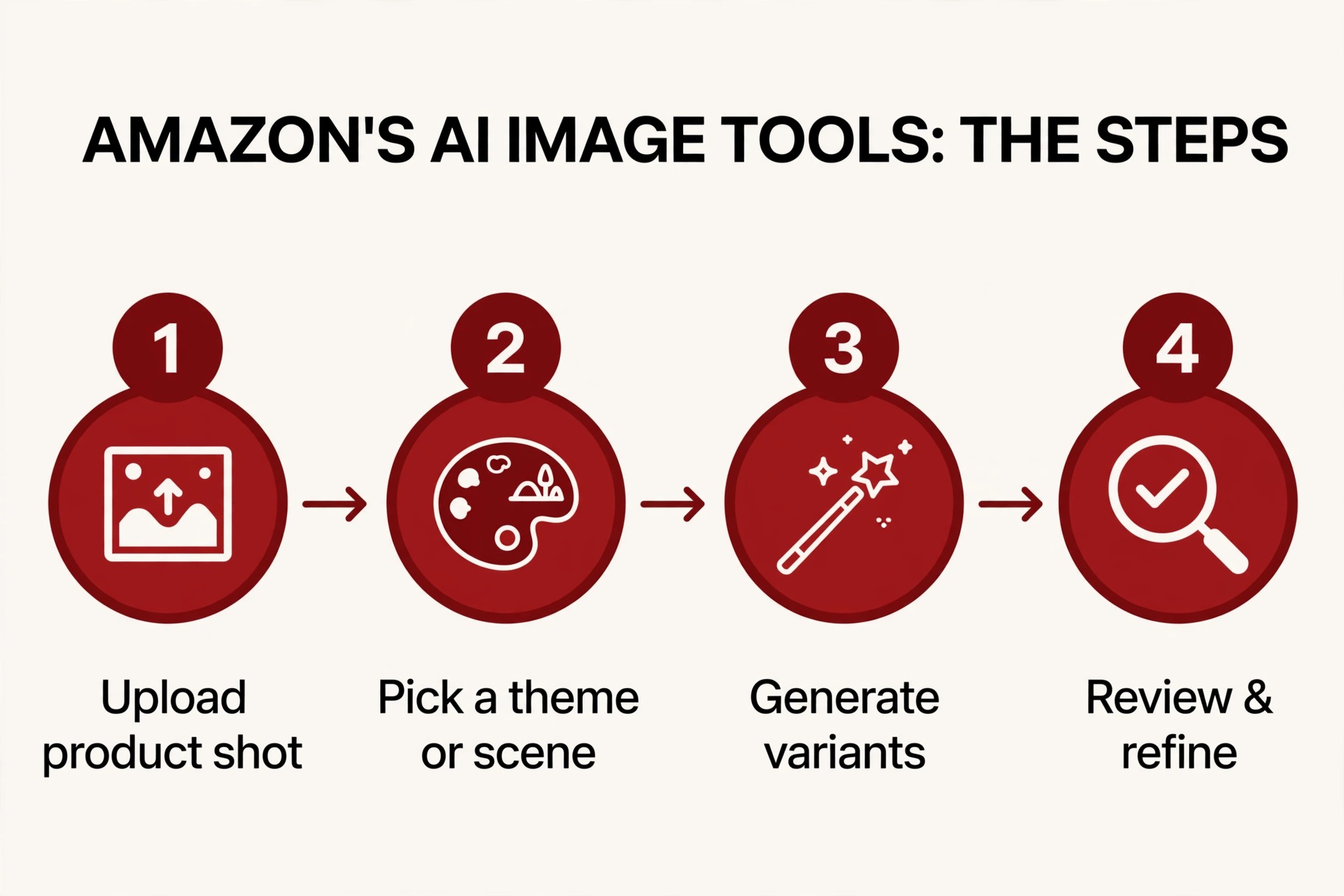
- Access Creative Studio. Ad console → left sidebar → “Creative Tools” → “Creative Studio.” (If your console lacks it, check the access checklist in salesduo’s 2026 guide — availability varies by account, permissions, and campaign type.)
- Load your product. Paste an ASIN or product URL — the tool pulls your listing images, title, and details automatically. Custom photo upload works too. Starting from an accurate product shot is the whole game; garbage in is garbage out.
- Describe the scene. Prompt it in plain language: “Create a lifestyle image showing this coffee maker on a kitchen counter, morning light, steam rising from a fresh cup.” The clearer the product description, the less the tool invents.
- Review the variations. The AI generates 3–4 variations per round, taking roughly 10–30 seconds each (occasionally up to a minute, per voc.ai). Expect to reject most of them. This is the normal loop, not a failure.
- Refine the closest one. Adjust the prompt, regenerate, iterate. Time budget once familiar: 5–10 minutes; 20–30 the first time (ClearAds, 2026).
- Export directly to campaigns. Outputs are auto-sized for the ad format. Save winners to the Creative Asset library for reuse.
That’s the machine. Now the judgment.
What it’s genuinely good at
Four lanes where the tool earns its keep:

- Lifestyle scenes from white-background shots. Its core trick: turning flat packshots into lifestyle context for ad creatives. This is the home-turf use case Amazon built it for — ad creatives first, product-detail-page images second.
- Multiple variations fast. Unlimited, free, 10–30 seconds a generation. For A/B testing ad creative, this is legitimately powerful — the bottleneck becomes your own judgment, not your budget.
- Seasonal reskins without photoshoots. Existing product photos get Christmas scenes, summer scenes, back-to-school scenes. No photographer, no studio booking.
- Blank-brief concepting. The Creative Agent’s concept-and-storyboard work gives a brand that would otherwise start from nothing a structured starting point — taglines with rationale, editable storyboards, music and voiceover options.
Where it falls short
Product accuracy is not guaranteed. This is the big one, and it’s documented from multiple directions. wifitalents.com’s 2026 review of AI product-photo generators warns that generated apparel images “can shift garment fit, fabric detail, or logos” and that “Amazon image-policy compliance is not automatically verified.” Amazon’s own auto-generated “shop by style” listing images drew Reddit seller complaints: “I don’t like the pictures they generated, and they don’t even show the right appearance of my products” (mediastreet.ie, Sep 2026). If Amazon’s own generation gets products wrong, your generated output needs verification — no exceptions.
Compliance stays on the seller. The tool won’t save a bad input. Amazon Ads policy (updated Jun 19, 2026) prohibits ad content that is “photorealistic but inaccurate” — and that prohibition bites the seller, not the tool. Salesduo’s slot-by-slot verdict: every AI use case is safe only “WITH REVIEW.” And on the one question sellers keep asking me — does the tool automatically handle the 2026 synthetic-performer tagging for AI people? — I found no source confirming it does. The tagging duty sits with you until proven otherwise.
Text and claims are AI’s weak spot. AI generators garble rendered text — garbled letters, invented spellings, confident nonsense. In my own designer experience, this is where AI-assisted infographics die: the scene looks beautiful and the headline is gibberish. And in A+, riverbendconsulting (2026) warns that Amazon is “becoming more sensitive to low-quality or repetitive” AI content — generic, templated AI copy underperforms; A+ needs product-specific, brand-voiced copy, not autocomplete.
Where human design still wins — the six lanes
Here’s my professional verdict, lane by lane:
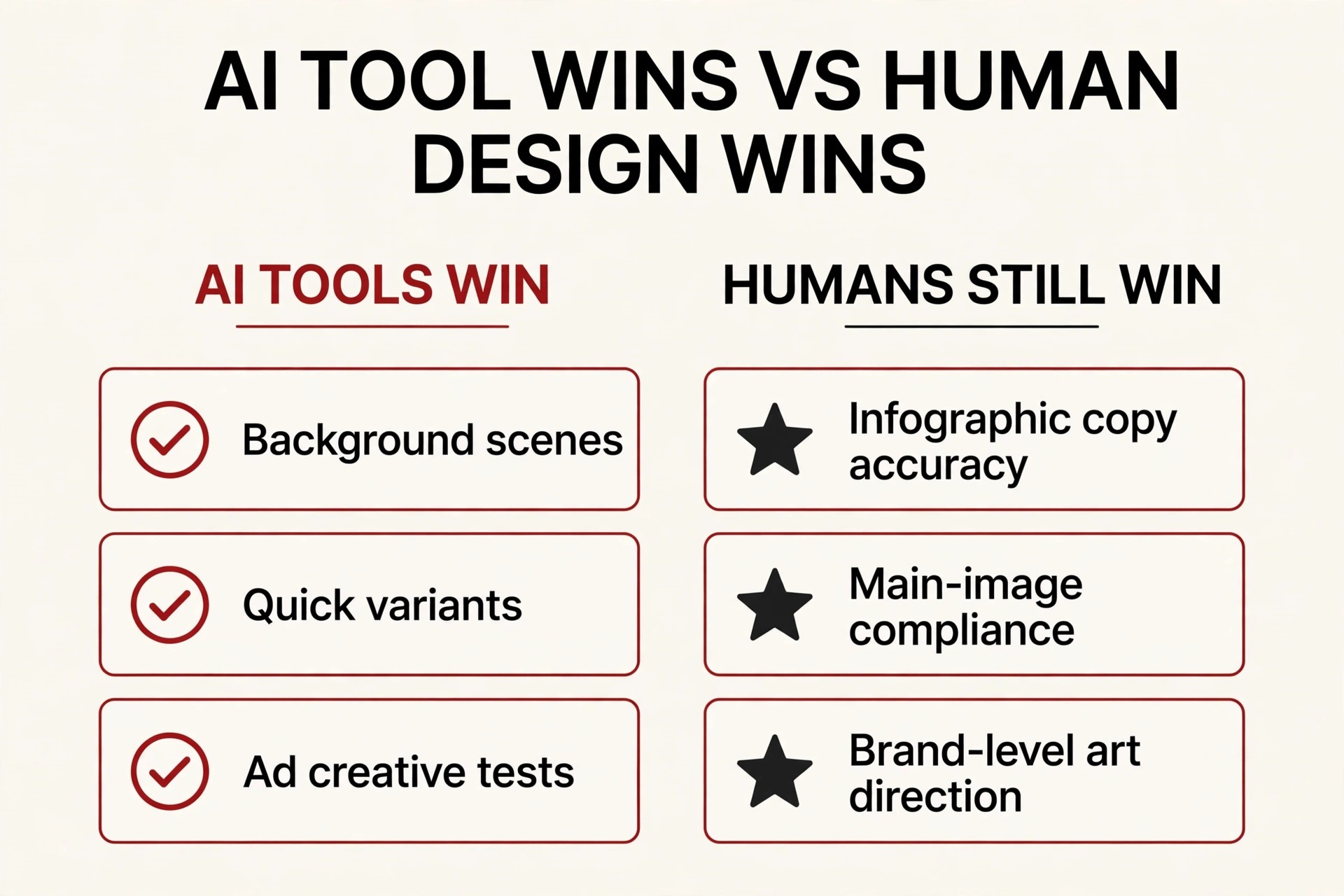
- Accuracy-critical main images. The white-background hero that decides search suppression. Real photo, verified against the physical product. The generator doesn’t get this job.
- Infographics with real copy and claim-safe wording. Accurate rendered text plus legally careful claims (supplements especially — see my supplements A+ post for the claim discipline). Two skills in one lane: typography and legal caution. AI has neither.
- Multi-panel narrative storytelling. A+ modules and Brand Story flow built for skimmers — sequencing, rhythm, the emotional arc. The generator makes images; it doesn’t make narratives. (See my A+ structure post for what I mean by skimmer architecture.)
- Brand consistency across dozens of ASINs. One color system, one lighting logic, one voice — maintained catalog-wide. AI generates one-offs; consistency is a human discipline.
- Anything involving people. The 2026 synthetic-performer tagging rule adds a compliance workflow that AI output doesn’t handle for you — audit, tag, re-upload, document.
- Apparel and fit-critical categories. wifitalents’ fit-shift warning applies double here: when the product IS the fit, generation is the wrong tool.
My hybrid workflow: how I’d actually use both on a new ASIN
For a new product today, here’s the pipeline I’d run:
- Main image: human-shot or verified-accurate, always. No generator output gets this slot.
- Gallery lifestyle scenes: generator for the first-pass backgrounds, human review against the physical product before anything uploads.
- Infographics and claim panels: human-designed, full stop. AI can draft layout ideas; copy, typography, and claim wording are human.
- Ad creatives: the generator’s best lane — rapid variations, seasonal reskins, A/B fuel. Human judgment picks winners.
- A+ Content: AI for module backgrounds and first-pass copy drafts; human for product accuracy, text proofing, claim safety, and skimmer-flow sequencing.
- Final gate: the same 6-step checklist from today’s policy article — with special attention to the people-tag audit and the accuracy comparison against the physical product.

The hybrid verdict, in one line: use Amazon’s tool for rapid ad-creative variations and lifestyle scene drafts; use a designer (or a careful human pipeline) for anything where accuracy, text, or brand voice decides whether the listing converts or gets flagged. The tool removes the blank page and the budget barrier. It doesn’t remove the need for someone who knows what a compliant, converting listing image looks like. That’s still a job — and it’s the job I do.
FAQ
Is it really free?
Yes — per the seller guides that document it, Creative Studio is free for sellers with ad-console access with no generation cap. What it costs is your time in the refine loop and your attention in the review step.
Can I use its images on my product detail page?
The tool is ad-creative-first — that’s its home. PDP images must still pass every listing-image rule (white background, 85% fill, accuracy), and every AI use case the guides document is “safe WITH REVIEW.” Generated scenes work for gallery lifestyle slots after human verification; I’d never put unverified generator output on a main image.
Does it tag AI people automatically?
Unknown — no source I’ve found confirms automatic synthetic-performer tagging. Until there’s evidence, the tagging duty is yours: audit, tag, re-upload. Check the current behavior in your console before relying on it.
Why don’t I see Creative Studio in my console?
Access varies by account, marketplace, permissions, and campaign type (salesduo’s 2026 access checklist). It’s normal for it to be absent in some setups — check your ad-console permissions and account type first.
Will AI-generated ad creatives hurt my account?
Only the same way any inaccurate creative would: Amazon Ads prohibits content that’s “photorealistic but inaccurate” (policy updated Jun 19, 2026). The violation is the inaccuracy, not the AI. Keep the product true and you’re inside the policy.

Azam Khan Tarakai
Founder, Lystiq Creative — Amazon Listing Image & A+ Content Designer
I design Amazon listing images, A+ Content, Brand Stories and Storefronts that turn browsers into buyers — built on my C.A.S.H. Creative Framework™.
2 Responses