
Amazon accepts four image file formats: JPEG (preferred), TIFF, PNG, and non-animated GIF. That is the whole list — but which format you upload changes how your images render, how big your files get, and what can break at upload time. This is the practical version: what each format actually means for your listings. For the full spec checklist (dimensions, main-image rules, everything), see my 2026 listing image requirements guide — I am not re-teaching it here.
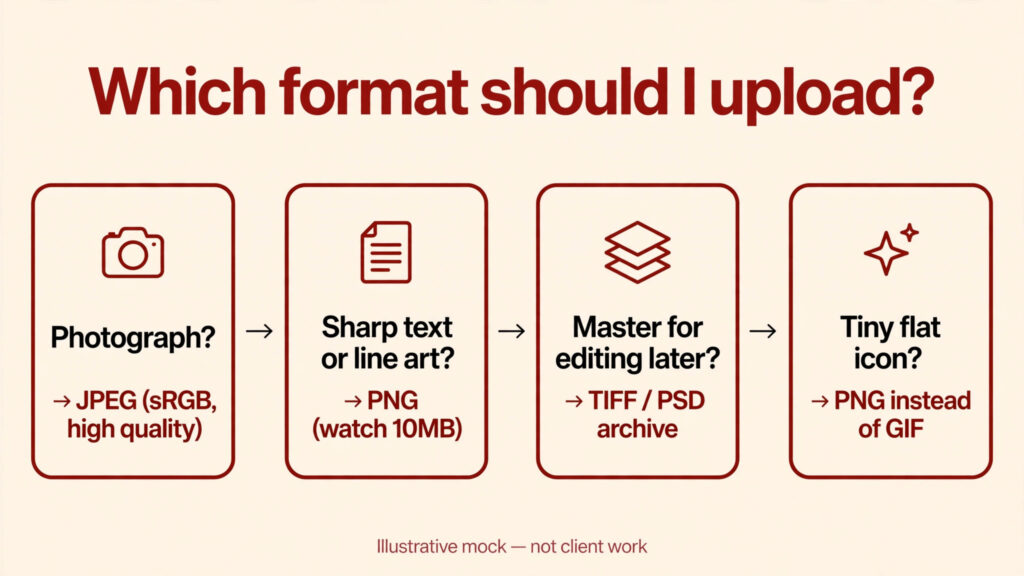
JPEG: the default, and usually the right answer. JPEG is Amazon’s preferred format for a reason: it keeps photographs small enough to upload and load fast while looking sharp. Any photo-based image — main image, lifestyle, alternate angles, detail close-ups — should be a JPEG. Export at high quality, in the sRGB color space, and you’re done. The one place JPEG fails you is crisp line work: text, thin lines, and flat graphics pick up soft edges and compression artifacts, which is why your infographics can look fine on your monitor and slightly fuzzy on the listing. If your infographic text looks soft after upload, the format — not the design — is usually the culprit.
PNG: the sharp-text format, at a weight cost. PNG renders text, icons, and flat graphics razor-sharp because it doesn’t throw away detail the way JPEG does. For infographics with small callout text or fine lines, PNG is often the better upload — the sharpness is visibly better at zoom. The tradeoff is file size: PNGs run heavier, so keep an eye on Amazon’s 10MB ceiling per image. And one hard rule: don’t use transparency in PNG uploads — transparent areas aren’t accepted behavior for listing images, and transparency is outright forbidden in main images.
TIFF: accepted, but its real job is archiving. Amazon lists TIFF as an accepted format, and it is — but TIFFs are heavy files, and uploading them to a listing buys you nothing the shopper can see once Amazon compresses and renders the image for display. In practice, TIFF is a format for your master files, not your uploads: keep your uncompressed or minimally layered masters as TIFFs or PSDs, and export JPEGs or PNGs from them for the actual listing. That way, when Amazon updates a requirement — or you need the same creative for another marketplace — you re-export from the master instead of re-editing a compressed JPEG, which loses quality every generation.
GIF: the tiny niche. Non-animated GIFs are accepted, but GIF’s 256-color palette makes it a poor choice for photographs — it banding-blocks gradients and dulls color. Its only real role on a listing is tiny, simple graphics like flat icons. In practice I almost never recommend uploading GIFs; if you’re reaching for GIF, PNG does the same job better.
What breaks with the wrong format. Three failure modes I see most:
- Wrong color space. Files saved in CMYK or Adobe RGB instead of sRGB get rejected or come back with shifted colors — dull, washed-out product shots that don’t match what you exported. Always export for listings in sRGB.
- Over-compression. An aggressively compressed JPEG uploads fine and looks broken — soft, blocky, blurry at zoom. Export at high quality; the file-size savings of a crushed JPEG aren’t worth the trust a shopper loses when your zoom reveals mush.
- Over the 10MB ceiling. Huge files can fail upload outright. If you’re hitting the ceiling, export at a lower quality JPEG or a smaller dimension rather than fighting the format.
The simple rule. Photographs → high-quality JPEG in sRGB. Text-heavy graphics → PNG, watch the file size. Masters → archived as TIFF or layered PSD. When in doubt, JPEG is the safe default — it is Amazon’s preferred format for a reason.
Mini-FAQ
Can I upload a TIFF and will Amazon compress it?
TIFF is an accepted format, but Amazon renders images for its own display pipeline either way — uploading a TIFF doesn’t buy you visibly better quality on the listing than a high-quality JPEG, and the file is much heavier. Save TIFF for your archived masters, not your uploads.
Is PNG better than JPEG for images with text?
Usually, yes — PNG keeps text and line edges sharp at zoom, where JPEG compression softens them. The cost is larger files, so check the 10MB ceiling and use PNG selectively for text-heavy infographics, not for every photo.
What about WebP?
WebP isn’t on Amazon’s published list of accepted formats. Format support can change, so check Seller Central’s current requirements before building your workflow around anything outside JPEG, TIFF, PNG, or non-animated GIF.
Need your listing images export-ready and compliant, not just compliant-looking? Get in touch — I’ll handle the technical side so you don’t have to think about it.

Azam Khan Tarakai
Founder, Lystiq Creative — Amazon Listing Image & A+ Content Designer
I design Amazon listing images, A+ Content, Brand Stories and Storefronts that turn browsers into buyers — built on my C.A.S.H. Creative Framework™.
One Response