
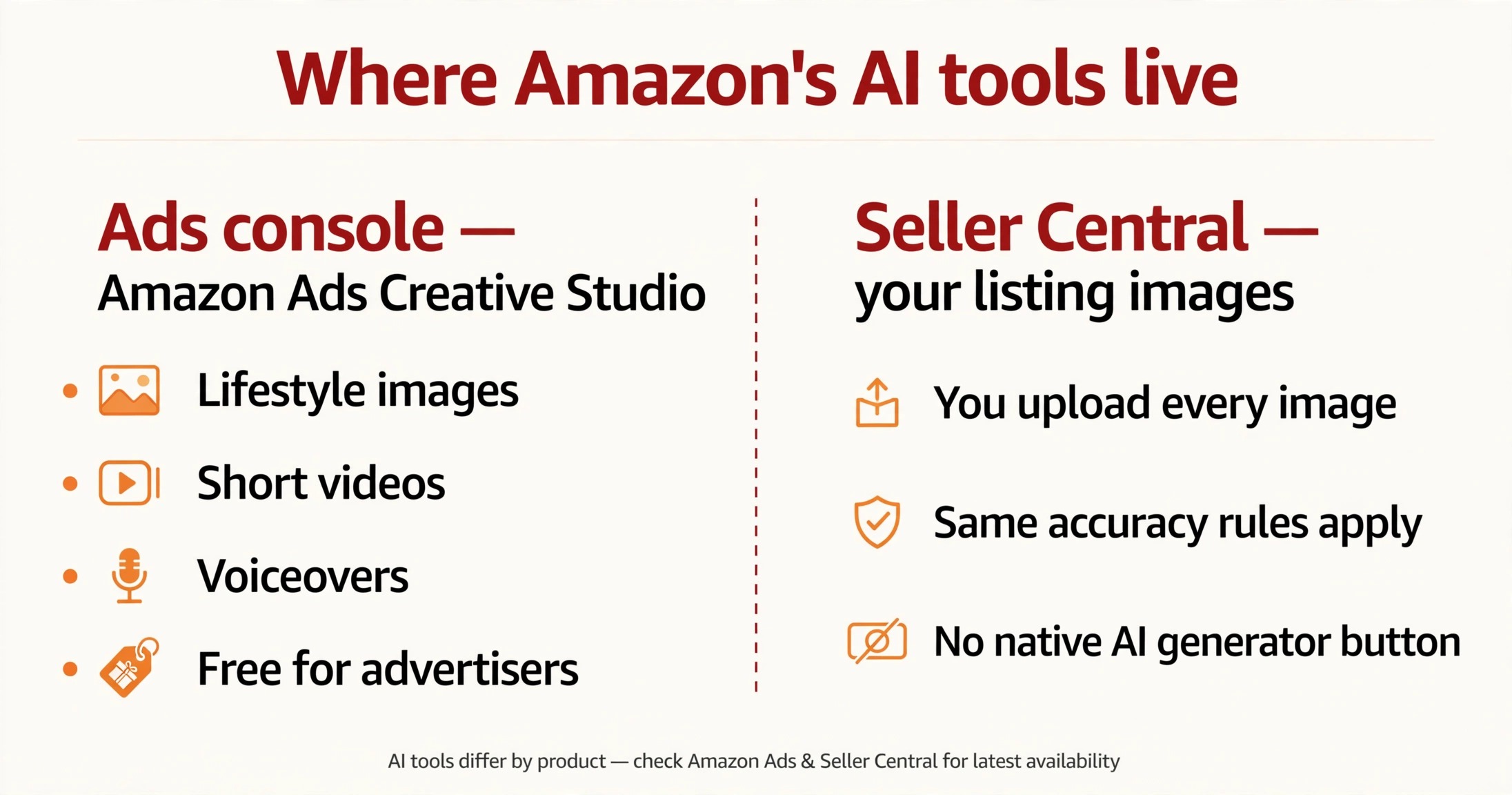
Amazon’s own AI image tools live almost entirely inside the Amazon Ads console — not Seller Central — under the name Amazon Ads Creative Studio. It is free for advertisers, and from one product photo it generates lifestyle images, short videos, and voiceover audio for your ads. Availability varies by country, account, and campaign type — and every output still needs a human accuracy check before it goes anywhere near your listing.
I walked through the image generator hands-on in post 849 — that one is the tutorial. This post is the inventory: what Amazon itself gives you, where it lives, what it costs, and who gets it.
The inventory: what actually exists
Amazon Ads Creative Studio is the umbrella name, and it holds four AI generators (per Amazon Ads’ own AI creative solutions page and 2026 guides from SalesDuo, ClearAds, and sellerapp): an image generator (lifestyle scenes, seasonal backgrounds, audience variations from one product photo), a video generator (short product videos sized for Amazon ad formats), an audio/voiceover generator, and a conversational Creative Agent (newer, per ClearAds 2026) that drafts concepts and storyboards and generates the connected assets.
Amazon’s official AI image guide (updated October 22, 2026) describes the flow plainly: pick an ASIN, prompt for a theme, generate variations, then save them to your Creative Assets library or deploy them to a campaign. Outputs feed Sponsored Brands, Sponsored Display, DSP, and Streaming TV ads. (The naming evolved — AI ad backgrounds in Oct 2023, video generator in Sep 2024, AI Creative Studio announced Jan 2025 on Bedrock models, per SalesDuo 2026 — so older and newer guides describe the same lineage.)
The distinction every guide glosses over: Ads console vs Seller Central
These are ad tools. They generate ad creative. Your listing images are still uploaded through Seller Central, under the same accuracy rules as ever — see my allowed/flagged lanes map and the real-photo main image rule. As of October 2026, Amazon has not put a native “generate my listing images” button in Seller Central.
You can see the split at a glance:
What it costs and who gets it
The tool itself is free for advertisers — there is no separate generation charge; your ad spend is the cost. But “who gets it” is genuinely variable. ClearAds (2026) notes it works across the major markets and image/video ad formats, and SalesDuo notes access depends on marketplace, advertiser account, permissions, and campaign type. I won’t print a fixed country list — every guide says the same thing: check your own Ads console. If the menu item isn’t there, your account/marketplace doesn’t have it yet.
One name-confusion warning before you search
A genuine trap: third-party tools now sell under confusingly similar names. SalesDuo’s own paid product is called “AI Creative Studio” — Amazon’s free tool is “Amazon Ads Creative Studio” (inside advertising.amazon.com). A seller searching “Amazon AI Creative Studio” lands on both. The rule is simple: if it isn’t inside your Amazon Ads console, it isn’t Amazon’s tool.
The review rule (non-negotiable)
SalesDuo’s 2026 guide states it plainly: “AI may change colors, packaging, proportions, labels, textures, or accessories. All outputs must be compared with the product page and original photos.” Advertisers remain responsible for the final review — Amazon does not QA for you. Amazon hands you the generator and keeps the liability yours.

Before you run your first generation — 5 checks
- Confirm you’re in the right console. Creative Studio lives at advertising.amazon.com — if you’re in Seller Central, you’re in the wrong place.
- Start from your best photo. The generator builds from your upload or your listing images — weak input, weak output.
- Check availability. Features vary by market and account; the menu not appearing is an eligibility signal, not a bug.
- Compare every output against the real product. Colors, labels, packaging, proportions, accessories — AI shifts all of them.
- Treat ad outputs and listing images differently. An ad creative that passed review still needs to meet gallery accuracy rules before it goes in a gallery slot.
One out-of-scope note: Amazon also ships “Enhance My Listing,” a generative-AI tool that rewrites titles and bullets — but that’s copy, not images, and it deserves its own answer another day.
If you’d rather have the gallery side handled by someone who checks all of this as standard practice, that’s exactly what my listing image service covers.
Quick FAQ
Can I use Creative Studio outputs as my listing images?
Yes, when the final image is accurate and compliant with the listing rules — the AI origin isn’t the issue, accuracy is. Check each output against the gallery standards in post 845 before uploading.
Is Creative Studio really free?
The generation is free for advertisers inside the Ads console — you pay only for the ad spend that runs the creative.
Why can’t I find it in Seller Central?
Because it isn’t there. It lives in the Amazon Ads console at advertising.amazon.com, as “Creative Studio” in the left navigation (some accounts show “Creative Assets” or “Brand Content”). Looking for it in Seller Central is the most common reason sellers conclude it doesn’t exist.

Azam Khan Tarakai
Founder, Lystiq Creative — Amazon Listing Image & A+ Content Designer
I design Amazon listing images, A+ Content, Brand Stories and Storefronts that turn browsers into buyers — built on my C.A.S.H. Creative Framework™.
One Response