
Key Takeaways
- ✓ A product page sells one product; a storefront sells the brand and the second, third, and fourth product — the listing converts, the storefront routes.
- ✓ The homepage’s only job is routing: one-headline hero, shop-by-need category tiles, a bestseller shelf, a brand strip, and a cross-sell lane — then stop, because every module must move the shopper deeper.
- ✓ Organize subpages by the decision the shopper is making, not your internal catalog logic — by roast, by health goal, by trip type — and keep every page within about three clicks of the homepage.
- ✓ Never bake prices into banner images: pricing changes and banners are slow to remake, so keep price language in copy modules and banners about the offer’s idea.
- ✓ A storefront with no traffic plan is a billboard in the desert — plan at least two arrival routes (Sponsored Brands, the brand byline, search, external links) before you design anything.
A product page sells one product. A storefront sells the brand — and the second, third, and fourth product. That’s the job I design for whenever I build an Amazon Brand Store: turn the shopper who arrived for one ASIN into a shopper who browses the catalog. In this post I’ll walk through the six design patterns that separate storefronts that actually do this from storefronts that are just decorated dead ends.
A word about the visuals first: every storefront mock in this post is a fresh illustrative mock I made for teaching — not client work, not real stores, and not implying any performance numbers. The brand in all of them is a fictional one I invented for this article: “TERRA ROAST,” a coffee brand that doesn’t exist, so nobody mistakes these diagrams for real client results or real brand stores. I also won’t name-and-rank real brands here, because “this store is great” is gossip, not guidance. Patterns are what you can actually use, so that’s what this post teaches.
And one eligibility note before the design talk: Amazon Brand Stores are only available to brands enrolled in Amazon Brand Registry — which requires a registered trademark — and they’re built with Amazon’s own drag-and-drop Store Builder. Setup itself is free. Registry rules and creative requirements change over time, so before you build, confirm the current requirements in Seller Central rather than trusting any third-party article (this one included) on spec details.
What an Amazon storefront actually is
An Amazon Brand Store is a multi-page, branded destination inside Amazon — a store within the store. You get a homepage, a handful of subpages, your logo, your imagery, your copy, and a short vanity URL you can use in off-Amazon marketing. Amazon’s own guidance suggests starting with around three subpages alongside the homepage, which is honest advice: most brands don’t need more until their catalog demands it.
Why do brands invest in one? Three reasons, in order of importance:
- Cross-sell. The listing page is designed to close one sale. The storefront is designed to make the second one easy — “you liked this, here’s the rest of the line.”
- Brand control. On a listing, your product sits next to sponsored competitor ads. In your store, there is no competitor — every module is yours.
- A landing page for traffic. Sponsored Brands ads send shoppers to your store, not just to listings. External traffic — social, email, influencers — lands somewhere that looks like your brand instead of a search results page.
Here’s the mental model that makes every pattern below obvious: the listing converts, the storefront routes. A good homepage doesn’t try to close the sale itself. It reads the shopper’s intent in one scroll and moves them to the page that will.
Pattern 1: The routing homepage
The best storefront homepages I see treat themselves as traffic control. A hero banner that states the brand promise in one headline. Below it, category tiles that route by need instead of by SKU. A bestseller shelf for the undecided. A brand story strip for the curious. Each module’s job is to move the shopper one step deeper — never to decorate.
What this kills: the “wall of product grids” homepage, where every module shows products and none of them tell the shopper why to click. If your homepage’s modules could be in any order and nothing would change, you don’t have a routing homepage — you have a brochure.
Where this fits in the store: homepage only. The homepage’s one job is routing; every other page’s job is selling. Keep those jobs separate and both get easier.
Pattern 2: Shop-by-need category pages
On the homepage the tiles say where to go; on the category pages, the products get grouped the way shoppers actually think. This is the single biggest structural decision in the whole store, and the rule is simple: organize by the decision the shopper is making, not by your internal catalog logic. A coffee brand groups by roast and format — light roast, dark roast, decaf — because that mirrors the choice already forming in the shopper’s head. A supplement brand groups by health goal. A luggage brand groups by trip type.
The fictional TERRA ROAST mock shows this: “Shop by Roast” (Light, Medium, Dark, Decaf), “Shop by Format” (Whole Bean, Ground, Pods), and “Brew Gear” (pour-over kits, grinders, travel mugs) as three separate pages. Nobody needs to know these are one brand’s warehouse shelves reorganized — they just see a store that answers the question they’re asking.
A practical guardrail: keep any page within about three clicks of the homepage. Mobile patience is thin, and every layer of navigation you add sheds visitors. If your category structure needs a map to understand, it’s your catalog logic talking — simplify until a stranger could navigate it.
Pattern 3: The bestseller shelf
Put your proven winners where they’re easiest to trip over. A “Bestsellers” module on the homepage and a dedicated bestsellers page serve the undecided shopper — the one who trusts the crowd and doesn’t want to research. This is also where trust signals belong: your flagship, your most-reviewed ASIN, the bundle that everyone buys.
One caveat I give every brand: bestseller placement is about margin as much as velocity. Your store is yours to merchandise — nothing forces you to feature the ASIN that sells a lot and earns little when a healthier one could hold the top shelf. Feature the winners you want more of, not just the winners you already have.
Pattern 4: The deals and events page
If you run promotions, seasonal pushes, or event sales, give them a home instead of letting them leak into random modules. A deals page does three things at once: it gives your advertising a high-converting destination during events, it gives repeat visitors a reason to come back, and it keeps discount messaging out of the brand-building modules where it would cheapen the story.
The mistake to avoid here is the one Amazon’s own moderation will catch: don’t bake prices into your banner images. Pricing changes; banners are slow to remake and hard to keep consistent. Keep price language in the copy modules Amazon can update, and keep banners about the offer’s idea (“Holiday Gift Sets,” “Summer Brew Kit Sale”), not its numbers.
Pattern 5: The new-launch page
Every catalog eventually grows, and every new product has the same problem: zero reviews, zero visibility, zero momentum. A “New Arrivals” page turns launches into an event instead of a burial. Send your email list and social followers to it. Cross-link it from the homepage hero for the first month. Retire products off it when they’ve graduated to the bestseller shelf.
This is also the cheapest cross-sell engine in the store: the shopper who came for your hero product sees the launch, and the launch borrows credibility from the hero. In the TERRA ROAST mock, the New Arrivals page sits one tile away from the homepage — not hidden three levels deep where launches go to die.
Pattern 6: The lifestyle editorial page
The storefront has one content superpower the listing page doesn’t: room to breathe. A lifestyle editorial page — a shoppable brand-story lane, a “how we brew” page, a “gifting guide” — is where the brand earns the premium price the listing can’t justify. Lifestyle photography shows outcomes, not just products. Short brand or how-to videos compress education into seconds for complex items.
This is where your storefront and your A+ Content design should feel like siblings: same color discipline, same lighting logic, same voice. The listing closes with detail; the storefront closes with atmosphere. When the two look like they came from the same brand, the shopper’s trust carries over instead of resetting.
The trap inside this pattern: lifestyle pages with no path to buy. Every editorial module should end in a product grid, a carousel, or a shoppable image. A beautiful page that strands the shopper is just a more expensive brochure.
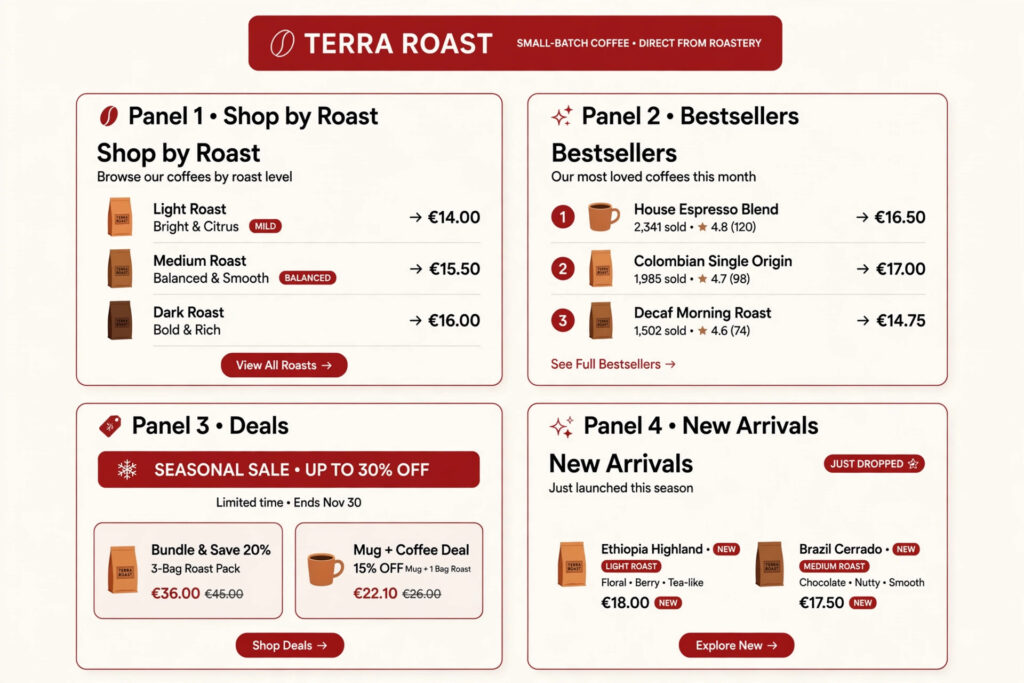
The anatomy of a strong storefront homepage
Putting the patterns together, here’s the module sequence I recommend as a starting point — adapt it to your catalog, but don’t invert the logic:

- Hero banner — one headline, one brand promise, lifestyle imagery. Three seconds to answer: what is this brand?
- Category tiles (3–5) — shop-by-need routing, specific labels (“Shop by Roast,” not “Products”).
- Bestseller shelf — crowd-trust module, margin-smart placement.
- Lifestyle brand strip — one full-width image or short video that shows the outcome your products deliver.
- Cross-sell lane — bundles, accessories, “complete the set” grids that lift average order value.
- Deals/new-arrivals module — one lane, rotated seasonally, to keep the store alive.
Then stop. A homepage with a dozen modules isn’t thorough — it’s a scroll nobody finishes. Every module has to earn its place by moving a shopper deeper; the ones that don’t are load time and bounce rate wearing a costume.
Four mistakes that kill storefronts

Mistake 1: The orphan storefront. A store with no inbound traffic is a billboard in the desert. Before you obsess over design, plan how shoppers arrive: Sponsored Brands campaigns pointed at the store, the brand byline link from your listings, external traffic with tagged links so you can see which channel actually worked. Design without a traffic plan is the most common failure I see.
Mistake 2: Banner text that dies on mobile. Most Amazon shopping happens on phones, and a banner designed for a desktop monitor will shrink its headline into unreadable dust on mobile. Preview every page on mobile before publishing — layouts that look balanced on desktop regularly bury the buy path on a phone. One short headline per banner survives; four lines of copy don’t.
Mistake 3: No cross-linking between pages. The routing homepage fails if the subpages don’t link back to each other. A shopper who finishes the category page and finds no “next” — no related collection, no bestsellers lane, no way forward — leaves. Dead-end pages are conversion leaks you built yourself.
Mistake 4: Treating it like another listing page. The storefront is not a bigger product page. Copy-pasting listing bullets into text tiles, stuffing modules with feature text, organizing everything by SKU — this is the “brochure thinking” failure. The listing answers “should I buy this?”; the storefront answers “what else, and why this brand?” Different questions, different design.
FAQ
Do I need a trademark to get an Amazon storefront?
Yes — Amazon Brand Stores require enrollment in Brand Registry, and Brand Registry requires a registered trademark for your brand. If you don’t have one yet, the trademark is the gate to clear first. Check Amazon’s current Brand Registry requirements for the exact rules in your marketplace.
Does an Amazon storefront cost anything?
Amazon doesn’t charge for the store itself — the Store Builder is free for Brand Registry-enrolled sellers. The real costs are the ones you choose: creative work (banners, lifestyle photography, video, copy), and advertising to send traffic to the store. I don’t publish service prices, so if you’re budgeting for design work, contact me and I’ll scope it honestly against your catalog.
Can a designer really make a difference, or is it just templates?
The builder’s templates handle structure; the difference is everything inside them. Templates can’t choose your category logic, write a one-headline banner that survives mobile, or merchandise your catalog by margin instead of habit. A designer buys you the decisions, not the drag-and-drop — the same way a good storefront and brand story design service is about the brand system behind the pages, not the pixels. If your catalog is one or two products, DIY is honestly fine; past that, the decisions multiply fast.
How do shoppers actually reach my storefront?
Four routes: the brand byline link on your listings, Sponsored Brands ads pointed at the store, Amazon search (stores can surface for brand searches), and external traffic — social, email, influencers — using the store’s short URL or tagged links. Plan at least two of these before you launch; a store with one traffic source has one point of failure.
How many pages should my storefront have?
Amazon’s own guidance suggests starting with around three subpages plus the homepage — that’s a starting point, not a hard rule. Let the catalog decide: distinct product lines earn their own pages; a single tight catalog might only need bestsellers, new arrivals, and deals. Add pages when shoppers need them, not because the builder allows it.
Can I update my storefront after it goes live?
Yes, and you should treat it as a living page, not a one-time project. Rotate the deals module seasonally, swap the hero for launches, retire pages that Store Insights shows nobody visiting. Store Insights gives you visitor, view, sales, and traffic-source data — check it on a schedule and let underperforming modules prove themselves or get cut.
Does my storefront design need to match my listing images?
Not pixel-for-pixel, but they should feel like one brand. If your listing infographics speak in calm minimalism and your storefront screams in discount-brochure orange, the shopper’s trust resets between pages. Consistent color, lighting, and voice across listings, A+ Content, and storefront is what makes the whole system compound instead of cancel out.
If you’re planning a storefront and want a second pair of eyes on the structure — which pages you actually need, how to organize by need instead of SKU, or what the homepage routing should look like — get in touch. I’ll tell you honestly whether your catalog needs four pages or fourteen.

Azam Khan Tarakai
Founder, Lystiq Creative — Amazon Listing Image & A+ Content Designer
I design Amazon listing images, A+ Content, Brand Stories and Storefronts that turn browsers into buyers — built on my C.A.S.H. Creative Framework™.
2 Responses