
Key Takeaways
- ✓ Plan your storefront’s architecture before you open the builder — most stores fail because pages get added by feel inside the builder until the store becomes a maze nobody navigates.
- ✓ Amazon’s own guidance frames the build: up to three levels of subpages, at least three subpages recommended, and grouping by product type, use, need, or theme.
- ✓ Group pages by the decision the shopper is making — by trip type, not by warehouse category — and pick one primary grouping logic for the whole store.
- ✓ Give every page exactly one job: the homepage routes, shop-by-need pages sell the decision, bestsellers convert the undecided, deals create return visits, and the story page connects emotionally.
- ✓ Amazon reports that 45% of customers who browse a brand’s Store once keep using Stores to shop (Amazon Internal, May 2020) — so design for return visits with seasonal refreshes and a quarterly map audit.
Most storefronts are planned inside the builder, and that’s exactly why they fail. The builder makes it dangerously easy to add pages — click, drag, publish — so sellers build the structure by feel: a page for every product line, a deals page because competitors have one, a brand page because it felt right. Six months later the store is a maze nobody navigates, and the owner blames the designer.
The structure should be decided before the builder opens. This post is the planning method I use: inventory the catalog, choose the grouping logic, draw the page map, give every page one job, and sketch the module sequences. Do this on paper (or a whiteboard) and the builder becomes what it should be — an assembly tool, not a thinking tool.
A word about the visuals: every mock in this post is a fresh illustrative mock I made for teaching — not client work, not a real store, and not implying any performance numbers. The brand is “FERNWAY,” a fictional camping-gear brand I invented for this article, so you can study the architecture without mapping anything onto a real business. I use camping gear on purpose: multi-category catalogs are where architecture decisions matter most, and a tent brand makes the logic visible.
And the eligibility note: Amazon Brand Stores require Amazon Brand Registry (which needs a registered trademark), and they’re built in Amazon’s own Store Builder. Setup is free. Registry rules and builder details change over time — confirm the current requirements in Seller Central rather than trusting any third-party article (this one included) on spec details.
Amazon’s rules of the game (what the platform gives you)
Before planning, know the constraints you’re planning inside. Amazon’s own Ads guide for brand building lays out the frame:
- Up to three levels of subpages. The homepage is level one; you can nest subpages one or two levels below it. That’s plenty — most brands never need the third level, and shoppers rarely travel that deep.
- At least 3 sub-pages recommended. Amazon’s own guidance suggests starting with three or more subpages alongside the homepage. Note the word recommended — it’s a starting point, not a quota. A focused three-page store beats a sprawling ten-page one.
- Group by product type, use, need, or theme. Amazon explicitly suggests these four grouping logics. “Use, need, or theme” is doing the heavy lifting in that sentence — it’s Amazon telling you, in its own documentation, not to organize by SKU.
- Stores are free for Brand Registry-enrolled sellers and vendors. The builder, the hosting, the vanity URL — no charge. Your costs are creative work and the traffic you send.
One more Amazon-published data point, because it sets the stakes: Amazon says 45% of customers who browse a brand’s Store once keep using Stores to shop on an ongoing basis (Amazon Internal, May 2020, quoted in Amazon’s brand-building guide). People who find a store they like come back — your architecture decides whether they can find their way.
Step 1: Inventory your catalog honestly
Before drawing a single page, list what you’re actually selling — and be brutal about it. Architecture follows catalog size, and most planning mistakes are catalog-size mistakes: a two-product brand planning a six-page store, or a forty-SKU brand trying to squeeze everything onto the homepage.
The catalog test I run with every brand:
- 1–3 products: You probably don’t need subpages yet. A strong homepage with a bestseller shelf and a brand strip does the job. Build the store when the catalog grows — there’s no prize for pages nobody clicks.
- 4–10 products: The sweet spot for the classic structure: homepage plus three or four subpages. This is where the FERNWAY map in this post lives.
- 11–30 products: You need grouping logic with real discipline (Step 2), and you may use the third hierarchy level for the first time — sub-subpages under one or two category pages.
- 30+ products: Consider whether every product belongs in the store at all. Curate. The store is a merchandised selection, not a warehouse inventory dump.
Write down every ASIN, its category, its margin tier (healthy / thin), and its review strength. You’ll need the margin column later — the bestseller shelf should feature the winners you want more of, not just the ones that already sell.
Step 2: Choose your grouping logic
This is the single biggest structural decision in the whole store, and Amazon’s own guidance points at the answer: group by the decision the shopper is making, not by your internal catalog logic.
The FERNWAY example makes it concrete. A camping brand could organize by product type — Tents, Sleeping Bags, Pads, Stoves — which mirrors the warehouse. Or it could organize by trip type — Backpacking, Family Camping, Winter — which mirrors the choice already forming in the shopper’s head. The second version wins every time, because the shopper arrives with a trip in mind, not a SKU taxonomy.
The shopper’s-decision test: for each candidate page, finish the sentence “The shopper visiting this page is trying to decide ___.” If you can fill the blank with a real decision (“which sleep system for a winter trip”), the page earns its existence. If the blank fills with your org chart (“products from our Q3 line”), kill the page.
Four grouping logics that work, borrowed from Amazon’s own list:
- By use case. Backpacking / family / winter. Supplements by health goal. Kitchen gear by meal type. This is the default winner for most catalogs.
- By need or problem. “Small spaces,” “sensitive skin,” “first apartment.” Powerful when the purchase is problem-driven.
- By theme or collection. Seasonal collections, gift guides, color stories. Best as secondary pages, not the primary structure.
- By product type. Tents / stoves / cookware. Use it only when shoppers genuinely think in product types — tool brands, replacement parts, accessories.
Pick one primary logic for the whole store. Mixing logics (“Shop by Trip Type” next to “Shop Tents”) forces the shopper to learn your taxonomy instead of shopping. Consistency is the architecture.
Step 3: Draw the page map
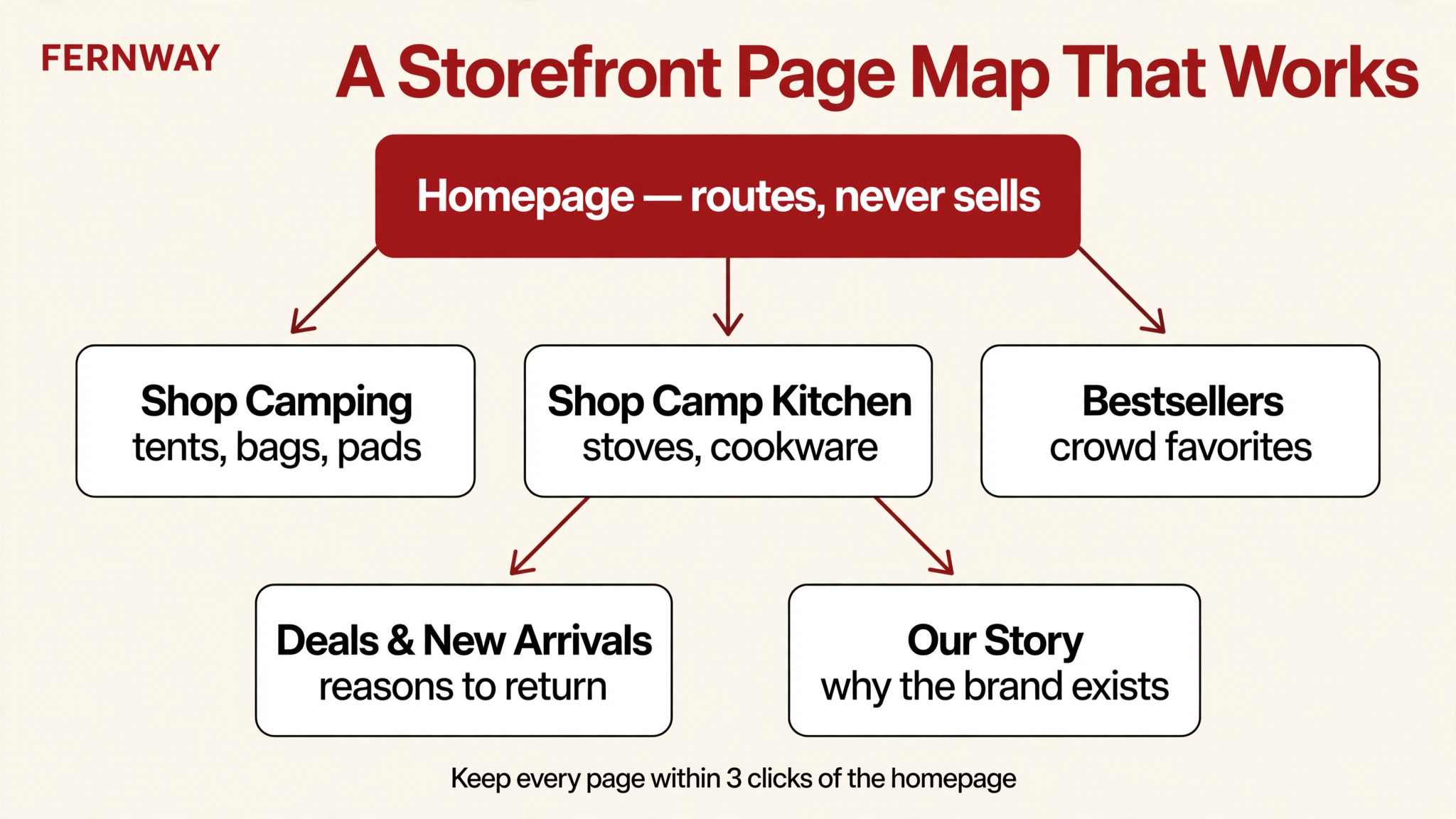
Now draw it — on paper, before the builder. The FERNWAY map shows the shape: a routing homepage on top, three to five subpages below it, every page within about three clicks of the homepage.
Here’s the map template I start every brand with:
- Homepage — routes, never sells. Its only job is reading intent and moving shoppers deeper. (Full sequence in Step 5.)
- 2–3 shop-by-need subpages — the heart of the store. One decision per page. These carry the catalog.
- Bestsellers page — for the undecided shopper who trusts the crowd. Margin-smart picks, not just velocity.
- Deals & New Arrivals page — the reason to come back. Seasonal rotations, launch announcements, event tie-ins.
- Our Story page — the emotional connection. Brand history, mission, craft. This is where the storefront borrows from your Brand Story narrative instead of reinventing it.
That’s five subpages plus the homepage — a complete store for most catalogs in the 4–30 product range. Every page you add is a page you must design, maintain, and drive traffic to.
The depth rule: keep every page within three clicks of the homepage, and use the third hierarchy level sparingly. Mobile patience is thin — and most Amazon shopping happens on phones — so a page buried three levels deep might as well not exist. If your structure needs a map to understand, it’s your catalog logic talking. Simplify until a stranger could navigate it.
Step 4: Give every page one job
A page with two jobs does neither well. Assign each page its single job before you design it:
- Homepage: route. Read the shopper’s intent in one scroll and move them to the right subpage. It does not close sales — it opens doors.
- Shop-by-need pages: sell the decision. One shopper decision per page, products grouped to resolve it, ending in a clear next step.
- Bestsellers: convert the undecided. Crowd trust, flagship products, the bundle everyone buys. No education needed — these shoppers want the safe pick.
- Deals & New Arrivals: create return visits. This page is allowed to change constantly. Seasonal banners, launch spotlights, event tie-ins. It’s the store’s heartbeat.
- Our Story: connect emotionally. The premium-price justification, the values, the craft. Short, visual, human.
The one-job test: cover the page title and ask “what is this page for?” If the answer takes more than a sentence, the page is doing too much. Split it or cut it. The homepage doesn’t carry pricing or deep product detail; the deals page doesn’t carry brand storytelling; the story page doesn’t carry product grids. Discipline at the planning stage is what keeps the store from becoming a brochure with navigation.
Step 5: Sketch the module sequences
With the map drawn and jobs assigned, sketch what goes on each page — still on paper, still before the builder. You need two sketches: the homepage sequence and one subpage template you can repeat.
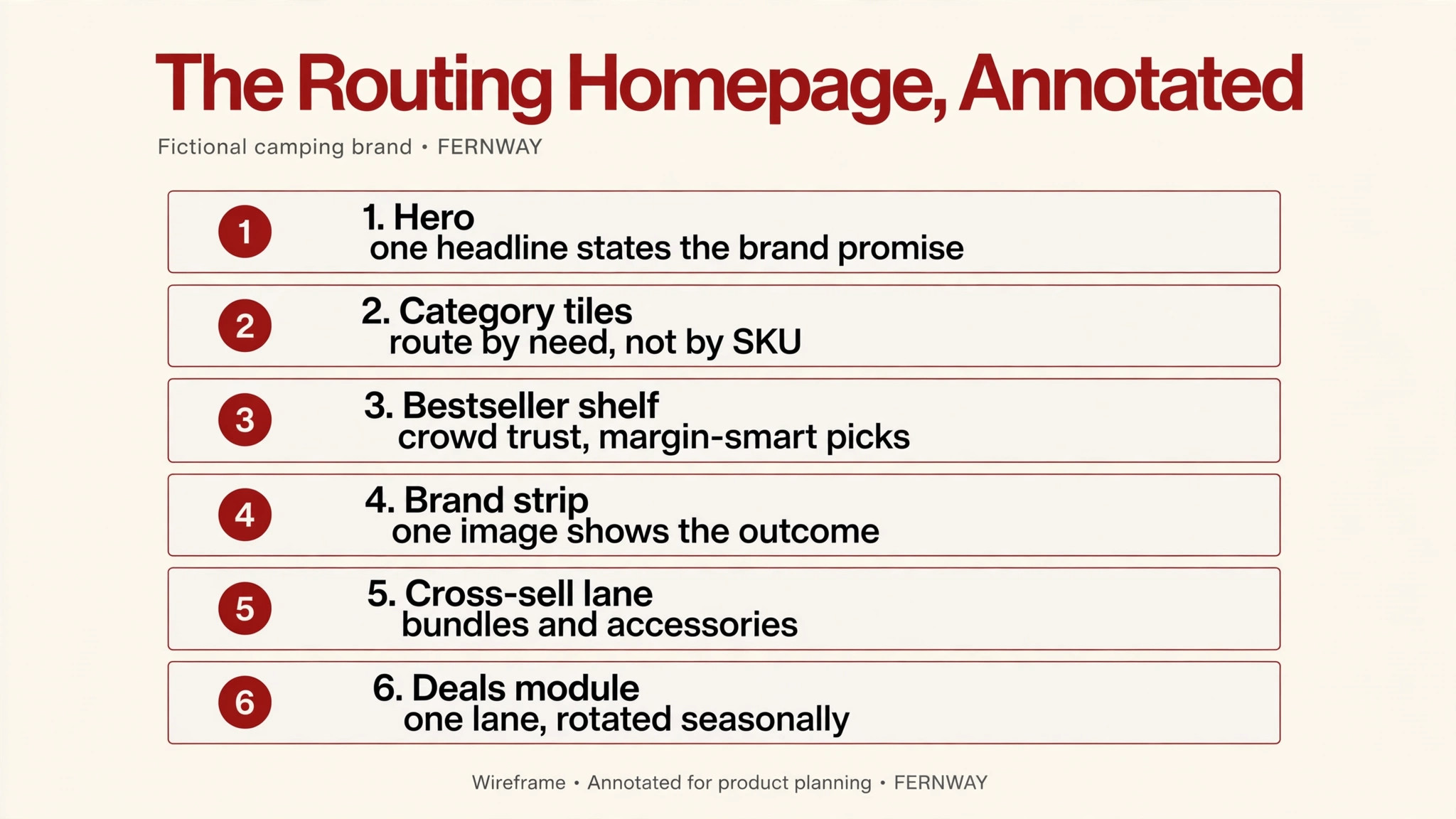
The homepage sequence (the annotated wireframe in this post):
- Hero banner — one headline, one brand promise, lifestyle imagery. Three seconds to answer: what is this brand?
- Category tiles (3–5) — shop-by-need routing with specific labels (“Shop by Trip Type,” not “Products”).
- Bestseller shelf — crowd-trust module, margin-smart placement.
- Lifestyle brand strip — one full-width image or short video showing the outcome your products deliver.
- Cross-sell lane — bundles, accessories, “complete the set” grids that lift average order value.
- Deals module — one lane, rotated seasonally, to keep the store alive.
Then stop. Six modules is a complete homepage. Every module has to earn its place by moving a shopper deeper; the ones that don’t are load time and bounce rate wearing a costume. I go deeper on each of these patterns in my storefront design examples post.
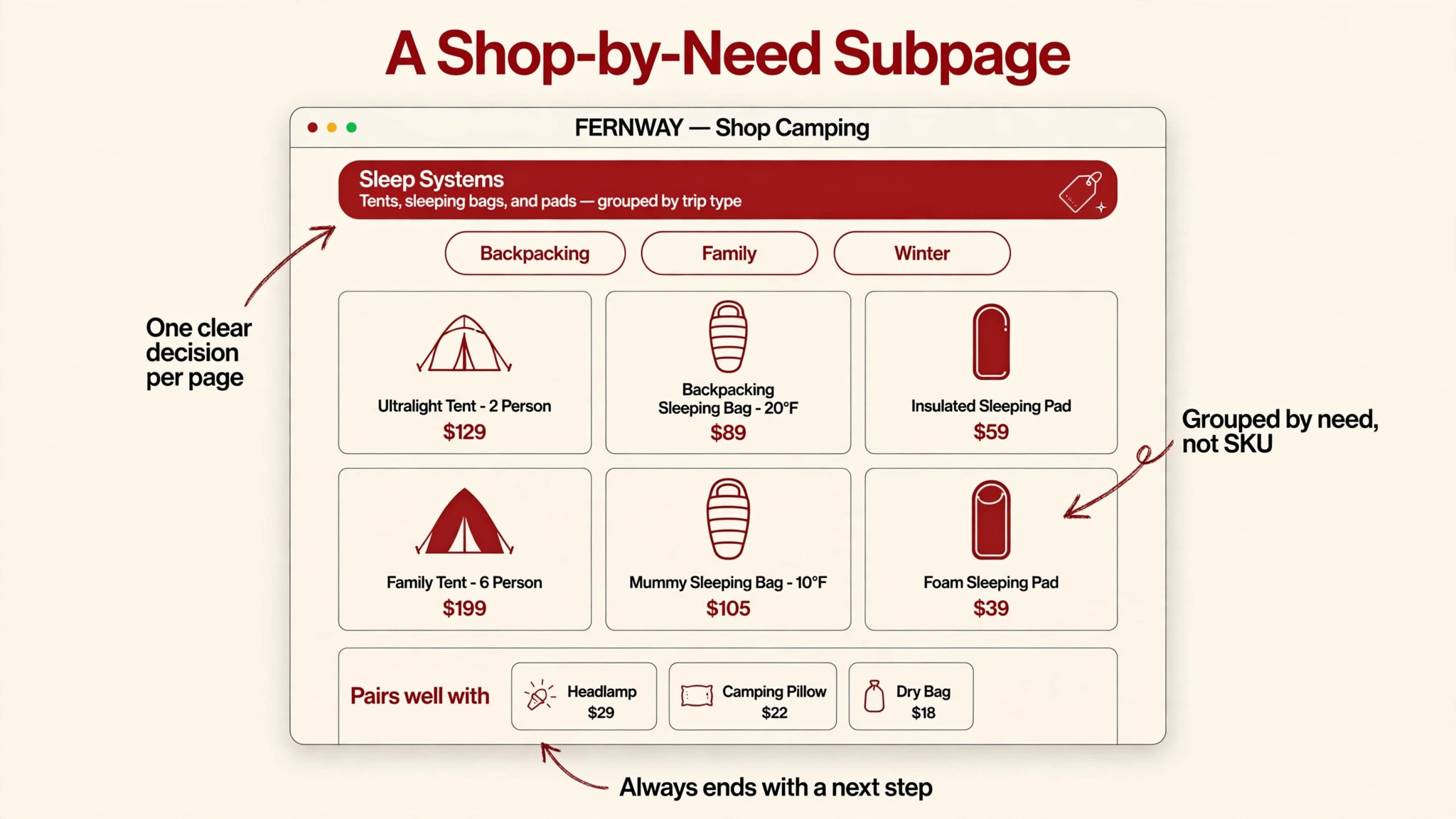
The subpage template (the FERNWAY “Shop Camping” mock): category header with one clear headline, filter chips that reflect the grouping logic, a product grid organized by need, and — critically — a cross-sell strip at the bottom (“Pairs well with”). No dead ends. Every subpage ends with a next step: a related collection, the bestsellers page, or the deals page. A shopper who finishes a page and finds nowhere to go leaves the store. Design the exits with the same care as the entrances.
Repeat this subpage template across your shop-by-need pages with the content swapped. Consistency across subpages isn’t laziness — it’s wayfinding. The shopper learns the pattern once and navigates every page on autopilot.
Plan the traffic before the design
I’ll say it once more because it’s the step everyone skips: a store with no inbound traffic is a billboard in the desert. Before you obsess over the map, plan how shoppers arrive:
- Sponsored Brands campaigns pointed at the store (or at specific subpages — a backpacking campaign landing on the backpacking page converts better than one landing on the homepage).
- The brand byline on your listings, which links to your store from every product page.
- External traffic — social, email, influencers — with custom source tags so you can see which channel actually worked. Seller guides describe Amazon’s source-tag feature for exactly this; verify the current setup in the Store Builder.
Design the store for the traffic you have, not the traffic you hope for. If Sponsored Brands is your main channel, the homepage hero should speak to ad clickers (cold traffic needs the brand promise fast). If external influencers drive the visits, make sure the linked page matches what the influencer promised. Architecture serves the traffic plan — never the other way around.
The build-day checklist
When the plan is on paper and you finally open the builder, run this checklist before submitting:
- No prices baked into banner images. Pricing changes; banners are slow to remake. Seller guides consistently flag this as a moderation rejection trigger. Keep price language in copy modules and banners about the offer’s idea.
- No contact info in creatives. No URLs, no emails, no social handles in images or copy — another consistent rejection trigger per seller guides.
- Mobile preview before publishing. Preview every page on a phone. Banners designed for desktop shrink headlines into unreadable dust on mobile; one short headline per banner survives, four lines of copy don’t.
- Claims need substantiation in the store. Don’t write checks the page can’t cash — unsubstantiated superlatives get flagged in review.
- Don’t rename the brand display name casually. Per seller guides, changing the display name changes the store URL, and Amazon advises against it unless necessary — external links and ad destinations break.
Seller guides report store approval commonly takes a business day or two; verify current timelines in Seller Central.
Keep it alive: the maintenance plan
A storefront is not a monument; it’s a retail floor. Plan the refresh cadence now: seasonal swaps of the hero and deals module, a new-arrivals lane where every launch gets a month in the spotlight before graduating to its category page, and a quarterly audit of the map against your catalog (new lines may earn a subpage; dead pages get merged). A store that changes earns return visits; a store that never changes trains shoppers to ignore it.
FAQ
How many pages should my Amazon storefront have?
Amazon’s own guidance recommends starting with at least 3 subpages alongside the homepage. For most catalogs, a homepage plus three to five subpages (shop-by-need pages, bestsellers, deals/new arrivals, brand story) is the complete structure. Add pages when catalog growth demands them — not before. Every page is a design, maintenance, and traffic commitment.
What page templates does the Store Builder offer?
Seller guides describe several starting templates — typically a blank canvas plus product grid, product highlight, and marquee-style layouts with preloaded module arrangements. Templates handle structure; the architecture decisions in this post are what make the store work. Confirm the current template set in the Store Builder, since it changes.
Can I change the structure after the store is live?
Yes — the builder’s Pages panel lets you add, reorder, and delete pages after launch. But treat restructuring as a real project: navigation changes confuse returning visitors, and per seller guides, renaming the brand display name changes the store URL (breaking external links), which Amazon advises against unless necessary.
Do storefront pages rank on Google?
Some SEO guides claim store pages can appear in Google results and recommend keyword-rich page titles and custom URLs. Treat that as third-party advice, not a guarantee — the storefront’s proven value is cross-sell, brand control, and ad-destination performance inside Amazon. Build the architecture for shoppers first; any search visibility is a bonus.
How long does Amazon take to approve a store?
Seller guides commonly report approval within a business day or two, with rejections possible for issues like prices baked into banners or contact info in creatives. Verify current timelines and the full creative policy in Seller Central before submitting — requirements change.
I only have two or three products. Should I still build a store?
Honestly? Probably not yet. A two-product brand gets almost nothing from a multi-page store — there’s nothing to route between. Put the effort into your Brand Story vs Storefront decision first: for a tiny catalog, the Brand Story is the better brand investment. If you’re set on building early, keep it to a homepage plus one page and expand later.
Want the architecture done right from the start? I plan and design Amazon Brand Stores — page maps, module sequences, and the full brand system — through my storefront and Brand Story design service. Tell me about your catalog and I’ll map the structure honestly before we design a single banner.

Azam Khan Tarakai
Founder, Lystiq Creative — Amazon Listing Image & A+ Content Designer
I design Amazon listing images, A+ Content, Brand Stories and Storefronts that turn browsers into buyers — built on my C.A.S.H. Creative Framework™.