
Key Takeaways
- ✓ Infographics convert when they answer the questions shoppers in that specific category actually ask — the same panel type that’s gold in one category is a wasted slot in another.
- ✓ Kitchen shoppers ask about fit, material, and cleaning first, so the size/fit panel is the most important graphic in the set and belongs in slot 2.
- ✓ Grocery shoppers are doing math: make pack quantity instantly legible, then cover preparation, origin, and storage — and keep every claim inside what the brand can substantiate.
- ✓ Tool shoppers want inventory and precision: show everything in the box with labels, then the actual bit sizes and dimension callouts — this is the one category that rewards dense information.
- ✓ Find your category’s real questions before designing: read the 3-star reviews and customer questions on the top listings, and let the question choose the infographic type — never the reverse.
Most infographic guides you’ll find organize by type — feature callouts, dimension charts, comparison panels, how-tos, what’s-in-the-box. That’s useful, but it’s not how a shopper thinks. A shopper buying a splatter screen has completely different questions than a shopper buying a screwdriver set, and the infographics that convert for each category are built around those category-specific questions.
I design Amazon listing images for a living, and I’ve learned this the hard way: the same infographic type works or fails depending on the category it’s serving. A comparison panel is gold for tools and a waste of a slot for groceries. A quantity panel is everything for food and irrelevant for a single tool. So this article does it the shopper’s way — one category at a time, the real questions buyers in that category ask, and the infographic jobs that answer them, shown from my own portfolio work.
Every example below is an excerpt from a listing image set I designed for Lystiq Creative clients — shown as cropped detail panels, with the design decisions explained.
Category 1: Kitchen — the questions are fit, material, and cleaning
Kitchen shoppers are anxious about fit. They’re not browsing; they’re solving a problem — “will this work with what I already own?” A splatter screen that doesn’t fit their 12-inch skillet is a return waiting to happen. So the dominant shopper questions in kitchen are: which sizes does it fit, what is it made of, and how hard is it to clean?
For a silicone splatter screen set I designed, the infographic jobs broke down like this:
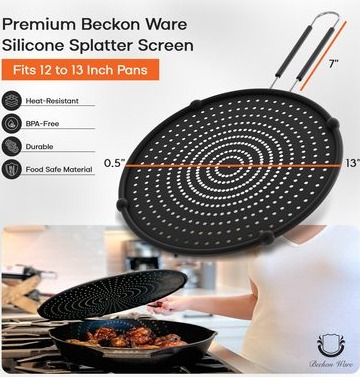
- Size/fit panel — the single most important graphic in the set. It maps each screen diameter to the pan sizes it covers, visually — circles over a pan silhouette, not a paragraph of inches. A kitchen buyer scanning on a phone needs the answer in two seconds: “yes, the big one fits my 12-inch pan.” That’s the panel shown in the excerpt above.
- In-use panel — the screen sitting on a pan mid-cook, so the buyer can picture the product doing its job. Kitchen is a show-me category; the photograph proves it works, the infographic labels why (the fine mesh stops grease but lets steam escape).
- Care steps — a three-step dishwasher-safe / rinse / store sequence. This answers the cleaning question before it’s asked, and it’s where a lot of kitchen listings lose buyers: people assume cleanup is a hassle unless you show them it’s not.
The pattern across kitchen infographics: lead with compatibility (fit charts, size callouts), then prove the outcome in use, then remove the maintenance objection. If your kitchen product has sizes, the fit panel is slot 2 of your gallery — it outranks almost everything else.
For the full infographic playbook these jobs come from, see my complete guide: Amazon Product Infographic Design: A Complete Guide to Images That Sell.
Category 2: Grocery and food — the questions are quantity, origin, storage, and use
Food shoppers are doing math. They’re comparing price per unit against three competing listings, and the one that makes quantity instantly legible wins. The questions are practical: how much do I get, where is it from, how do I store it, how do I use it?
For a dried porcini mushroom set I designed, the infographic jobs were:
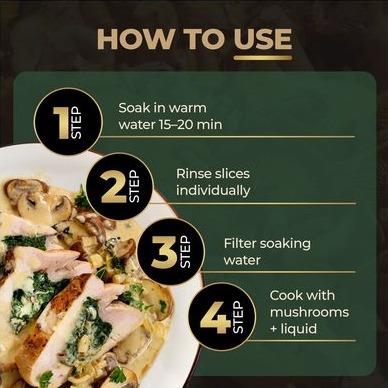
- Pack/quantity clarity — the hero job. The panel shows exactly what arrives: the number of packs, the weight per pack, the total. No ambiguity, no “1 pack” listings hiding behind lifestyle shots. On grocery, if the buyer has to scroll to the bullet points to learn the quantity, you’ve already lost some of them — and the ones who stay are comparing your math against the listing above you.
- Preparation steps — dried porcini need soaking; the panel shows the rinse-soak-cook sequence in three frames. This does double duty: it answers “how do I use this?” and it quietly signals freshness and process quality without making any claims I have no business making.
- Origin and storage — small, factual panels: where the product comes from, how to store it after opening. Short shelf-life or special storage is a question food buyers always have; answering it in an image beats answering it in a review thread.
A caution I take seriously: I’m showing the design here, not repeating the product’s artwork as facts about the food. Infographics for food categories must stay inside what the brand can substantiate — origin, weight, storage, and preparation are factual logistics; quality superlatives belong to reviews, not to my graphics. When I design grocery panels, I push back on copy that makes claims the packaging can’t support. Amazon’s compliance team reads the images too.
The pattern across grocery infographics: quantity first (make the math instant), then use (preparation or serving ideas), then logistics (storage, origin). Food is the category where the infographic does the heaviest trust work — the buyer can’t touch or smell anything, so the graphics carry the entire sensory argument.
Category 3: Tools and DIY — the questions are what’s included and will it fit my task
Tool shoppers are building a mental checklist. They’ve got a job to do, and they’re asking: does this set have the bit I need, and is it the right size for my work? Everything else is secondary.
For a 24-in-1 ratchet screwdriver set I designed, the infographic jobs were:
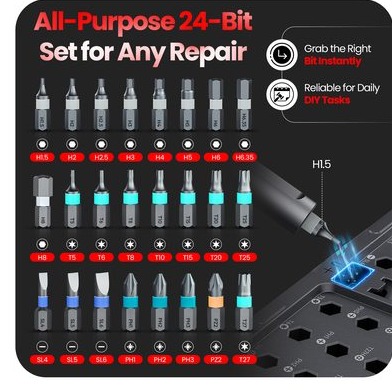
- What’s-in-the-box layout — the centerpiece. Every bit, head, and accessory shown and labelled, organized so a buyer can scan the inventory in one glance. For a multi-piece set, this panel is the listing for a large share of buyers: if their needed bit isn’t visible, they click away. The excerpt above shows how the inventory is laid out — grouped by function, labelled, no guessing.
- Bit/head inventory with sizes — a companion panel that goes one level deeper: the actual sizes. A tool buyer who knows what they need will zoom this panel on their phone. It’s the highest-information-density image in the set, and it earns its slot.
- Dimension callouts — the ratchet handle length, the extension reach. “Will it fit my task” often comes down to reach and clearance, so the graphics put measurements on the product itself rather than burying them in specs.
The pattern across tools infographics: inventory first (show everything), then precision (sizes and specs for the knowledgeable buyer), then capability (what the set can handle). Tools is the one category where shoppers want dense information — this is not the place to be coy. A tool listing with thin infographics reads as a thin product.
How to find your category’s real questions (before you design anything)
The examples above all came from one research step I do before touching a canvas: reading the category like a buyer. You don’t need fancy tools for this — you need an hour and a browser:
- Read the 3-star reviews of the top five listings in your category. Five-star reviews tell you what worked; 1-star reviews tell you what’s broken; 3-star reviews tell you exactly what the buyer wished the listing had answered. “I couldn’t tell if it would fit my pans” is a fit-panel brief handed to you for free.
- Read the questions on the top listings. Amazon’s customer questions section is a direct feed of unanswered shopper questions. If three listings in your category all get asked “how many does it come with,” your quantity panel writes itself.
- Screenshot the top three galleries and list what jobs their images do. You’ll usually find a pattern — and a gap. The gap is your opportunity: the question nobody’s graphics answer is the panel that differentiates your listing.
This is also where I decide which infographic type serves each category question. A fit question becomes a dimension panel; a quantity question becomes a pack-clarity panel; a “what’s included” question becomes an inventory layout. The type follows the question — never the other way around. Designers who start with “I want a comparison chart” and then hunt for something to compare are building graphics in search of a buyer.
What the categories teach together
The same shopper instinct — “answer my question before I have to ask it” — takes a different shape in every category. Kitchen wants compatibility. Grocery wants math. Tools wants inventory. The infographic types that get all the attention in generic guides (feature callouts, comparisons, how-tos) are just tools in a drawer — the category decides which ones you reach for.
A few rules I apply no matter the category:
- One job per image. The moment a panel tries to answer fit and cleaning and materials, it answers none of them. The slot-by-slot discipline in my listing image requirements checklist covers the gallery structure this sits inside.
- Design for the phone zoom. Roughly two-thirds of Amazon traffic is mobile. If the key answer in a panel isn’t legible when the image is thumb-sized, the panel doesn’t exist for most buyers.
- Never invent the answer. Every number, size, weight, and step on my graphics comes from the client’s product data — never guessed, never stretched. Infographics that lie are a review disaster and an account risk.
FAQ
How many infographic images should a listing have?
It depends on the category’s question load. Tools sets often need two or three dense infographic panels (inventory, sizes, dimensions). Kitchen usually needs one or two (fit, care). Grocery needs one or two (quantity, use). The rest of your gallery goes to lifestyle, detail, and scale shots — infographics are powerful, but a gallery of nothing but graphics reads like a spec sheet.
Should infographics replace the bullet points?
No. They should mirror the most important bullet points visually. Many buyers never read the bullets; the infographics are your second chance at the same information. Keep the two consistent — a size that says 12 inches in the bullets and looks different in the graphic is a trust problem.
Do category-specific infographics actually outperform generic ones?
I won’t print a percentage — anyone who does is selling you something. What I can say from doing this daily: listings where the infographics answer the category’s top three shopper questions convert better than listings with generic feature callouts, because every panel is removing a specific objection. That’s design logic, not a studied statistic.
Can I use the same infographic style across different product categories?
The style — fonts, colors, brand system — should stay consistent across your catalog. The content structure should follow the category’s questions. Same voice, different answers.
Designing a listing and not sure which questions your category’s buyers are really asking? That’s the first thing I map in every project — get in touch and I’ll walk through your category with you.

Azam Khan Tarakai
Founder, Lystiq Creative — Amazon Listing Image & A+ Content Designer
I design Amazon listing images, A+ Content, Brand Stories and Storefronts that turn browsers into buyers — built on my C.A.S.H. Creative Framework™.
2 Responses