
No. Your main image must never carry text — Amazon’s rules forbid it, and a listing with text on the main image risks suppression. Beyond that first slot, text is a tool, not a requirement: put words only on the images where text answers a buyer question faster than a photo can, and leave it off everywhere else. More text is not more selling — the right text in the right slots is.
Why the hard line on the main image. The main image is the only image in your gallery Amazon’s automated checks police for compliance, and the rules are blunt: no text, no logos, no badges, no borders, no watermarks — product only, on a pure white background (RGB 255, 255, 255), filling about 85% of the frame. Break this and the listing gets suppressed — invisible in search until you fix it. This is the spec only; for the full checklist see my 2026 listing image requirements guide.
The one-job-per-image rule for the gallery. Once the main image is out of the way, every remaining slot can carry text — but “can” is not “should.” I plan galleries with one job per slot, and the job decides the text:
- Text earns its place when: the image answers a doubt a photo alone can’t settle — dimensions (“fits a 16oz bottle”), quantity (“set of 4”), what’s included, a 3-step how-to, or a comparison (“this vs. the standard version”). These are the infographic and callout slots, and they’re where most buying decisions get closed.
- Photos do the work alone when: the job is emotional or visual — lifestyle shots, detail close-ups, alternate angles, the product in a real setting. Text on these slots is decoration at best and clutter at worst. A beautiful lifestyle image with a paragraph slapped on it sells less, not more.
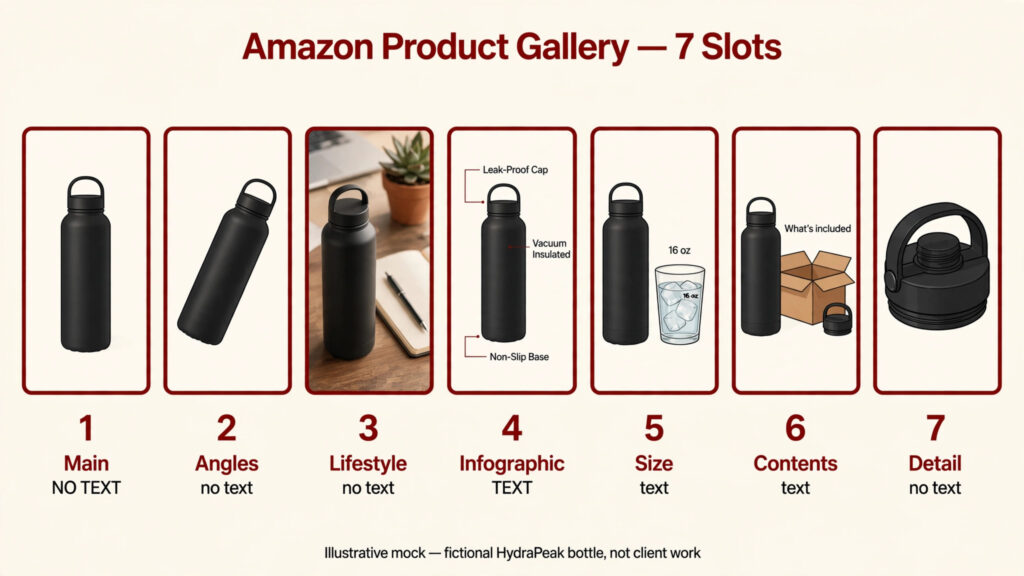
The real risk is text overload, not text absence. Galleries that text-wall every slot create two problems. First, mobile: most Amazon browsing happens on phones, and six-point callouts that looked fine on a 27-inch monitor are unreadable at gallery size on a phone. Second, dilution: when every image shouts, no image gets heard. A gallery with three crisp text images and four clean photos outperforms a gallery with seven shouting graphics — I see the “everything must have text” impulse most often in exactly the listings that needed restraint.
Your text-vs-no-text checklist per slot. Run each gallery image through this before you add a single word:
- Slot 1 (main image): never. No text, ever — compliance, not opinion.
- Can the buyer get this information from the photo alone? If yes, no text.
- Is this a doubt that stops purchases? Size, fit, quantity, and contents stop purchases — text here is earned.
- Can it be said in under 8 words? If the point needs a paragraph, the image is wrong — split it into two images or rewrite the point.
- Is it readable on a phone at thumbnail size? Preview every text image at small size. If you squint, the buyer skips.
- Is it a claim you can support? No promo phrases like “best seller” or “limited offer” — seller guides flag these as rejection triggers on imagery.
- Does the slot already have a job? One job per image. If a slot needs two sentences and a diagram, it’s doing two jobs — split it.
A note on how much text. When text is earned, keep it short, large, and consistent: same fonts, same sizes, same style across all text images. The words that do the heavy lifting are the words shoppers would ask about in a review — how to choose which words is a craft of its own, and my infographic copywriting guide is where I teach it. And if you’re still planning how many images your listing needs in total, my 7-slot guide pairs with this one.
Mini-FAQ
Is text on the main image ever allowed?
No. The main image is product-only on pure white — no text, logos, badges, or watermarks of any kind. Category exceptions change the photo style (clothing on a model, for instance), not the text rule. Check your category’s style guide in Seller Central to confirm.
How much text is too much on one image?
If you need more than a headline and a couple of short callouts, the image is overloaded. A gallery image that takes longer than a few seconds to read gets scrolled past. Split dense content across two images.
Does text on images affect mobile shoppers?
Only in that text must be large enough to survive small screens. Keep text big, high-contrast, and minimal — preview at thumbnail size before uploading. Text that works on mobile works everywhere.
Not sure which of your gallery slots are doing their job? Get in touch — I’ll audit your image set slot by slot.

Azam Khan Tarakai
Founder, Lystiq Creative — Amazon Listing Image & A+ Content Designer
I design Amazon listing images, A+ Content, Brand Stories and Storefronts that turn browsers into buyers — built on my C.A.S.H. Creative Framework™.