
The question every Brand Registry brand eventually asks
If you’re selling on Amazon with Brand Registry, you’ve already heard of A+ Content — the enhanced product description section that sits below your listing and turns a plain text block into a real brand experience. But at some point every brand runs into the next question: should I upgrade to Premium A+?
Sellers ask me this all the time. And the honest answer is not what most agencies give you. The honest answer is: it depends on your traffic, your assets, and your eligibility — and for a lot of brands, a well-built Basic page beats a half-built Premium page every single time.
In this guide I’ll break down exactly what each version gives you, what Amazon says about the sales impact, how Premium eligibility actually works in 2026, what it really costs, and the verdict I give brands in my own Amazon A+ Content design work.
What Basic A+ actually gives you
The foundation everyone starts with. Basic A+ is available to any Brand Registry brand on a Professional selling plan. It lets you build a page of up to 5 modules chosen from 14 module types, replacing the dry standard description with branded visuals, comparison charts, and storytelling layouts.
For most products, that’s plenty. Five well-planned modules can cover your hero story, key benefits, how it works, what’s in the box, and a comparison chart — which is honestly more than most shoppers will ever scroll through. Basic A+ is where I tell new brands to start, because learning to say your story in five modules teaches you to say it well.
What Premium A+ adds on top
The expansion pack for brands with the assets to use it. Premium A+ isn’t a different product — it’s a bigger canvas and a richer toolkit on the same page. You get up to 7 modules and 19 module types, plus the features that actually change what’s possible:
- Full-width imagery — the largest standard module jumps to a 1,464 × 600 pixel banner, which is a genuinely different visual presence than Basic’s 970-pixel-wide modules.
- Video — including video carousels. If your product needs a demonstration (how it assembles, how it works, how it moves), this is the single biggest Premium argument.
- Interactive hotspots — clickable points on your imagery that reveal product details. Shoppers explore instead of scroll.
- Image and navigation carousels — swipeable galleries and mini-navigation inside the A+ page.
- Q&A module — answer common questions right inside the content.
- Enhanced and shoppable comparison charts — stronger cross-selling across your own catalog.
Basic A+ vs Premium A+: the comparison table
Here’s the head-to-head, based on Amazon’s own A+ guide and current seller documentation:
| Basic A+ | Premium A+ | |
|---|---|---|
| Who gets it | Brand Registry brands (Professional plan) | Same — plus Premium eligibility (see below) |
| Modules per page | Up to 5 | Up to 7 |
| Module types | 14 | 19 |
| Largest standard image | 970 px wide modules | 1,464 × 600 full-width |
| Video | No | Yes, including video carousels |
| Interactive hotspots | No | Yes |
| Image / navigation carousels | No | Yes |
| Q&A module | No | Yes |
| Comparison charts | Standard / shoppable | Enhanced / shoppable |
Nothing in Basic gets taken away when you go Premium. The upgrade is purely additive — more space, more module types, richer interaction.
The sales question: what does Amazon actually claim?
Attribute this one carefully — it’s the most misquoted number in Amazon content. Amazon’s own A+ Content page states that Basic A+ can increase sales by up to 8%, and well-implemented Premium A+ by up to 20%. Note every qualifier: Amazon reports this, it’s up to, and the Premium figure specifically says well-implemented.
I say this because you’ll find blog posts floating around claiming “20–30%” for Premium or “3–10%” for Basic. Those numbers conflict with Amazon’s own page and with each other — I don’t use them, and neither should you. The takeaway is direction, not precision: Amazon itself credits well-executed Premium A+ with a meaningfully larger lift than Basic. “Well-implemented” is doing the heavy lifting in that sentence, which brings us to the part most articles skip.
Premium eligibility in 2026: the current rules (and the outdated ones)
Eligibility is earned, not bought. The current consensus, reflected in Amazon’s A+ guide and current seller documentation, is that Premium access requires:
- A published Brand Story across all catalog ASINs, and
- 5 or more approved A+ projects in the past 12 months.
A word of caution: you’ll still find live guides claiming Premium is invitation-only, requires 15 ASINs, or demands some vague “high sales history.” Those were older or unofficial versions of the criteria — don’t plan around them. And because Amazon controls access directly, the safest move is to confirm your own eligibility status on the Premium eligibility page inside A+ Content Manager in Seller Central before you invest in Premium-specific assets.
This eligibility structure is also why I love the middle-path strategy I’ll get to below: the road to Premium is paved by doing Basic well.
What Premium really costs (it’s not the platform fee)
The honest answer: there’s no Amazon platform fee listed right now — the real cost is production. Multiple current guides report that Premium is currently free during a promotional period and that Amazon may charge in the future, but Amazon’s public A+ page doesn’t confirm that as a settled fact. So phrase it the careful way: currently no Amazon platform fee is listed; check Seller Central, as Amazon has signaled this could change. Don’t let anyone sell you a “Premium is permanently free” promise.
The cost that actually decides the question is asset production, and this is where the upgrade decision lives or dies:
- Full-width 1,464 × 600 imagery for the big Premium banners — these need dedicated creative, not upscaled Basic assets.
- Separate mobile versions for several Premium modules — several Premium modules need their own mobile builds (this is exactly why I wrote a full A+ Content image sizes and requirements guide).
- Video production — real video, edited for the module, not a repurposed ad.
- Hotspot and carousel asset sets — layered imagery and multiple slides.
A brand that can’t feed those modules properly gains almost nothing over a well-built Basic page. That’s not a knock on Premium — it’s the core of the verdict below.
For the full production-cost breakdown, I covered what A+ Content actually costs in detail.
The verdict: when Premium is worth it, when Basic is right, and the middle path
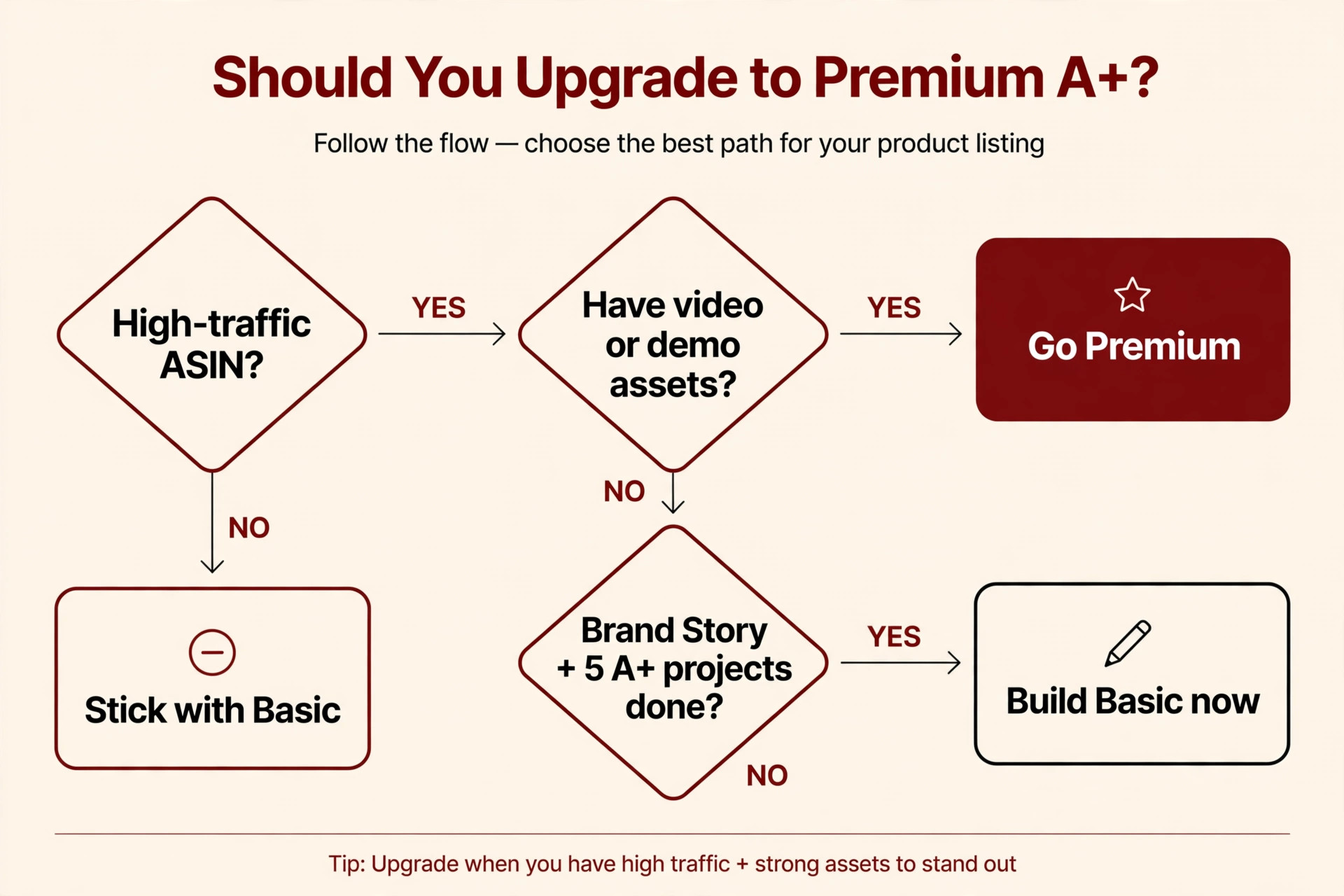
When Premium is worth it: your ASIN gets real traffic, the product is higher-ticket or needs demonstration (video, hotspots), you have a wide catalog to cross-sell (carousels, enhanced comparison charts), and you already meet eligibility or are one or two projects away.
When Basic is the right call: you’re a newer Brand Registry brand, your product can be fully explained in five modules, you have no video assets, or your traffic is still too low for the extra modules to earn their keep. A brilliant Basic page will outsell a thin Premium page on the same listing, every time.
The middle path (my practical takeaway): build excellent Basic now, publish your Brand Story everywhere, and bank your five approved A+ projects. That is the road to Premium eligibility — you’re not waiting for Premium, you’re qualifying for it. By the time you unlock it, you’ll have the traffic data, the brand assets, and the creative instincts to actually use the bigger canvas. If you want a visual version of this decision, here’s the flow I walk brands through:
And here’s what the craft level looks like when a full A+ stack is done properly — a detail excerpt from a fishing cast net A+ layout:

One mistake I see constantly: upgrading for the modules, not the message
Premium doesn’t fix a weak story — it amplifies one. The most common Premium failure I see is a brand unlocking the bigger canvas and then filling two extra modules with more of the same: another feature list, another lifestyle photo, another block of “about us.” The modules weren’t the bottleneck. The message was. If your five Basic modules already convert and your shelves are stocked with video, demos, and cross-sell opportunities you literally cannot fit, then Premium earns its keep. Upgrade when the canvas is what’s holding you back — not because the bigger number sounds better.
For inspiration on what great modules look like in practice, my roundup of Amazon A+ Content examples that actually sell breaks down seven design patterns I reuse constantly.
FAQ
Can any Brand Registry brand get Premium A+?
No. You need Brand Registry on a Professional plan (same as Basic), plus the Premium eligibility criteria: a published Brand Story across all catalog ASINs and 5+ approved A+ projects in the past 12 months. Confirm your status in A+ Content Manager.
How much does Premium A+ cost on Amazon?
Currently no Amazon platform fee is listed for Premium A+. Guides report it’s in a promotional free period and Amazon may charge in the future — check Seller Central for the current terms. The real cost is creative production: full-width imagery, mobile versions, video, and carousel/hotspot assets.
Is Premium A+ worth it for a new brand?
Usually not yet. New brands typically have lower traffic, fewer assets, and no eligibility anyway. Build a strong Basic page and publish your Brand Story — that’s exactly what qualifies you for Premium later.
What’s the biggest real difference between Basic and Premium?
Video and interactivity. The full-width 1,464 × 600 banners look impressive, but video modules, interactive hotspots, and carousels are the features Basic simply can’t replicate. If your product needs a demo, Premium is where that lives.
How many modules should I actually use?
Up to 5 for Basic, up to 7 for Premium — but “up to” is a ceiling, not a target. Use the modules your story needs. Shoppers skim; two extra modules of filler will never beat five tight ones.
Can I upgrade an existing Basic page to Premium later?
Yes. Once your brand is Premium-eligible, you can rebuild or expand your existing A+ content using Premium modules in A+ Content Manager. This is exactly why the “build great Basic now” strategy works — nothing is wasted.
The bottom line: Premium A+ is a bigger, richer toolbox — not a magic switch. Amazon credits well-implemented Premium with up to 20% sales lift versus up to 8% for Basic, but “well-implemented” is the whole game. If you have the traffic, the assets, and the eligibility, take the upgrade. If not, build Basic beautifully and earn your way there. Want help deciding — or building either version? Talk to me about your A+ Content.
One Response