
Key Takeaways
- ✓ Redesigns win when they fix a specific, nameable failure — if you can’t name the failure a redesign fixes, it isn’t a redesign, it’s a re-skin.
- ✓ Every before/after in this post is an illustrative mock of an invented product, not client work — and I print no conversion or CTR numbers, because a teaching mock can’t generate evidence.
- ✓ The invisible main image gets fixed with one identity cue: the actual packaging and a readable brand turn a generic product-on-white shot into something a shopper can pick out of the grid.
- ✓ The text wall gets fixed by translation, not deletion: one benefit headline, three short callouts, and a detail crop carry the same information a 60-word panel buried.
- ✓ The only verification I trust is Amazon’s own A/B testing through Manage Your Experiments — diagnose everything, A/B test the main image individually, and batch the additive gallery fixes.
Redesigns don’t win because they look prettier — they win when they fix a specific, nameable failure. That’s the whole argument of this post, and it’s the test I run on every image set before I touch a single pixel: if I can’t name the failure the redesign fixes, it isn’t a redesign — it’s a re-skin. The three breakdowns below each isolate one failure pattern I see on Amazon every week, show the redesign principle that answers it, and name what the shopper can see in five seconds that they couldn’t before.
A word about the visuals before we start: every before/after image in this post is a fresh illustrative mock I made for teaching purposes — not client work, not real results, and not implying any performance numbers. The product in all three is an invented one: a fictional “BAMBOOHOME” bamboo utensil set that doesn’t exist, so nobody reads it as a real brand. There are no conversion lifts or CTR percentages printed anywhere in this article, for the same reason: I have no interest in dressing up teaching diagrams as proof. What you do get is honest diagnosis — the kind you can run on your own listing in about three minutes.
Breakdown 1: The invisible main image
The failure: a perfectly fine product-on-white shot that is indistinguishable from the forty other listings in the search grid. Technically compliant — pure white background, nothing in the frame but the product — and commercially invisible. The shopper scanning the results page has no reason to click this thumbnail instead of the one above it or below it.
The principle: the main image has exactly one job — the click. Everything in the frame should earn attention in the grid, and nothing in it may break compliance. In the mock’s “after” panel, three things change: the product’s packaging comes into the frame, the (fictional) brand name is readable, and one identity cue names the use case — a small “GIFT SET” badge on the box.
What the shopper sees in five seconds that they couldn’t before: what this is and who it’s for. The before panel shows wooden utensils. The after panel shows a gift-ready branded set. That gift cue alone can separate the listing from a grid of generic utensil photos — not because it’s decorative, but because it answers the shopper’s split-second question: “Is this the one I’m looking for?”
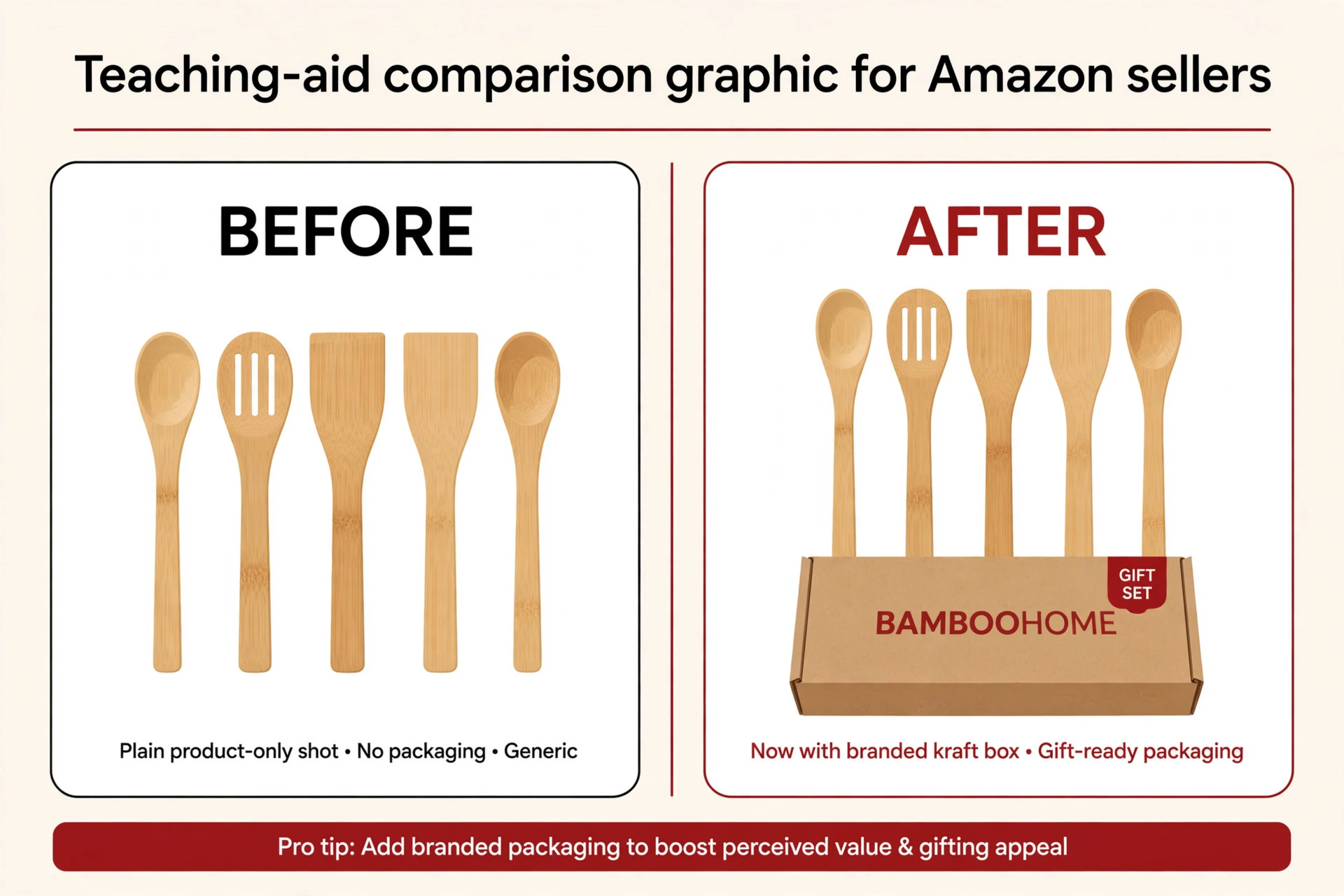
The compliance line I won’t cross: everything in the after panel is the actual product and its actual packaging — what the buyer would receive. That matters, because the main-image rules forbid text overlays, decorative props, and badge graphics added on top of the image. A “GIFT SET” ribbon printed on the physical box is part of the product; a “GIFT SET” sticker slapped onto the photo is a violation. The distinction is the whole game, and it’s exactly why I wrote the main-image rules post as the compliance companion to this one — this post is the applied version; that post is the boundary line.
This is also the one redesign where image dimensions do quiet technical work. Amazon recommends 2,000 pixels on the longest side (1,000 minimum for zoom to kick in), and a main image that fills the frame sharply at 2,000px looks crisper in the search grid than one upscaled from a small file. Sharpness doesn’t change the concept, but it protects the concept — a differentiating detail that renders blurry stops being differentiating.
Breakdown 2: The text wall
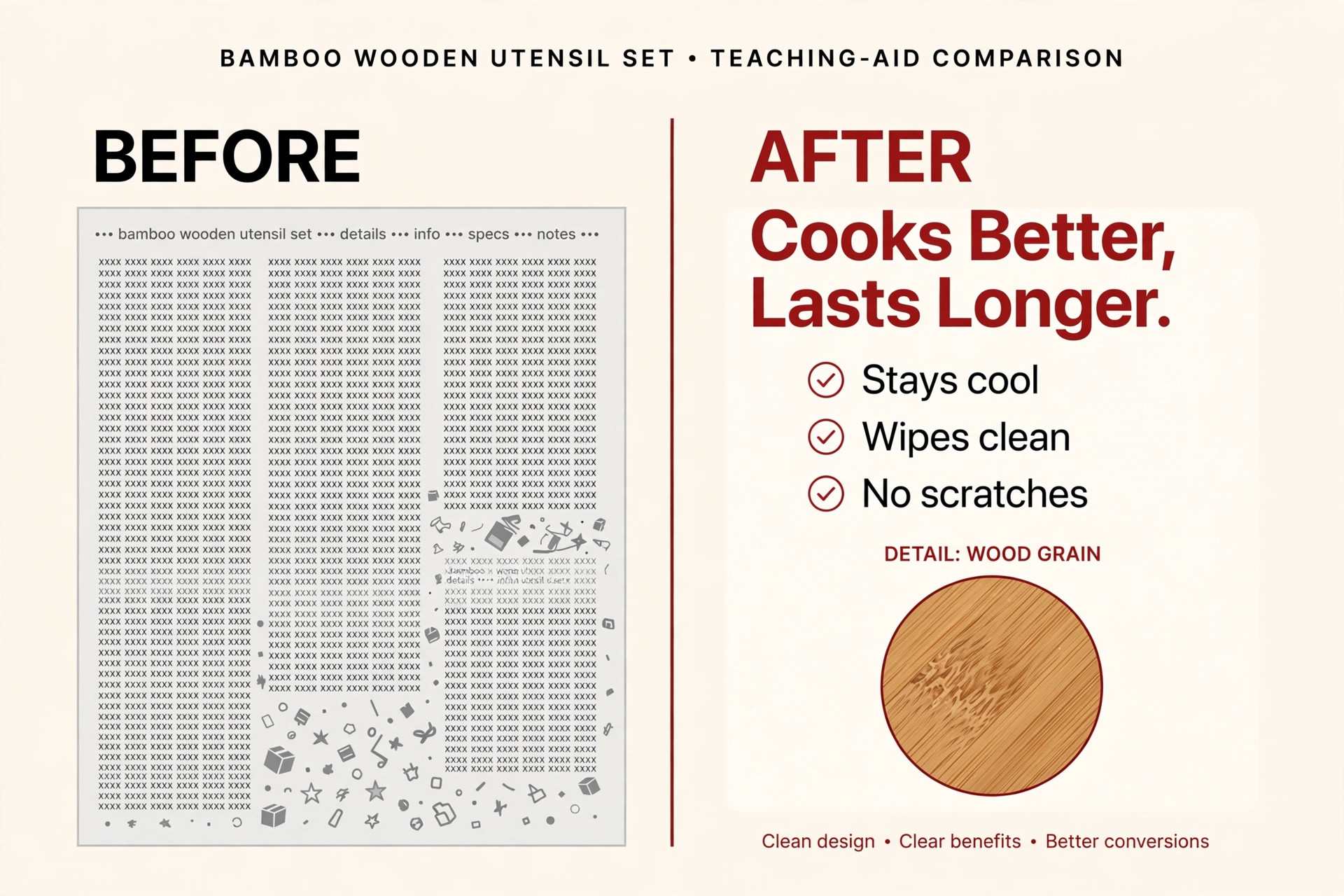
The failure: an infographic panel carrying 60+ words, all roughly the same size, listing features with no benefits. The seller is paying for image space and then using it like a product manual. Nobody reads it — and because nobody reads it, the information on it functionally doesn’t exist.
The principle: shoppers scan; every word has to earn its place. In the mock’s “after” panel, the same information is rebuilt as one benefit-led headline (“Cooks Better, Lasts Longer.”), three short checkmarked callouts (“Stays cool,” “Wipes clean,” “No scratches”), and a detail crop showing the wood grain. Nothing real was deleted — it was translated. “Smooth sanded finish” became what the shopper actually gets: “Wipes clean.”
What the shopper sees in five seconds that they couldn’t before: the benefit, in plain language, before any feature. In the before panel, the eye drowns. In the after panel, the eye lands on the headline, confirms with three callouts, and inspects the detail crop. That sequence — promise, proof, inspection — mirrors how a buyer actually moves through a gallery image: glance, scan, zoom.
The copy skill behind this one: rewriting features into benefits under severe word budgets is its own craft, and it has its own deep dive. If the word economy side of this is what your listings need, read my companion piece, Infographic Copywriting: Words That Sell on Amazon Images — it covers the word-count discipline, feature-to-benefit rewriting, and image-text compliance in full. I won’t re-teach it here; the principle you need for this breakdown fits in one sentence: if the words would work on a bullet point, they don’t need to be on the image — the image must say something the bullets can’t.
Breakdown 3: The context-free gallery
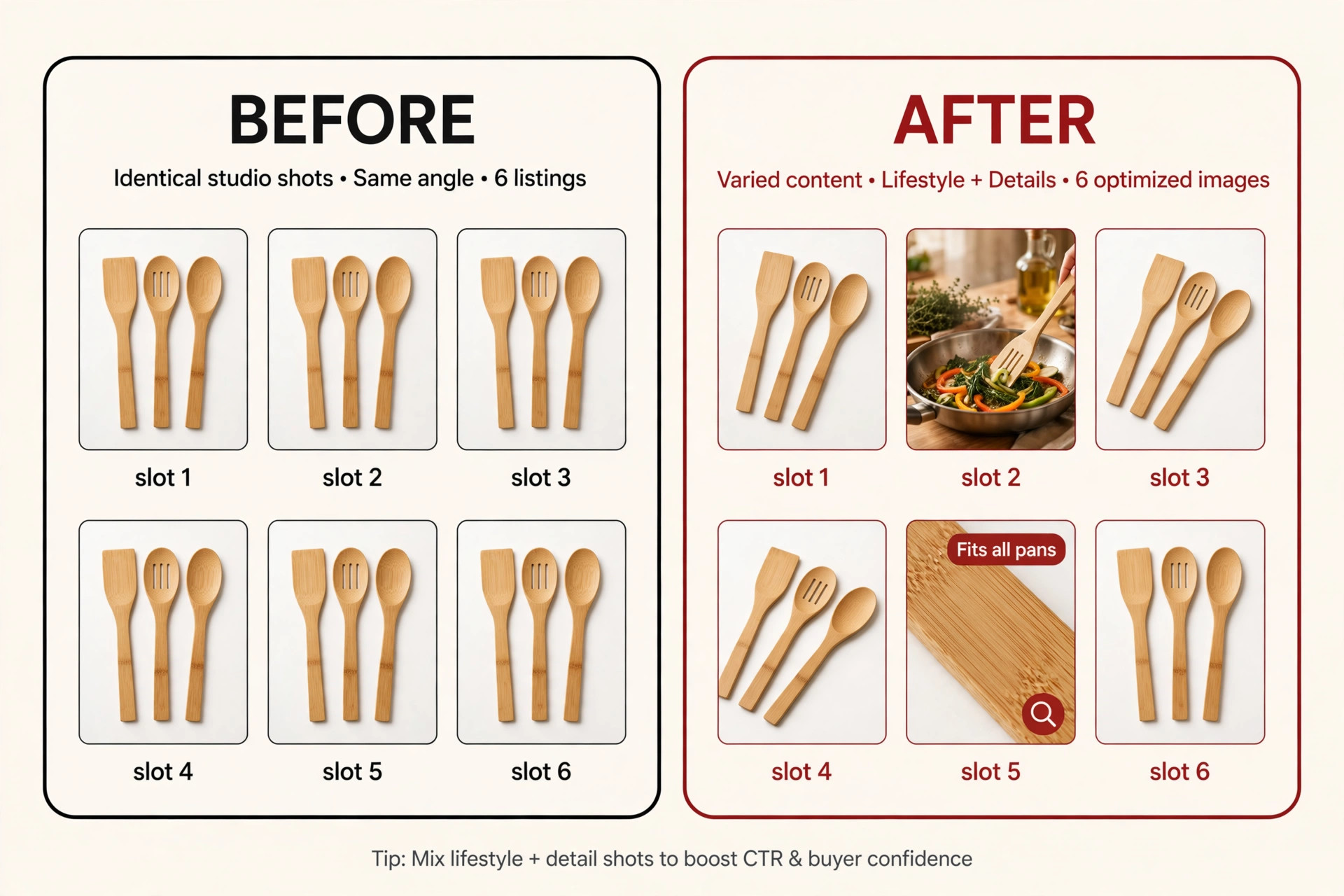
The failure: seven studio shots, all on white, all roughly the same angle. No sense of scale, no in-use shot, no answer to the question sitting in every buyer’s head: “Will this fit my space?” The gallery is a photo album, not a decision journey — and it wastes the five slots Amazon gives you to close the sale.
The principle: one job per image. In the mock’s “after” panel, slot 2 becomes a lifestyle in-use shot — the utensils in a real kitchen pan — which answers scale and context in a single frame. Another slot answers the category’s top buyer doubt head-on: a close-up with a “Fits all pans” cue, because for kitchen tools the unspoken objection is almost always compatibility.
What the shopper sees in five seconds that they couldn’t before: themselves using it. The lifestyle shot puts the product in a kitchen that looks like the shopper’s kitchen; the doubt-answering slot removes the reason not to buy. Together they turn the gallery from “seven pictures of a thing” into “everything I need to decide.”
The slot-planning behind this: if you want the full architecture of what goes in each slot and why, my slot-map post lays out the whole decision journey image by image. And for the lifestyle-vs-infographic question that sits underneath it — when a slot should show context and when it should show information — the lifestyle breakdown covers that trade-off in detail. Both are the strategy layer; this post is the diagnosis layer.
What redesigns are NOT (the honest guardrails)
I need to say the quiet part clearly, because the internet is full of before/after posts that don’t.
Redesigns are not a magic lift. This article prints no before/after metrics — not because I have secret numbers I’m withholding, but because an illustrative mock cannot generate evidence. You’ll see other agencies publish case studies with big conversion-lift numbers attached. Those are their claims about their clients, and they tell you nothing about what a redesign would do for your listing, your niche, your price point, your review count. Treat them as marketing, not benchmarks. And I extend that honesty to myself: nothing in this post promises that a redesign will improve your conversion rate. It promises something more useful — a way to see what’s wrong.
Redesigns are not decoration. Every breakdown above names its failure first, because the failure is the redesign’s reason to exist. “The main image is invisible in the grid” is a failure. “The infographic carries sixty words nobody reads” is a failure. “The gallery answers nothing the buyer is asking” is a failure. A proposal that starts with “let’s make it pop” and ends with no failure named is a re-skin — new paint on the same invisible listing. Before you approve any redesign, ask it the one question: what failure does this fix? If the answer is vague, so is the value.
The honest verification step. If you want to know whether a redesign actually worked, there is exactly one method I trust: Amazon’s own A/B testing through Manage Your Experiments, where available. Test the new main image against the old one and let real shopper behavior decide. That’s the verification step — a way to check a result, not a promise of one.
A 3-minute self-audit for your own listing
Run these three checks right now, before you read anything else on this site:
- The grid test (main image): open the search results page for your main keyword and shrink the page until your thumbnail is the size shoppers actually see. Can you tell yours apart from the five listings around it in two seconds? If not, you have Breakdown 1’s failure. The fix starts with one identity cue, not a full reshoot.
- The word-count test (infographics): pick your busiest image and count the words. Over forty, with everything the same size? You have Breakdown 2’s failure. Try rebuilding it as one headline, three callouts, one detail crop — and check the requirements checklist while you’re at it, since a text-heavy panel is also where compliance mistakes hide.
- The doubt test (gallery): list the top two reasons a buyer hesitates in your category (size, fit, compatibility, durability — whatever your reviews complain about). Is there one image answering each? If not, you have Breakdown 3’s failure. One slot per doubt is all it takes to start.
FAQ
Will a listing image redesign improve my conversion rate?
Honestly: it depends on what’s wrong and on everything else — price, reviews, competition, demand. A redesign that fixes a real, nameable failure removes a reason shoppers bounce; it doesn’t guarantee a lift. This post prints no metrics for exactly that reason. If you want to know whether yours moved the needle, test the new main image through Amazon’s Manage Your Experiments rather than taking anyone’s word for it.
Can I put text or badges on my main image to stand out?
No — Amazon’s main-image rules are explicit: no text, no logos, no badges, no additional objects, on a pure white background (RGB 255, 255, 255). The “identity cue” in Breakdown 1 works because it’s printed on the physical packaging, which is part of what the buyer receives — not a graphic added to the photo. See the full compliance boundaries in my main-image rules post.
Is showing packaging in the main image allowed?
Yes, as long as it’s the actual packaging the buyer receives. Amazon wants the main image to be an accurate representation of the product; the box it ships in qualifies. What isn’t allowed is dressing the shot with props that don’t ship with the order, or overlaying text and badge graphics on the photo itself. When in doubt, my requirements checklist walks the line image by image.
How do I figure out which failure my listing has?
Run the 3-minute self-audit above: the grid test, the word-count test, and the doubt test. Most listings have one dominant failure, and the audit points at it fast. Fix the dominant one first — redesigning everything at once makes it impossible to know what actually helped.
Should I redesign all my images at once or one at a time?
Diagnose everything, but change strategically. The main image is the one slot worth A/B testing individually, since it’s the click-driver. Gallery slots are additive — reworking slot 2 into a lifestyle shot and adding a doubt-answer image doesn’t destroy anything, so batching those is fine. The slot map shows which slots do what, so you can prioritize by impact.
Do I need a professional photographer for these fixes?
Not necessarily for the thinking — the diagnosis in this post costs nothing and a phone camera can prototype the layout. What professional work buys you is the finish: consistent lighting, correct color, 2,000px files that hold up at zoom, and a gallery that looks like it came from one brand. The failures above are about decisions, though; a crisp photo of a text wall is still a text wall.
If the audit surfaced a failure you’re not sure how to fix, Get in touch — I’ll tell you honestly which breakdown fits your listing and whether a redesign is the right move.

Azam Khan Tarakai
Founder, Lystiq Creative — Amazon Listing Image & A+ Content Designer
I design Amazon listing images, A+ Content, Brand Stories and Storefronts that turn browsers into buyers — built on my C.A.S.H. Creative Framework™.