
Key Takeaways
- ✓ The Brand Story and the Storefront aren’t two versions of the same thing — the Brand Story is a carousel on your product page, and the Storefront is a multi-page destination with its own URL.
- ✓ The Brand Story meets shoppers where they already are and reassures the deciding buyer; the Storefront only works if you deliberately send traffic to it — a beautiful store with no inbound traffic is a billboard in the desert.
- ✓ Build in this order: Brand Registry first, Brand Story second (one build rolled out across all your ASINs), and the Storefront when your catalog and a traffic plan justify it.
- ✓ Per current third-party guides, a published Brand Story covering your ASINs is one of the gates to Premium A+ eligibility — confirm the current requirements in Seller Central, because gates shift.
- ✓ Plan the two as one brand system: when the Brand Story and the Storefront share color discipline, lighting logic, and voice, shopper trust carries over instead of resetting between surfaces.
Sellers ask me which one to build — the Storefront or the Brand Story — and the question itself is the problem. They aren’t two versions of the same thing. They’re two tools that do different jobs in different places for different shoppers. Once you see the difference clearly, the build order answers itself.
This post gives you that clarity: what each one is, the five differences that actually matter, how they connect, and the sequence I’d follow. All the visuals are fresh illustrative mocks I made for teaching — a fictional camping brand called “FERNWAY” that doesn’t exist, so nothing here reads as a real client result. No performance numbers appear anywhere: these mocks can’t generate evidence, and I’d rather give you honest structure than borrowed stats.
One eligibility note that covers both tools: Amazon’s brand surfaces are gated by Amazon Brand Registry, which requires a registered trademark. Registry rules and creative requirements change over time, so confirm the current requirements in Seller Central rather than trusting any third-party article (this one included) on spec details.
What a Brand Story is
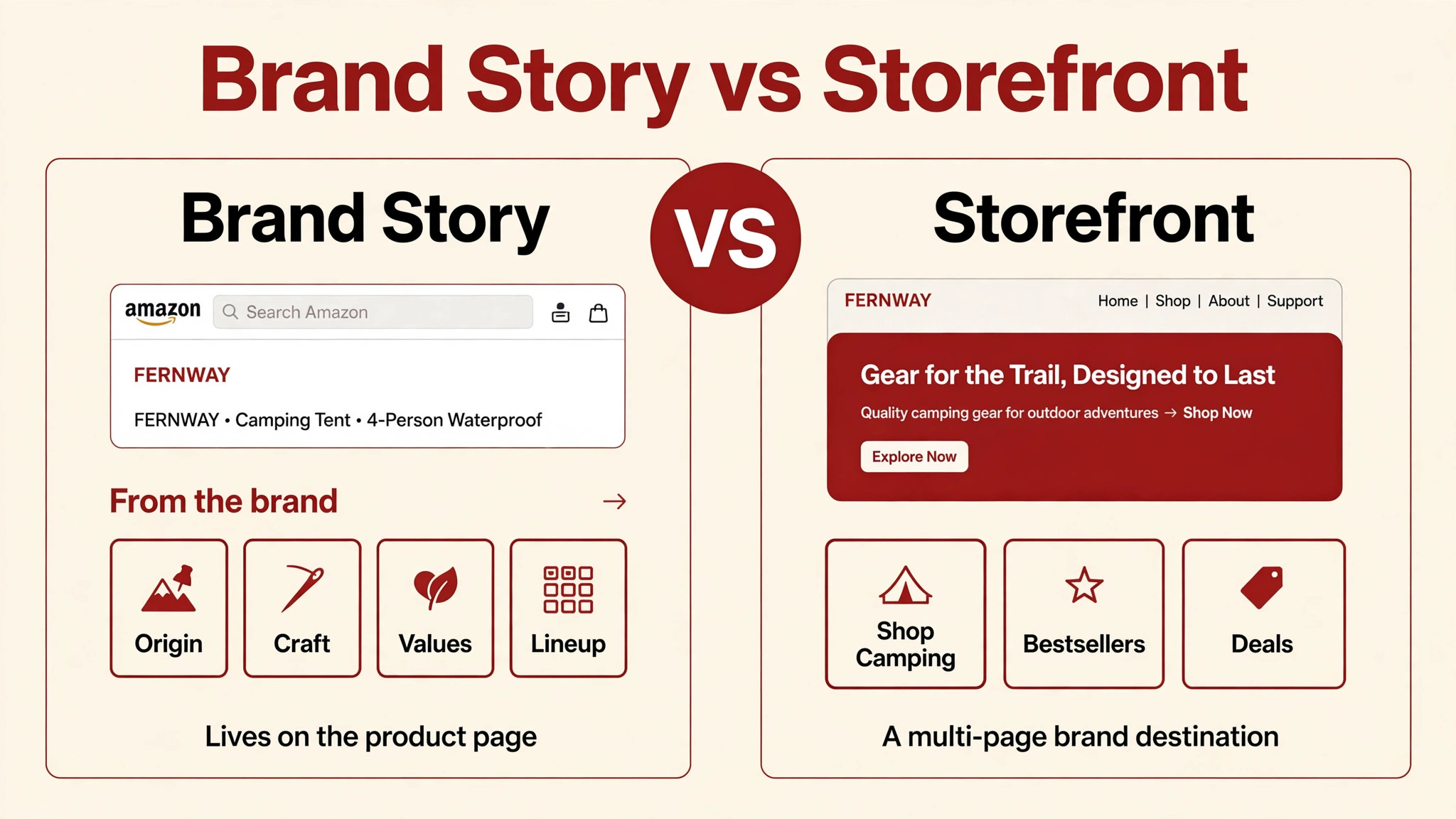
The Brand Story is a swipeable carousel in the “From the brand” section of your product detail page — typically sitting just above the A+ Content modules, per the guides that document this feature. It’s built inside the same A+ Content Manager in Seller Central, it goes through Amazon’s review before it goes live, and you can build one story and roll it out across your ASINs instead of redesigning it per product.
Its job is brand-level, not product-level: origin, craft, values, the lineup, the founder. A+ Content sells the product; the Brand Story sells the brand. I teach the six narrative patterns that work in my Brand Story examples post — this post is about where the module fits, not how to write it.
The key placement fact: the Brand Story meets the shopper where they already are. They’re on your product page, deciding. The module’s job is reassurance and differentiation — answer “is this brand real and worth the price?” — not to drive traffic anywhere.
What a Storefront is
An Amazon Brand Store — sellers also call it a Storefront or just “the Store” — is a multi-page branded destination inside Amazon: a store within the store. You get a homepage, subpages, your logo, your imagery, your copy, and a short vanity URL you can use in off-Amazon marketing. It’s built in Amazon’s Store Builder with drag-and-drop templates, and setting it up is free.
Its job is the opposite of the Brand Story’s: the Storefront is a destination, not a module. Shoppers arrive via Sponsored Brands ads, the brand byline on your listings, or external traffic — social, email, influencers — and once they’re inside, there are no competitor ads. Every tile is yours. I break down the design patterns that make stores work in my storefront examples post.
The key placement fact: the Storefront only works if shoppers arrive. A beautiful store with no inbound traffic is a billboard in the desert.
The five differences that matter
1. Where it lives
The Brand Story lives on the product detail page — one slot, in the “From the brand” section, surrounded by the same buy box, reviews, and sponsored ads as every other listing element. It has to earn attention inside a page that’s already busy.
The Storefront lives off the product page entirely — its own URL, its own navigation, its own pages. The shopper who lands there has left the Amazon search environment behind. That’s the superpower and the weakness in one: total brand control, but you have to get them there first.
2. What job it does
The Brand Story’s job is conversion support: it works on the shopper who’s already deciding on this product and removes the last doubts — legitimacy, quality, “why this brand and not the cheaper one.”
The Storefront’s job is cross-sell and routing: it works on the shopper who’s open to browsing and turns one-product interest into a multi-product order — “you liked this tent; here’s the sleep system, the camp kitchen, and the deals page.”
Different questions, different designs. The Brand Story answers “why trust this brand?” The Storefront answers “what else, and where do I go next?”
3. Who it serves
The Brand Story serves every shopper on the page, automatically. You build it once, roll it out across your ASINs, and it works for organic visitors, ad visitors, and anyone who lands on any product — forever, with no maintenance beyond occasional refreshes.
The Storefront serves the shoppers you send to it. Its audience is the traffic you deliberately route: Sponsored Brands campaigns, external links, brand-follow notifications. Nobody stumbles into a store the way they stumble onto a product page — which means the store’s value scales with your traffic plan, and a store without one is decoration.
4. What it costs to build and maintain
Both tools are free to publish — Amazon doesn’t charge for the Brand Story module or the Store Builder. The real cost in both cases is the creative work: copy, design, lifestyle imagery, video.
But the maintenance profiles differ sharply. A Brand Story is close to one-and-done: build it once, deploy it across ASINs, refresh it when the brand changes. A Storefront is a living surface — seasonal banners, deals pages, new-launch pages, refreshed bestseller shelves. If you build a store and never touch it again, it slowly becomes a dated brochure. Budget the maintenance honestly before you build.
5. What it unlocks
This is the difference sellers miss. The Brand Story is a gate: per current third-party guides, having a published Brand Story covering your brand’s ASINs is one of the eligibility requirements for Premium A+ Content — Amazon’s highest content tier. Build the story early and the Premium door is already unlocked when you’re ready. (Confirm the current Premium A+ eligibility in Seller Central; gates shift.)
The Storefront is a destination for your ads: Sponsored Brands campaigns can point at your store instead of individual listings, which changes what the ad can do — sell the brand, not just the SKU. It also becomes your cleanest landing page for external traffic, with custom source tags so you can see which channel actually sent the sale.
The comparison at a glance:
| Brand Story | Storefront | |
|---|---|---|
| Lives on | The product detail page (“From the brand”) | Its own multi-page destination + vanity URL |
| Job | Reassure the deciding shopper | Route browsers; earn the second purchase |
| Audience | Every visitor to your listings, automatically | Traffic you deliberately send |
| Build effort | One build, deployed across ASINs | Homepage + subpages + ongoing refreshes |
| Unlocks | Premium A+ eligibility gate | Sponsored Brands destination; external-traffic landing page |
| Cost to publish | Free (creative work is the cost) | Free (creative work is the cost) |
| Gate | Brand Registry | Brand Registry |
How they connect: two lanes, one brand

Here’s the mental model I use with every brand: the product-page lane and the brand-destination lane. The product-page lane is listing images, A+ Content, and the Brand Story — everything that converts the shopper who’s already on the page. The brand-destination lane is the Storefront — the multi-page experience that gives every shopper a reason to buy a second product.
The lanes connect, not compete. The Brand Story can include links to your store (third-party guides describe an ASIN Showcase module for this — verify the current module in Seller Central), so the reassured shopper on the product page has a path into your catalog. Meanwhile, the Storefront’s brand-story strip borrows the narrative the Brand Story established, so the two feel like one brand instead of two projects.
When both lanes share the same color discipline, lighting logic, and voice, trust carries over instead of resetting. When they don’t — when the Brand Story looks like one brand and the store looks like another — the shopper subconsciously starts over. That’s the real reason to plan them together, which is exactly what my storefront and Brand Story design service is built around: one brand system, two surfaces.
Which do you build first?
The honest sequence, for almost every brand:
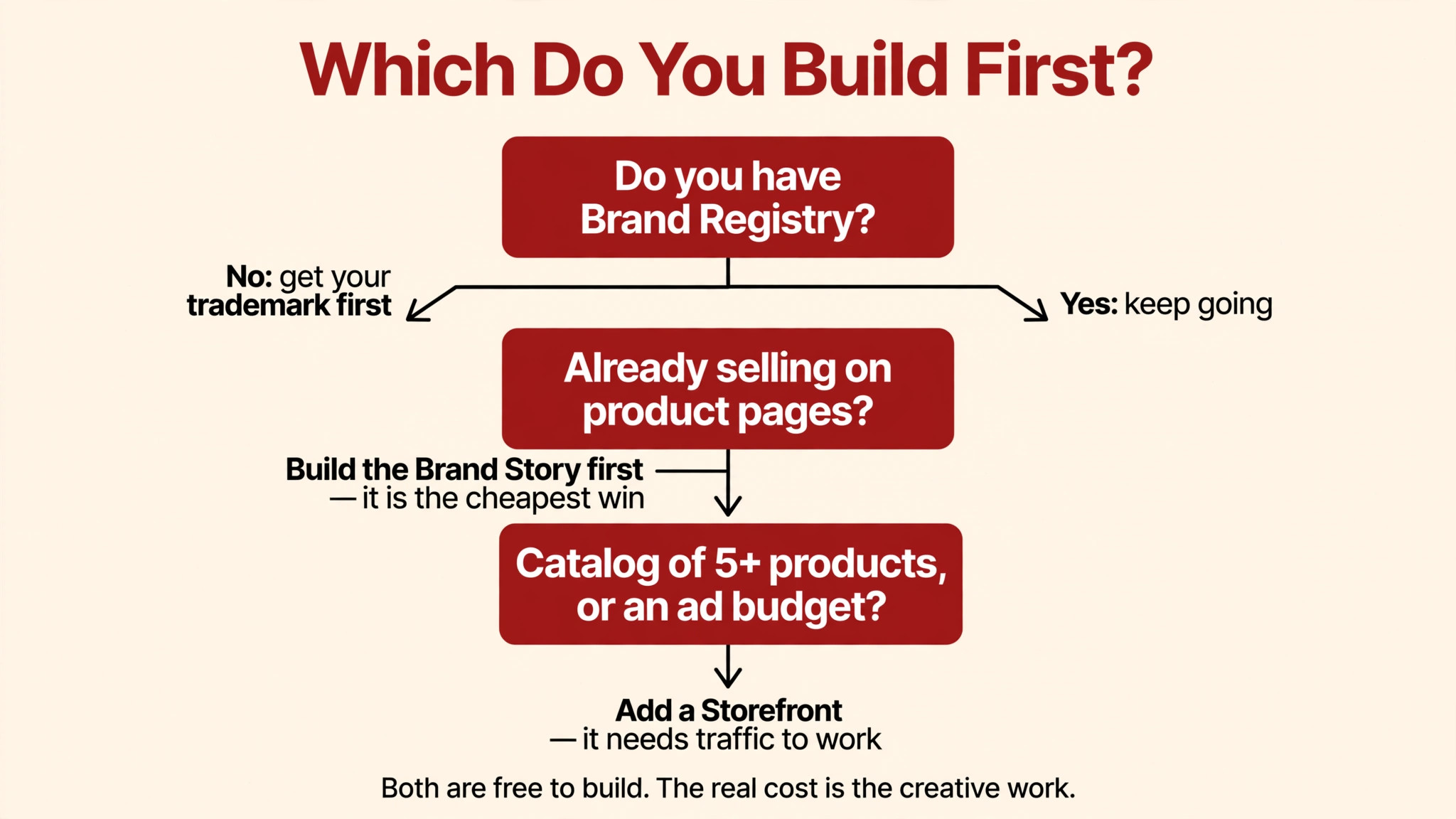
Step 0: Get Brand Registry sorted. Neither tool exists without it, and the trademark is the gate. If you’re still waiting on registration, spend this time on listing images and A+ Content — the surfaces that don’t need the gate.
Step 1: Build the Brand Story. It’s the cheaper win by every measure: one build, deployed across all your ASINs, working on every visitor from day one, no traffic plan required. It also unlocks the Premium A+ gate for later. There is no brand profile where the Brand Story is the wrong first move.
Step 2: Add the Storefront when two conditions hold — a catalog worth browsing (roughly five or more products, or clear bundles and accessories to cross-sell) and a way to send traffic (Sponsored Brands budget, an email list, social following, influencer plans). A two-product brand with no ad budget gets almost nothing from a store; a twelve-product brand running Sponsored Brands gets a destination that multiplies every campaign.
The exception that proves the rule: if you’re launching with external traffic already lined up — a big email list, a launch partner, PR — the store can come first, because the traffic plan exists on day one. But for most sellers, story first, store second is the right order.
Three mistakes I see constantly
Mistake 1: The orphan storefront. Building a store before planning how shoppers arrive. Design comes second; the traffic plan comes first. Sponsored Brands, the brand byline, external links with source tags — if none of these exist, wait on the store.
Mistake 2: The Brand Story that duplicates A+. The most common Brand Story failure is re-listing product features — a second A+ section wearing a different hat. The module’s job is brand-level narrative: origin, craft, values, lineup, founder. If your Brand Story cards could be A+ modules, start over.
Mistake 3: Treating them as interchangeable. “We’ll skip the Brand Story and just do the store” is like skipping the handshake and going straight to the catalog. The product-page shopper and the browsing shopper are different mindsets; you need the tool that meets each one where they are.
FAQ
Do I need a trademark for both the Brand Story and the Storefront?
Yes — both require Amazon Brand Registry enrollment, and Brand Registry requires a registered trademark for your brand. The trademark is the single gate for every brand surface on Amazon. Check Amazon’s current Brand Registry requirements for the exact rules in your marketplace.
Does either one cost anything to publish?
Amazon doesn’t charge for publishing a Brand Story or for the Store Builder itself — the tools are free for Brand Registry-enrolled brands. The real cost is the creative work: copy, design, photography, video. I don’t publish service prices, so if you’re budgeting for the design side, contact me and I’ll scope it honestly against your catalog.
Will a Brand Story or Storefront improve my search rankings?
Not directly. A+ and Brand Story text isn’t indexed for Amazon search keywords, so the module won’t move your position — it works on the shopper who’s already on the page. A Storefront’s value is in cross-sell, brand control, and giving your ads a better destination. Think of both as conversion and brand tools, not ranking tools.
Can my Brand Story link to my Storefront?
Third-party guides describe modules that let the Brand Story link to products and to your Brand Store — verify the current module options in Seller Central’s A+ Content Manager, since available modules change. Either way, plan the two as connected surfaces: the story reassures, the store receives.
Do I actually need both, or is one enough?
They do different jobs, so “enough” depends on your catalog and traffic. A small catalog with no ad budget: the Brand Story alone is the right call, and it’s the cheapest brand win on the product page. A growing catalog with traffic to route: add the Storefront as the second lane. Most established brands end up with both — which is why I plan them as one brand system in my design service.
If I can only afford one design project this quarter, which converts better?
That’s the wrong comparison — they don’t compete for the same conversion. The Brand Story supports the purchase already forming on your product pages; the Storefront creates purchases that wouldn’t otherwise happen. If your listings already get traffic, the Brand Story is the safer first dollar. If your catalog is broad and your ads need a destination, the Storefront earns its keep. When in doubt, follow the sequence above: story first, store second.
Building your brand surfaces on Amazon? I design Brand Stories and Storefronts as one coherent brand system — tell me about your catalog and I’ll tell you honestly which one your brand needs first.

Azam Khan Tarakai
Founder, Lystiq Creative — Amazon Listing Image & A+ Content Designer
I design Amazon listing images, A+ Content, Brand Stories and Storefronts that turn browsers into buyers — built on my C.A.S.H. Creative Framework™.
One Response