
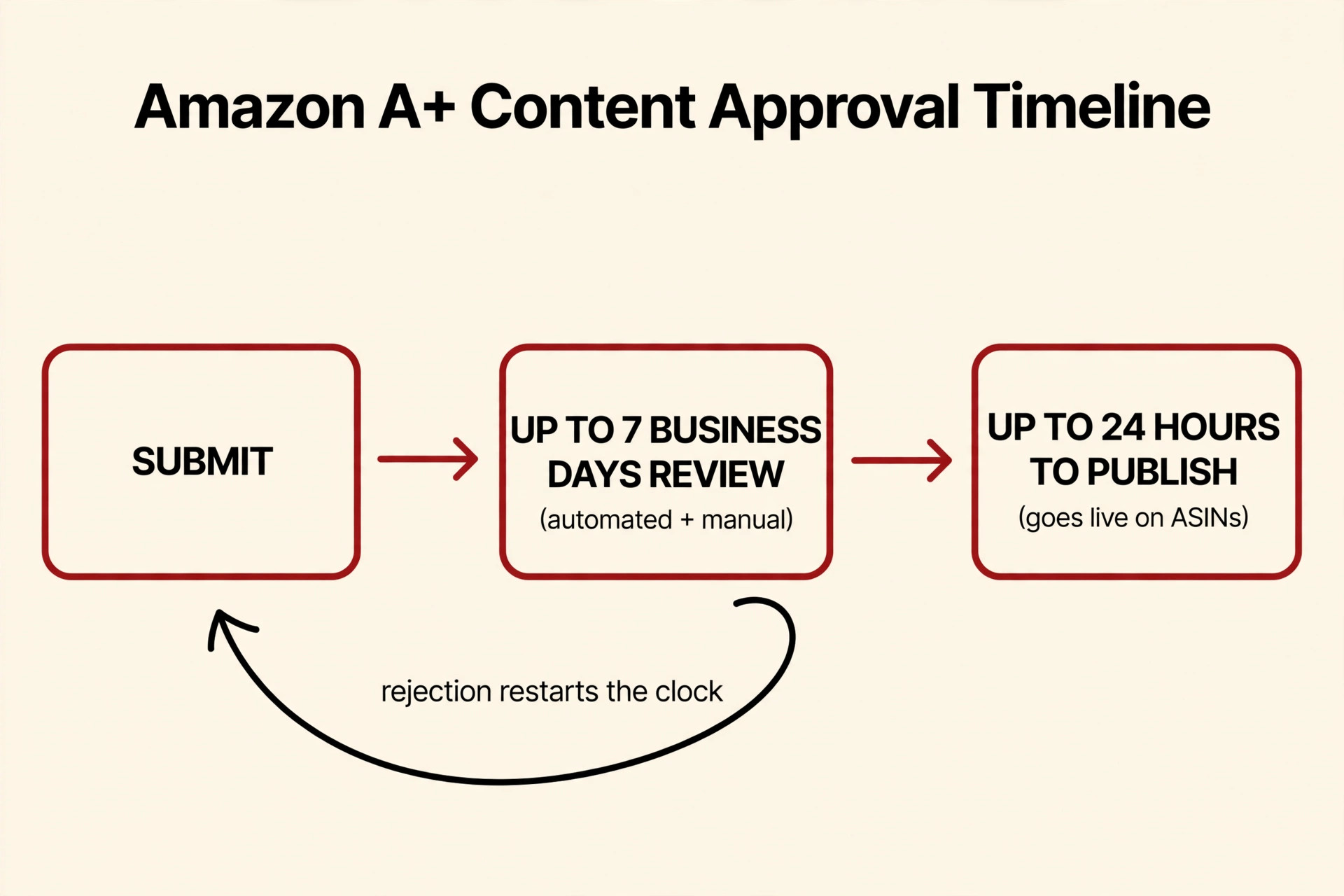
Amazon’s official answer is short: review can take up to seven business days — and it can run longer during periods of high volume. After approval, your content isn’t on your listing yet: it can take up to 24 hours to be published on the detail pages of the applied ASINs. That’s the number to plan any launch around. Never promise a launch date faster than that window — no one, including me, can make Amazon’s reviewers move quicker.
This question comes up constantly with brands I work with, so here’s exactly how the process works and how I plan around it.
How the A+ review actually works
Two layers of review, not one. Every A+ piece — all text and all images — goes through both automated and manual review. That includes text baked into your images and even image keywords, not just the copy fields. Amazon’s reviewers are reading your modules like a buyer would, plus running policy checks a human might miss.
Your status lives in the A+ Content Manager. After you hit “Review & Submit,” the status flips to in-review, and that same page is where rejection reasons show up if a piece comes back “Not Approved.” You can edit the flagged issues right there and resubmit — no need to start from scratch.
A rejection restarts the clock. This is the part that hurts: Amazon’s own guide says that if you resubmit content after being rejected, it takes up to seven business days for review again. A rejection isn’t a small delay — it’s a whole second review cycle.
Why the wait varies
Amazon’s own caveat is “longer during periods of high volume.” We’re heading into Q4 as I write this, and the holiday season is the classic slowdown window — every brand wants their A+ live before the rush, and the review queue reflects that. Seller guides I’ve read report that most content clears well inside the 7-day window in quiet seasons and slows down in holiday season — but I want to be clear: that’s guide experience, not Amazon’s promise. The official number is the only one you can bank on.
Complexity adds time, too. In my practical experience, complex builds with many modules or video take longer to clear than a plain Basic layout — which makes sense given the manual-review layer. That’s my advice, not Amazon’s statement.
One quick reality check: some sellers report approvals landing much faster than seven business days off-peak. Great when it happens — but if you plan for a fast turnaround and the queue is busy, your launch date is the thing that breaks.
My practical advice: plan for two full cycles
For a Q4 launch, I tell brands to have their A+ content submitted at least two weeks out — one full 7-business-day review cycle, plus one more in case of a rejection-and-resubmit loop. Two weeks feels generous until a rejection costs you a week you didn’t budget for.
And two habits that actually save time:
- Don’t hover-resubmit. Every resubmission after a rejection is a fresh review window. Read all the rejection reasons, fix everything at once, then submit once. Partial fixes sent one at a time just restart the clock repeatedly.
- Check the A+ Content Manager instead of re-uploading “just in case.” Duplicates create confusion for reviewers, not speed. If it’s in-review, it’s in-review — leave it alone.
Pre-submit QA checklist (the real time-saver)
The cheapest week of this process is the hour you spend before hitting submit. Run your piece against this checklist first:
- Images meet the spec — sizes and formats per Amazon’s requirements (my image sizes and requirements guide covers the exact specs).
- No policy tripwires — no competitor comparisons, no promotional claims (“best,” “cheapest”), no fake badges or warranties that don’t exist.
- Text inside images proofread — reviewers flag typos and unreadable text baked into graphics just as fast as copy-field errors.
- Image keywords clean — alt and keyword fields should describe the image, not stuff keywords.
- Previewed end-to-end in the A+ Content Manager on desktop and mobile before submitting.
My two companion posts go deeper here: why A+ Content gets rejected lists the actual rejection reasons, and my A+ Content mistakes article is the full pre-submit QA source I wish every brand read before their first upload.
Mini-FAQ
Does a rejection restart the whole waiting period?
Yes. Amazon’s own guide is explicit: resubmitted content gets another full review window of up to seven business days.
Why isn’t my A+ Content showing right after approval?
Because approval and publishing are two different steps. Amazon says it can take up to 24 hours after approval for the content to publish on the applied ASINs. If a day hasn’t passed, wait — don’t resubmit.
Do Premium A+ or video modules take longer?
Amazon doesn’t publish separate timelines by module type. In my practical experience, more complex builds and video take longer to clear through the manual layer — so if your piece includes video, give it extra buffer in your launch plan.
If you’re planning a launch and want your A+ Content designed right the first time — so there’s no rejection cycle eating your timeline — take a look at my A+ Content design service or get in touch and we’ll plan around your actual launch date.