
For the main image, Amazon expects a real photograph — current listing guides report the hero “should not be an illustration or rendering of the product,” and a render in the main slot risks suppression. For the gallery images that follow, 3D renders are widely used and acceptable — provided they’re accurate to the physical product. My rule: photograph the product for the main image; use renders anywhere they make the gallery clearer — so long as nothing invents what the box doesn’t contain.
Why sellers ask in the first place. Usually it’s one of three reasons: the product is still in development, a photoshoot feels expensive for an early test run, or the manufacturer already handed over CAD renders that look sharper than anything a camera could capture. A good render can look better than a mediocre photo — but the question isn’t which looks better, it’s which keeps you compliant. Enter the two lanes.
Lane one: the main image is a photograph. This is the strictest slot on the listing. Guides covering the current requirements say the hero must be a real photo — no illustration, no rendering — and the rest of the main-image rules underline it: pure white background (RGB 255, 255, 255), the product filling roughly 85% of the frame, no text, no graphics, no watermarks. Enforcement has teeth now: Amazon’s new listing-creation flow auto-checks main images for defects before you can submit — non-white backgrounds, text, graphics — with an “Issue detected” gate, and non-compliant main images can be suppressed from search results.
Here’s the honest part: enforcement isn’t perfectly consistent. Some sellers and agencies report running photorealistic renders as main images without an immediate penalty, and Amazon’s own public wording is less explicit than the secondary guides. But the documented guidance says photo-only for the hero, and a render that passes today can get flagged tomorrow. The conservative lane — a real photo for the main image — stays compliant under both readings. (Framing note: this is guide-reported guidance plus observed enforcement, not a published one-line Amazon ban — Amazon hasn’t printed one.)
Lane two: the gallery is where renders shine. Secondary images have real freedom: the same guides that restrict the hero explicitly say graphics and composite photos can be used on secondary images to detail product features — and this is exactly where renders, exploded views, and cutaways belong. A render can show the product exploded into its components, held to scale next to a hand, or broken into labeled feature callouts. The one caveat, straight from the guides: don’t let them get overwhelming or confusing. A gallery render should make the product clearer, not busier.
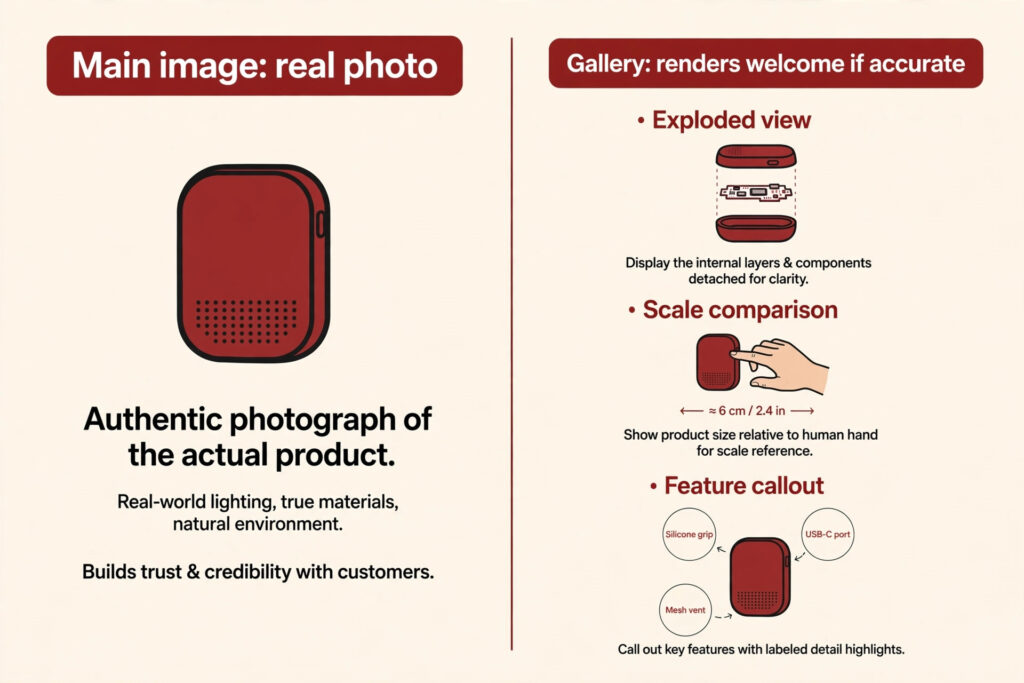
The accuracy line: where a helpful render becomes a misrepresentation. A render that matches the physical product is a selling tool. A render that improves on it is a liability. Current guides are plain: don’t change the product’s color or shape through retouching — and that applies just as hard to a render built from CAD. If your render shows a sleeker color, a different shape, features the real product doesn’t have, or implies contents that aren’t in the box, it’s the same offense as a lifestyle photo showing a different product variant — and reviews that say “doesn’t look like the pictures.” Build every render from the final product specs, not the marketing wishlist.
One paragraph on people — then I’ll point you onward. If your render includes a photorealistic synthetic human figure (a hand model, a person wearing your product), disclosure rules come into play: photorealistic AI-generated people carry a contains-synthetic-performer disclosure requirement in A+ Content, and the same honesty principle applies everywhere. I walk through it in my A+ Content mistakes guide — same idea, different slot. Short version: no synthetic people without the proper disclosure; when in doubt, use a real person or crop the figure out.
Your pre-upload checklist for any render:
- It matches the physical product exactly — color, shape, proportions. Built from final specs, not aspirations.
- The main image is a real photograph — no render, illustration, or composite in slot one.
- No untagged synthetic people — every photorealistic human figure needs the required disclosure.
- Gallery renders are captioned honestly — “exploded view,” “shown with optional accessories” — never implying un-included contents.
- The category style guide gets the final word — Seller Central’s requirements for your category override everything above — check them before you upload.
Mini-FAQ
Can I use 3D renders in A+ Content?
Yes — A+ Content is a design space, not a photography slot, so renders are standard there: infographic cutaways, exploded views, comparison charts. The same accuracy rule applies, plus the synthetic-people disclosure above.
What if my product isn’t manufactured yet?
Build the listing prep with renders (packaging design, gallery layouts, A+ modules), but don’t upload a render as the main image. The practical path: get to a physical sample, photograph the hero, then let the renders do the heavy lifting in the gallery — renders ready on day one, hero photo the moment samples land.
Do renders count as AI images?
They’re related but different: 3D renders are built from product geometry (CAD files), while AI-generated images are synthesized from prompts. The compliance question differs by slot, so I cover it in my companion question, Can Your Amazon Main Image Be AI-Generated?.
Mixing renders and photography on a listing? Get in touch and I’ll map your slots before you upload.

Azam Khan Tarakai
Founder, Lystiq Creative — Amazon Listing Image & A+ Content Designer
I design Amazon listing images, A+ Content, Brand Stories and Storefronts that turn browsers into buyers — built on my C.A.S.H. Creative Framework™.
2 Responses