
Key Takeaways
- ✓ Compliance is the floor, not the ceiling: your main image has exactly two jobs — pass Amazon’s automated checks and win the click in a grid of identical white squares.
- ✓ Fill the frame like you mean it — the 85% minimum is a checkbox for most sellers, but a tightly cropped, instantly readable product is the highest-impact fix in this article and needs no reshoot.
- ✓ Choose the angle your competitors didn’t: line up the top five competing main images, and shoot the 3/4 view that shows your product’s most defining feature instead of defaulting to flat front-on.
- ✓ Make white look expensive and keep everything honest: background sampled at pure 255, 255, 255, calibrated color that matches what arrives, and true proportions — no wide-angle tricks that invite “smaller than expected” reviews.
- ✓ Standing out never means text, badges, starbursts, props, or lifestyle scenes on the main image — competitors doing it are survivors of enforcement waves, not proof it’s allowed.
Let me get the compliance part out of the way fast, because it’s the least interesting half of this article.
Your main image is a compliance gate. Amazon requires a pure white background (RGB 255,255,255), the product filling at least 85% of the frame, and zero text, logos, borders, watermarks, badges, or props — one product, shown honestly. Some categories have exceptions, but the rules are the rules. If you want the full rules half of this topic — every requirement, every rejection reason, every category exception — that’s my 2026 listing image requirements checklist. Read it, check your main image against it, come back here.
This article is the other half: once your main image is compliant, how do you make it win the click? Because here’s the thing most sellers miss — compliance is the floor, not the ceiling. On a search results page, your main image sits in a grid of twenty identical white squares. Every one of them passed the same rules. The ones that get clicked are the ones built within the rules by someone who understands the craft. These are the eight tactics I use — every one fully compliance-safe.
First, understand what the main image’s job actually is
The main image has exactly two jobs: pass Amazon’s automated checks, and get clicked in search results. That’s it. It’s not supposed to sell, explain features, show scale, or tell a story — that’s what the rest of the gallery is for. I wrote about this as the “one image, one job” principle in my guide to how many listing images a product needs: the main image is the compliance gate, the gallery is your sales pitch.
This framing is what makes the tactics below work. When you stop asking your main image to do five jobs, you can optimize it for its two. Most sellers do the opposite — they cram selling ideas into the first slot, which is how they end up with the text and badges that get listings suppressed.
1. Choose the angle your competitors didn’t
Most sellers default to flat front-on. It’s the safe choice, the manufacturer-photo choice — and on a results page of twenty listings, the safe choice is invisible.
Shoot the 3/4 view that shows the product’s most defining feature. For a backpack, that might be the angle showing the front pockets and the strap system in one frame. For a kitchen gadget, it’s the angle that shows the working mechanism, not the flat profile. For a bottle, it’s the slight tilt that shows the cap mechanism and the body in proportion. The winning angle is the one that answers the buyer’s first unspoken question — “what IS this thing, and why is it different?” — before they’ve read a word.
Here’s how I pick it in practice: I screenshot the main images of the top five competing listings and line them up. If three are flat front-on, I don’t shoot flat front-on. If they all show the product upright, I test the angle that shows the feature they hid. It’s about being distinct at thumbnail size, where buyers decide in a fraction of a second whether your square deserves the click — and the angle is 100% within the rules as long as the product is shown honestly.
2. Fill the frame like you mean it
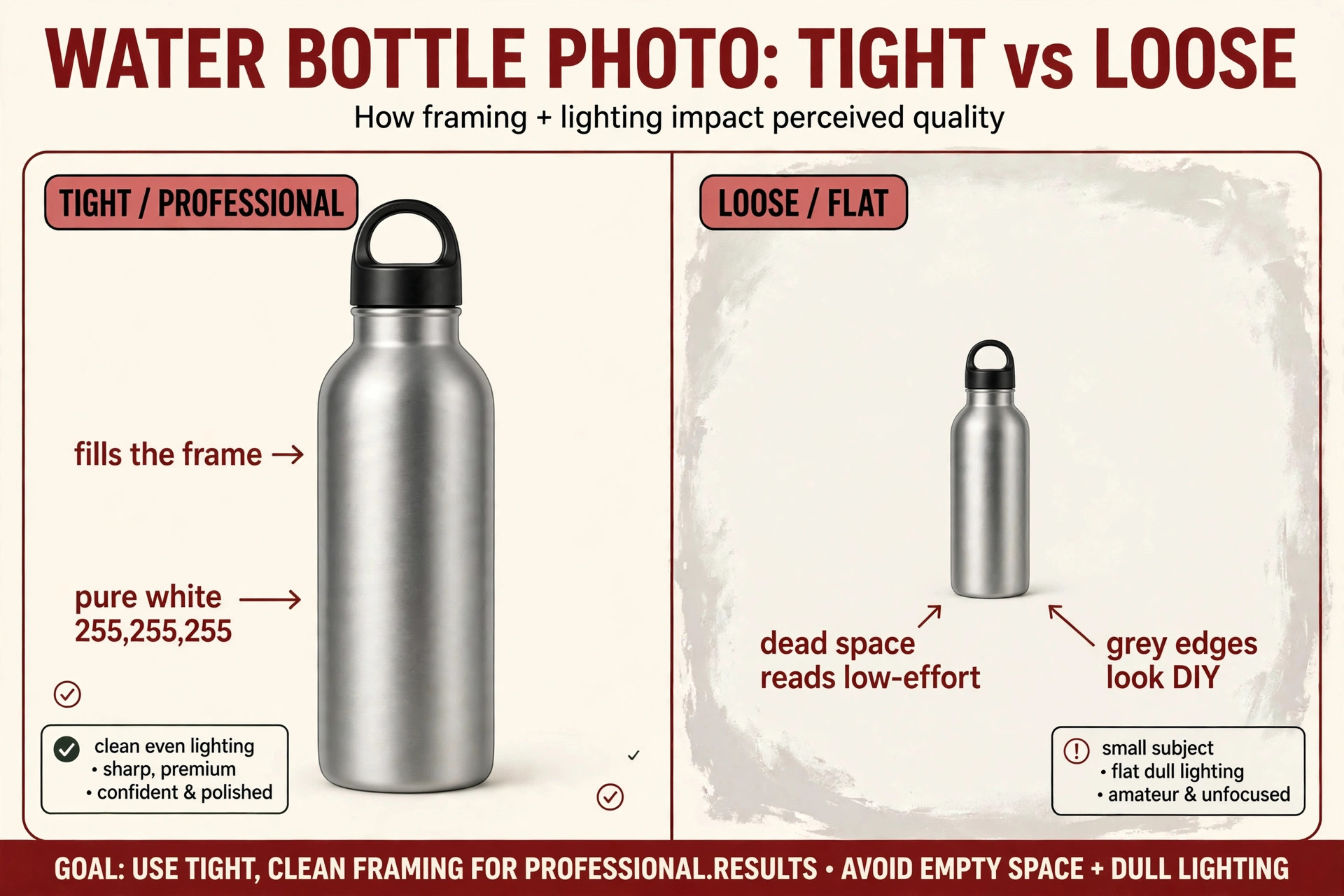
Amazon says the product must fill at least 85% of the frame. Most sellers treat that as a checkbox. I treat it as the single biggest creative lever in main-image design.
Dead white space around your product reads as low-effort in search results; a frame-filling product reads as premium. This is the first thing I see in audits: a perfectly compliant main image floating in a sea of white, the product occupying maybe 60% of the frame — technically legal and completely forgettable next to a competitor whose product fills the square edge to edge. At thumbnail size, which is how most impressions happen, the small product is a gray smudge. The frame-filling product is a product.
Crop tight, but crop smart. The 85% fill is Amazon’s guidance, so treat anything well above it as your working target — leaving just enough margin that no product edge touches the frame. Fill vertically for tall products, horizontally for wide ones, and check the crop at actual search-result size: if the product is still instantly readable as a small square, you’ve done it right.
Best effort-to-impact ratio in this entire article: no reshoot, no new equipment, no rule-bending — just a tighter crop.
3. Make white look expensive
Pure white is mandatory. But light is still craft — and this is where amateur main images die.
The most common amateur tell on Amazon is “white” with grey edges. The center is white but the corners fall off to grey — it happens when the background isn’t lit separately from the product. At thumbnail size it reads as dingy, and dingy reads as untrustworthy.
What professional main-image lighting looks like: soft, even studio light across the product, the background sampling at pure white 255,255,255 on the eyedropper — not 240, not “close enough” — with a subtle, controlled shadow grounding the product without greying the background. A hard shadow looks cheap, no shadow looks like a floating render, and a soft contact shadow looks real. “Real” is what gets clicked.
If you’re DIY-ing this: use two lights minimum — one for the product, one for the background — and check your background with an eyedropper tool in any free editor before uploading. If the corners sample below pure white, add background light. This is a ten-minute check that separates “looks like a brand” from “looks like a garage listing,” and it costs nothing.
4. Match the color that arrives at the door
Calibrated color is a trust signal — and a returns strategy.
The product on screen should match what arrives in the box. I regularly see main images where the “sage green” product arrives looking olive because the white balance was off and nobody checked. Every mismatch is a “not as pictured” return waiting to happen — costing you the sale, the shipping, and a review you didn’t want.
How to get it right: shoot with a grey card in frame for your first shot, set white balance off it, then remove it. When editing, compare the screen against the physical product under neutral light — not your memory of it. And resist “punching up” saturation for search-result pop: oversaturated images get clicks from buyers expecting a vivid product and returns from buyers who receive the real one. Accurate color earns the click AND the five-star review.
5. Keep the proportions honest
No wide-angle distortion that makes the product look bigger, sleeker, or more substantial than it is.
This is the quiet version of the color problem. A wide-angle lens shot close to a small product makes it look large and dramatic — but the main image sets the buyer’s size expectation, and “smaller than expected” is a classic negative-review theme. If your product looks twice its real size in the main image, the buyer who opens the box feels misled before they’ve used it.
Shoot at a natural focal length, keep the product’s true proportions, and let the dimensions panel in your gallery do the size communication (that’s slot 4 in my image-slot structure). Honest scale earns the click from buyers who want a product your size — and protects you from “smaller than expected” reviews, which linger and poison conversion for months.
6. Give the main image one job: the single most clickable attribute
This is the “one thing” rule, and it’s the strategic core of the article.
Your main image should communicate the single most clickable attribute of the product — and nothing else. Not the three best features. Not the feature list. One thing: the attribute that, for your specific buyer, is most likely to earn the click over the listing above and below you.
What “one thing” looks like by category: for a backpack, the feature that justifies the price — anti-theft pocket, USB port, expandable compartment — shown in the angle, not in text. For a supplement, the count and the form (gummies vs. capsules) visible in the product itself. For a tool, the mechanism. You don’t add anything — you choose the angle, variant, and configuration that makes the one thing unmistakable at thumbnail size.
Everything else belongs in the gallery — the second feature in slot 3, dimensions in slot 4, the lifestyle story in slot 2. The main image is not where you win the argument; it’s where you win the click. Sellers who make the main image do everything end up making it do nothing — usually by adding the text and graphics that get them flagged.
7. Work the background — legally
The background must be pure white. Within that constraint, there’s still craft.
Lighting falloff and micro-texture separate premium from DIY. An evenly, luminously white background with a soft controlled shadow reads as a professional studio shot; an unevenly lit or grey-edged one reads as amateur — even though both are technically “white backgrounds.” Buyers feel the difference before they can articulate it.
Let me be explicit about the line, because this is where bad advice lives: off-white, cream, gradients, vignettes, or scenes “for differentiation” aren’t tactics — they’re rejection reasons, covered in the rejection section of my requirements checklist. The tactic here is: pure white, sampled at 255,255,255, lit beautifully. Anyone telling you to warm up the background to “stand out” is handing you a suppression risk dressed as a tip.
8. What “standing out” never means
This section is the honesty moat of the article, so let me be blunt.
“Standing out” never means text, badges, starbursts, lifestyle scenes, props, or inset images on the main image. Every one of these is an automatic flag in Amazon’s image review — not a gray area, not a “some sellers get away with it” situation. Text overlays (“#1 BEST SELLER,” “50% OFF,” feature callouts), badge graphics, starburst shapes, lifestyle backgrounds, props that aren’t the product, and inset detail images composited into the main frame: all of them can get your listing suppressed, and suppression means your product disappears from search while you fix it.
The temptation logic goes like this: “my competitors are doing it, so it must be fine.” It means they haven’t been caught yet — Amazon’s image enforcement runs in waves, and badge-reliant sellers are building on sand. Every tactic in sections 1–7 is enforcement-proof because none bend a rule. That’s the real advantage: a main image that wins clicks and survives every review wave, while badge-stuffed listings periodically vanish.
If you want the complete list of what gets flagged and why, it’s in the rejection section of my 2026 requirements checklist. Memorize it, then forget about rule-bending entirely — you don’t need it.
The pre-upload check I run on every main image
Before any main image goes live for a client, it passes this five-point check. Steal it:
- Pixel-sample the background. Eyedropper the four corners and the center in any editor. All five should read 255, 255, 255. If any corner is grey, fix the lighting, not the image.
- Check the fill at thumbnail size. Shrink the image to the size of a search-result square on your phone. Is the product instantly readable? If it’s a smudge, crop tighter.
- Screenshot the competition. Line your main image up against the top five results for your main keyword. Is yours distinct at a glance — different angle, tighter crop, cleaner light? If it blends in, change the angle, not the rules.
- Color-check against the physical product. Hold the product next to your screen under neutral light. If they don’t match, fix white balance before upload.
- Run the flag scan. No text, no badges, no starbursts, no props, no lifestyle background, no inset images, one product shown honestly. If any of those are present, remove them — no exceptions, no “but it converts.”
Run this check every time you update a main image, not just at launch — listings get refreshed, variants get added, and the main image that was perfect at launch drifts. Five minutes, five checks, zero suppression risk.
FAQ
Can I put any text at all on my main image?
No. Amazon’s main-image rules prohibit text of any kind — no feature callouts, badges, slogans, or starbursts. Text belongs in your gallery (slots 2 and beyond), where designed graphics are allowed. One text overlay can trigger suppression of the whole listing.
My competitors have badges and lifestyle backgrounds on their main images. Should I copy them?
No — you’re looking at survivors of enforcement, not proof it’s allowed. Amazon reviews main images in waves, and non-compliant listings get suppressed when their turn comes. Build inside the rules with the eight tactics above, and you’ll still be visible when the rule-benders temporarily aren’t.
Does my main image have to be a photograph, or can I use a 3D render?
It has to honestly represent the actual product. A photorealistic render matching the real product in color, proportion, and detail is generally fine; one that idealizes the product beyond what arrives is a returns and review problem. When in doubt, photograph the real thing — it’s also easier to get color and proportions right.
How do I actually verify the 255,255,255 background?
Open the exported image in any editor with an eyedropper tool and sample the four corners plus the center of the background — all five should read RGB 255, 255, 255. Check the exported JPEG, not your working file: compression and export settings can shift values.
Should I A/B test my main image?
If you’re Brand Registered, Amazon’s Manage Your Experiments tool lets you test main images against live traffic — the legitimate way to do it. Test one variable at a time: angle vs. angle, crop vs. crop. Never test a compliant image against a rule-bending one — even if the rule-bender “wins,” it loses the enforcement wave.
Do these tactics apply to all categories?
The craft principles apply everywhere, but some categories have specific main-image exceptions — the category exceptions in my 2026 requirements checklist always take precedence. Check your category’s rules first, then apply the tactics within them.
Your main image is competing in a grid of identical white squares — and the winners are built, not lucked into. If you want a professional audit of your main image against the compliance rules and these eight tactics, get in touch and I’ll tell you exactly what’s costing you the click.

Azam Khan Tarakai
Founder, Lystiq Creative — Amazon Listing Image & A+ Content Designer
I design Amazon listing images, A+ Content, Brand Stories and Storefronts that turn browsers into buyers — built on my C.A.S.H. Creative Framework™.